# dYdX Documentation
import { HomePage } from 'vocs/components'
dYdX DocumentationThis website contains all the required documentation for dYdX protocol to start trading.Get startedGitHub
## Open Source Repositories
Please find the open source repositories on our [GitHub](https://github.com/dydxprotocol):
* [Monorepo](https://github.com/dydxprotocol/v4-chain)
* [Protocol](https://github.com/dydxprotocol/v4-chain/tree/main/protocol)
* [Indexer](https://github.com/dydxprotocol/v4-chain/tree/main/indexer)
* [Clients](https://github.com/dydxprotocol/v4-clients)
* [Frontend](https://github.com/dydxprotocol/v4-web)
* [iOS](https://github.com/dydxprotocol/v4-native-ios)
* [Android](https://github.com/dydxprotocol/v4-native-android)
* [Terraform](https://github.com/dydxprotocol/v4-infrastructure)
* [dYdX Technical Docs](https://github.com/dydxprotocol/v4-documentation)
* [Pocket protector TG bot docs](https://docs.pocketprotector.xyz/)
When contributing, please ensure your commits are verified. You can follow these steps to do so:
* [Generate a new signing key](https://docs.github.com/en/authentication/managing-commit-signature-verification/generating-a-new-gpg-key) for work use and [turn on Vigilant Mode](https://docs.github.com/en/authentication/managing-commit-signature-verification/displaying-verification-statuses-for-all-of-your-commits)
* [Tell Git about your GPG key](https://docs.github.com/en/authentication/managing-commit-signature-verification/telling-git-about-your-signing-key) and install `pinentry` if necessary
#### Third-Party Integrations
* [LEAN / dYdX Exchange Plugin](https://qnt.co/dydx-lean-repo)
## Third-Party Integrations
### QuantConnect
QuantConnect is a leading algorithmic trading platform that empowers developers and traders to research, backtest, and deploy quantitative strategies across various asset classes. The [integration with dYdX](https://qnt.co/dydx-docs) enables members to live trade Crypto Futures on the dYdX decentralized exchange from within the QuantConnect platform. QC's battle-tested infrastructure provides a stable environment that handles all the communication with the dYdX API, so you can focus on researching new strategies and monitoring your live algorithms. The LEAN engine that powers QC has an extensive suite of features to equip you with all the AI models, indicators, and dataset you'll need to take your trading to the next level with just a few lines of code.
## TODO
#### Fill
Add testnet USDC to a subaccount.
##### Method Declaration
:::code-group
```python [Python]
async def fill(
self,
address: str,
subaccount_number: int,
amount: float,
headers: Optional[Dict] = None,
) -> httpx.Response
```
```rust [Rust]
pub async fn fill(&self, subaccount: &Subaccount, amount: &Usdc) -> Result<(), Error>
```
```typescript [TypeScript]
public async fill(
address: string,
subaccountNumber: number,
amount: number,
headers?: {},
): Promise
```
```url [API]
/faucet/tokens
```
:::
##### Parameters
| Parameter | Location | Type | Required | Description |
| ------------------- | -------- | ------------------ | -------- | ------------------------------------------------------------ |
| `address` | body | [Address] | true | The wallet address that owns the account. |
| `subaccount_number` | body | [SubaccountNumber] | true | A number that identifies a certain subaccount of the address |
| `amount` | body | [BigDecimal] | true | Amount to fill |
##### Response
| Status | Meaning | Schema | Description |
| ------ | ------------- | ------ | ------------------------------------ |
| `200` | [OK] | | The response |
| `400` | [Bad Request] | | The request was malformed or invalid |
| `404` | [Not Found] | | The subaccount was not found. |
[Python] | [TypeScript]
[Python]: https://github.com/dydxprotocol/v4-clients/blob/main/v4-client-py-v2/examples/faucet_endpoint.py
[TypeScript]: https://github.com/dydxprotocol/v4-clients/blob/main/v4-client-js/examples/faucet_endpoint.ts
[Address]: /types/address
[SubaccountNumber]: /types/subaccount_number
[BigDecimal]: /types/big_decimal
[OK]: /types/ok
[Bad Request]: /types/bad-request
[Not Found]: /types/not-found
#### Fill Native
Add native dYdX testnet token to an address.
##### Method Declaration
:::code-group
```python [Python]
async def fill_native(
self,
address: str,
headers: Optional[Dict] = None,
) -> httpx.Response
```
```rust [Rust]
pub async fn fill_native(&self, address: &Address) -> Result<(), Error>
```
```typescript [TypeScript]
public async fillNative(address: string, headers?: {}): Promise
```
```url [API]
/faucet/native-token
```
:::
##### Parameters
| Parameter | Location | Type | Required | Description |
| --------- | -------- | --------- | -------- | ----------------------------------------- |
| `address` | body | [Address] | true | The wallet address that owns the account. |
##### Response
| Status | Meaning | Schema | Description |
| ------ | ------------- | ------ | ------------------------------------ |
| `200` | [OK] | | The response |
| `400` | [Bad Request] | | The request was malformed or invalid |
Examples: [Python]
[Python]: https://github.com/dydxprotocol/v4-clients/blob/3e8c7e1b960291b7ef273962d374d9934a5c4d33/v4-client-py-v2/examples/fund_account_example.py#L25
[Address]: /types/address
[OK]: /types/ok
[Bad Request]: /types/bad-request
import FaucetClient from './intro.mdx'
import Fill from './fill.mdx'
import FillNative from './fill_native.mdx'
## Faucet API
### Methods
## Indexer API
The Indexer is a high-availability system designed to provide structured data. It serves both over its [HTTP/REST API](/indexer-client/http) for spontaneous requests and over its [WebSockets API](/indexer-client/websockets) for continuous data streaming.
See the [guide](/interaction/endpoints#indexer-client) on how to use the available Indexer client to learn how to connect to it.
## Connecting to dYdX
dYdX provides two networks for trading: a **mainnet**, and a **testnet**:
* **mainnet**: The core network where real financial transactions occur;
* **testnet**: A separate, risk-free, network. Served mainly for the purposes of testing and experimenting before transitioning to the **mainnet**.
For the purposes of this guide, we'll assume that the **mainnet** is being used. Nevertheless, the API is exactly the same for both the **mainnet** and the **testnet**, so any code working in the **mainnet** should work in the **testnet**. Choosing between the **mainnet** and the **testnet** is simply a matter of changing the used endpoints.
:::note
It is advisable that for the purposes of learning and trying out the dYdX ecosystem that the **testnet** is used and preferred over the **mainnet**.
:::
### Available clients
Interacting with the dYdX network API is made through several sets of methods grouped with structures referred to as clients. Each of these clients essentially connects to a different server with its own functionality and purpose.
#### Node client
The Node client (also known as the Validator client) is the main client for interacting with the dYdX network. It provides the [Node API](/node-client/index) allowing the user to do operations that require authentication (e.g., issue trading orders) through the [Private API](/node-client/private/index).
You'll need an endpoint to setup the Node client. Grab an RPC/gRPC endpoint from [here](#node). Additionally for the Python client, you'all also need a HTTP and WebSockets endpoints.
:::tip[OEGS]
With the release of the Order Entry Gateway Service (OEGS), users can now connect to dYdX via OEGS endpoints. OEGS provides both gRPC and RPC endpoints.
for more info on OEGS, check [here](/concepts/architecture/oegs.mdx)
:::
:::code-group
```python [Python]
from dydx_v4_client.network import make_mainnet
from dydx_v4_client.node.client import NodeClient
config = make_mainnet( # [!code focus]
node_url="oegs.dydx.trade:443" # [!code focus]
rest_indexer="https://indexer.dydx.trade", # [!code focus]
websocket_indexer="wss://indexer.dydx.trade/v4/ws", # [!code focus]
).node # [!code focus]
# Call make_testnet() to use the testnet instead. # [!code focus]
# Connect to the network. # [!code focus]
node = await NodeClient.connect(config) # [!code focus]
```
```typescript [TypeScript]
import { ValidatorClient, Network } from '@dydxprotocol/v4-client-js';
// Using a pre-configured endpoint. // [!code focus]
const config = Network.mainnet().validatorConfig; // [!code focus]
// Or use `Network.testnet()` for the testnet. [!code focus]
// You can modify the endpoint doing `config.restEndpoint = "...";`
// Connect to the network. // [!code focus]
const node = await ValidatorClient.connect(config); // [!code focus]
```
```rust [Rust]
use dydx::{config::ClientConfig, node::NodeClient};
// The configuration file should have the endpoint. Use a gRPC endpoint. // [!code focus]
let config = ClientConfig::from_file("config.toml").await?; // [!code focus]
// Connect to the network. // [!code focus]
let node = NodeClient::connect(config.node).await?; // [!code focus]
```
:::
While the Node client can also query data through the [Public API](/node-client/public/index), the Indexer client should be preferred.
#### Indexer client
The Indexer is a high-availability system designed to provide structured data and offload computational burden from the core full nodes. The Indexer client provides methods from the [Indexer API](/indexer-client/index). It serves both as a spontaneuous source of data retrieval through its REST endpoint, or a continuous feed of trading data through its WebSockets endpoint.
Given that the Indexer client can use these two different protocols, you'll need two endpoints to setup it up. Grab these from [here](#indexer).
:::code-group
```python [Python]
from dydx_v4_client.network import make_mainnet
from dydx_v4_client.indexer.rest.indexer_client import IndexerClient
from dydx_v4_client.indexer.socket.websocket import IndexerSocket
config = make_mainnet( # [!code focus]
node_url="your-custom-grpc-node.com", # [!code focus]
rest_indexer="https://your-custom-rest-indexer.com", # [!code focus]
websocket_indexer="wss://your-custom-websocket-indexer.com" # [!code focus]
).node # [!code focus]
# Instantiate the HTTP sub-client. # [!code focus]
indexer = IndexerClient(config.rest_indexer) # [!code focus]
# Instatiate the WebSockets sub-client, connecting to the network. # [!code focus]
socket = await IndexerSocket(network.websocket_indexer).connect() # [!code focus]
```
```typescript [TypeScript]
import { IndexerClient, Network, SocketClient } from '@dydxprotocol/v4-client-js';
const apiTimeout = 1000;
// Using a pre-configured endpoint. // [!code focus]
const config = Network.mainnet().indexerConfig; // [!code focus]
// You can modify the HTTP endpoint doing `config.restEndpoint = "...";` [!code focus]
// You can modify the WebSockets endpoint doing `config.websocketEndpoint = "...";` [!code focus]
// Instantiate the HTTP client. // [!code focus]
const indexer = new IndexerClient(config, apiTimeout); // [!code focus]
// Instantiate the WebSockets client, connecting to the network. // [!code focus]
const socket = new SocketClient( // [!code focus]
config.indexerConfig, // [!code focus]
() => {}, // onOpenCallback
() => {}, // onCloseCallback
() => {}, // onMessageCallback
() => {} // onErrorCallback
); // [!code focus]
socket.connect(); // [!code focus]
```
```rust [Rust]
use dydx::{config::ClientConfig, indexer::IndexerClient};
// The configuration file should have the endpoint. // [!code focus]
let config = ClientConfig::from_file("config.toml").await?; // [!code focus]
// Instantiate the client. // [!code focus]
// Both HTTP and WebSockets methods are provided with the `indexer`. // [!code focus]
let indexer = IndexerClient::new(config.indexer); // [!code focus]
```
:::
#### Composite client (TypeScript only)
The Composite client groups commonly used methods into a single structure. It is essentially composed by both the Node and Indexer clients.
```typescript [TypeScript]
import { CompositeClient, Network } from '@dydxprotocol/v4-client-js';
const network = Network.mainnet();
const client = await CompositeClient.connect(network); // [!code focus]
```
:::info
The Python and Rust APIs do not have a Composite client. The explicit Node and Indexer clients should be used instead.
:::
#### Faucet client
To test your trading strategy, test funds can be requested from the Faucet client. This client only works in the **testnet**. The acquired test funds can only be used in the **testnet**.
:::code-group
```python [Python]
from dydx_v4_client.network import TESTNET_FAUCET
from dydx_v4_client.faucet_client import FaucetClient
faucet = FaucetClient(TESTNET_FAUCET) # [!code focus]
```
```typescript [TypeScript]
import { FaucetApiHost, FaucetClient } from '@dydxprotocol/v4-client-js';
const client = new FaucetClient(FaucetApiHost.TESTNET); // [!code focus]
```
```rust [Rust]
// The feature `faucet` must be enabled.
use anyhow::anyhow as err;
use dydx::{config::ClientConfig, faucet::FaucetClient};
let config = ClientConfig::from_file("config.toml").await?;
let faucet = FaucetClient::new( // [!code focus]
config // [!code focus]
.faucet // [!code focus]
.ok_or_else(|| err!("The config file must contain a [faucet] config!"))?, // [!code focus]
); // [!code focus]
```
:::
#### Noble client
To move assets in and out of the dYdX network, the Noble network is commonly employed.
:::tip[Alternatives]
Moving assets is not restricted to using the Noble client directly. Please see the [Deposits and Withdrawals](/interaction/deposits-withdrawals/overview) page.
:::
:::code-group
```python [Python]
from dydx_v4_client.indexer.rest.noble_client import NobleClient
client = NobleClient("https://rpc.testnet.noble.strange.love") # [!code focus]
await client.connect(MNEMONIC) # [!code focus]
```
```typescript [TypeScript]
import { NobleClient } from '@dydxprotocol/v4-client-js';
const client = new NobleClient('https://rpc.testnet.noble.strange.love', 'Noble example'); // [!code focus]
```
```rust [Rust]
// The feature `noble` must be enabled.
use anyhow::anyhow as err;
use dydx::{config::ClientConfig, noble::NobleClient};
let config = ClientConfig::from_file("config.toml").await?;
let noble = NobleClient::connect( // [!code focus]
config // [!code focus]
.noble // [!code focus]
.ok_or_else(|| err!("The config file must contain a [noble] config!"))?, // [!code focus]
).await?; // [!code focus]
```
:::
### Endpoints
Some known endpoints are provided below. Use these to connect to the dYdX networks.
Feel free to compare the most suitable gRPC endpoint from this [status endpoint](https://grpc-status.dydx.trade/)
#### Node
Connections to the trading client to the full nodes are established using the (g)RPC protocol.
##### mainnet
##### gRPC
| Team | URI | Rate limit |
| --------- | ---------------------------------------------------------------------------------------------------------------------------------------------- | ---------- |
| OEGS | `grpc://oegs.dydx.trade:443` | |
| Polkachu | `https://dydx-dao-grpc-1.polkachu.com:443` `https://dydx-dao-grpc-2.polkachu.com:443` `https://dydx-dao-grpc-3.polkachu.com:443` | 300 req/m |
| KingNodes | `https://dydx-ops-grpc.kingnodes.com:443` | 250 req/m |
| Enigma | `https://dydx-dao-grpc.enigma-validator.com:443` | |
##### Archive gRPC
| Team | URI | Rate limit |
| --------- | --------------------------------------------------------- | ---------- |
| Polkachu | `https://dydx-dao-archive-grpc-1.polkachu.com:443` | 300 req/m |
| KingNodes | `https://dydx-ops-archive-grpc.kingnodes.com:443` | 250 req/m |
| Enigma | `https://dydx-dao-grpc-archive.enigma-validator.com:1492` | |
##### RPC
| Team | URI | Rate limit |
| --------- | ----------------------------------------------- | ---------- |
| OEGS | `https://oegs.dydx.trade:443` | |
| Polkachu | `https://dydx-dao-rpc.polkachu.com:443` | 300 req/m |
| KingNodes | `https://dydx-ops-rpc.kingnodes.com:443` | 250 req/m |
| Enigma | `https://dydx-dao-rpc.enigma-validator.com:443` | |
##### Archive RPC
| Team | URI | Rate limit |
| --------- | -------------------------------------------------------- | ---------- |
| Polkachu | `https://dydx-dao-archive-rpc.polkachu.com:443` | 300 req/m |
| KingNodes | `https://dydx-ops-archive-rpc.kingnodes.com:443 ` | 250 req/m |
| Enigma | `https://dydx-dao-rpc-archive.enigma-validator.com:443 ` | |
##### REST
| Team | URI | Rate limit |
| --------- | ----------------------------------------------- | ---------- |
| Polkachu | `https://dydx-dao-api.polkachu.com:443` | 300 req/m |
| KingNodes | `https://dydx-ops-rest.kingnodes.com:443` | 250 req/m |
| Enigma | `https://dydx-dao-lcd.enigma-validator.com:443` | |
##### Archive REST
| Team | URI | Rate limit |
| --------- | ------------------------------------------------------- | ---------- |
| Polkachu | `https://dydx-dao-archive-api.polkachu.com:443` | 300 req/m |
| KingNodes | `https://dydx-ops-archive-rest.kingnodes.com:443` | 250 req/m |
| Enigma | `https://dydx-dao-lcd-archive.enigma-validator.com:443` | |
##### testnet
##### gRPC
| Team | URI |
| --------- | -------------------------------------------------- |
| OEGS | `oegs-testnet.dydx.exchange:443` |
| KingNodes | `test-dydx-grpc.kingnodes.com:443 (TLS)` |
| Polkachu | `dydx-testnet-grpc.polkachu.com:23890 (plaintext)` |
##### RPC
| Team | URI |
| --------- | ----------------------------------------------- |
| OEGS | `https://oegs-testnet.dydx.exchange:443` |
| Enigma | `https://dydx-rpc-testnet.enigma-validator.com` |
| KingNodes | `https://test-dydx-rpc.kingnodes.com` |
| Polkachu | `https://dydx-testnet-rpc.polkachu.com` |
##### REST
| Team | URI |
| --------- | ----------------------------------------------- |
| Enigma | `https://dydx-lcd-testnet.enigma-validator.com` |
| KingNodes | `https://test-dydx-rest.kingnodes.com` |
| Polkachu | `https://dydx-testnet-api.polkachu.com` |
#### Indexer
Connections with the Indexer are established either using HTTP (for spontaneuous data retrieval) or WebSockets (for data streaming).
##### mainnet
| Type | URI |
| ---- | -------------------------------- |
| HTTP | `https://indexer.dydx.trade/v4` |
| WS | `wss://indexer.dydx.trade/v4/ws` |
##### testnet
| Type | URI |
| ---- | --------------------------------------------- |
| HTTP | `https://indexer.v4testnet.dydx.exchange` |
| WS | `wss://indexer.v4testnet.dydx.exchange/v4/ws` |
#### Faucet
Used to retrieve test funds.
##### testnet
`https://faucet.v4testnet.dydx.exchange`
#### Noble
Connections with the Noble blockchain. Similarly to the dYdX networks, Noble also has a **mainnet** and a **testnet**.
##### mainnet
| Team | URI |
| -------- | -------------------------------------------------- |
| Polkachu | `http://noble-grpc.polkachu.com:21590 (plaintext)` |
##### testnet
| Team | URI |
| -------- | --------------------------------------------------- |
| Polkachu | `noble-testnet-grpc.polkachu.com:21590 (plaintext)` |
:::info
In the Cosmos blockchains (dYdX, Noble, etc.) inter-blockchain communications require IBC relayers to be present that facilitate bridging between networks.
These IBC relayers may not be active, specially for the **testnet** networks.
:::
## Guide
import Details from '../../components/Details';
## Wallet Setup
To manage your accounts, issue orders, and perform other operations that are required to be signed, a Wallet is required. To instantiate a Wallet, you must first have your associated **mnemonic**.
* The Python client requires the use of an address to setup the Wallet. However, the address can only be fetched using a Wallet. The address is derived from the mnemonic (address \< public key \< private key \< mnemonic).
* Wallet, accounts, subaccounts are all handled differently among the clients. Probably the Rust client handles this best, giving the user more control:
1. There is a `Wallet`;
2. The `Wallet` is used to derive an `Account` by index (each `Account` is associated with a keypair);
3. An `Account` is used to derive a `Subaccount` by index. A `Subaccount` is employed to create orders.
::::steps
### Getting the mnemonic
A Wallet is setup using your secret **mnemonic** phrase. A **mnemonic** is a set of 24 words to back up and access your account.
You can fetch your **mnemonic** from the [dYdX Frontend](https://dydx.trade). After logging in, follow the instructions in "Export secret phrase", accessed by clicking your address in the upper right corner.
For the purpose of this guide, lets copy and store the **mnemonic** in a `mnemonic.txt` file.
:::warning
Handle your **mnemonic** in a secure manner. **Do not share** it with other parties. Do not commit your **mnemonic** to a public VCS like GitHub. Access to your **mnemonic** provides access to your account and funds.
:::
### Read the mnemonic
Lets start coding. Load the mnemonic into a string variable. This assumes the mnemonic is stored in a text file.
:::code-group
```python [Python]
mnemonic = open('mnemonic.txt').read().strip()
```
```typescript [TypeScript]
const mnemonic = require('fs').readFileSync('mnemonic.txt', 'utf8').trim();
```
```rust [Rust]
let mnemonic = std::fs::read_to_string("mnemonic.txt").unwrap().trim().to_string();
```
:::
### Create the Wallet
Use the **mnemonic** to create a Wallet instance capable of signing transactions.
:::code-group
```python [Python]
from dydx_v4_client.key_pair import KeyPair
from dydx_v4_client.wallet import Wallet
# Define your address.
address = Wallet(KeyPair.from_mnemonic(mnemonic), 0, 0).address()
# Create a Wallet with updated parameters required for trading
wallet = await Wallet.from_mnemonic(node, mnemonic, address)
```
```typescript [TypeScript]
import { BECH32_PREFIX, LocalWallet } from '@dydxprotocol/v4-client-js';
const wallet = await LocalWallet.fromMnemonic(mnemonic, BECH32_PREFIX);
```
```rust [Rust]
use dydx::node::Wallet;
let wallet = Wallet::from_mnemonic(&mnemonic)?;
```
:::
:::note
Please check the list of [available endpoints here](/interaction/endpoints#endpoints).
:::
### Instantiate a Subaccount
:::note
This step is not required in the Python client.
:::
When issuing orders, the relevant Subaccount must be chosen to place the order under. A Subaccount is associated with an Account, and is meant to provide trade isolation against your other Subaccounts and enhance funds management.
See more about [Accounts and Subaccounts](/concepts/trading/accounts).
:::code-group
```python [Python]
# Not required. The `wallet` instance created above already contains the necessary information.
# The Subaccount to be used is defined using an integer when creating an order.
```
```typescript [TypeScript]
import { SubaccountInfo } from '@dydxprotocol/v4-client-js';
const subaccount = new SubaccountInfo(wallet, 0);
```
```rust [Rust]
// Create an `Account` instance for the account index 0. This `Account` has updated parameters required for trading.
let account = wallet.account(0, &mut node).await?;
// Create a `Subaccount` instance for the subaccount index 0.
let subaccount = account.subaccount(0)?;
```
:::
:::info
By default, both Python and TypeScript client Wallets will derive and use the Account indexed at 0.
:::
::::
#### Connect
Connect the Noble client to the Noble network.
##### Method Declaration
:::code-group
```python [Python]
async def connect(self, mnemonic: str)
```
```rust [Rust]
pub async fn connect(config: NobleConfig) -> Result
```
```typescript [Typescript]
async connect(wallet: LocalWallet): Promise
```
```url [API]
```
:::
##### Parameters
##### Response
Examples: [TypeScript] | [Rust]
[Rust]: https://github.com/dydxprotocol/v4-clients/blob/3e8c7e1b960291b7ef273962d374d9934a5c4d33/v4-client-rs/client/examples/wallet.rs#L89
[TypeScript]: https://github.com/dydxprotocol/v4-clients/blob/3e8c7e1b960291b7ef273962d374d9934a5c4d33/v4-client-js/examples/noble_example.ts#L19
#### Get account
Query for [an account](https://github.com/cosmos/cosmos-sdk/tree/main/x/auth#account-1) by it's address.
##### Method Declaration
:::code-group
```python [Python]
async def get_account(self, address: str) -> BaseAccount
```
```rust [Rust]
pub async fn get_account(&mut self, address: &Address) -> Result
```
```typescript [TypeScript]
```
```url [API]
```
:::
##### Parameters
##### Response
Examples: [Python] | [Rust]
[Python]: https://github.com/dydxprotocol/v4-clients/blob/3e8c7e1b960291b7ef273962d374d9934a5c4d33/v4-client-py-v2/examples/basic_adder.py#L159
[Rust]: https://github.com/dydxprotocol/v4-clients/blob/3e8c7e1b960291b7ef273962d374d9934a5c4d33/v4-client-rs/client/examples/wallet.rs#L89
#### Get Account Balance
Query token balance of an account/address.
##### Method Declaration
:::code-group
```python [Python]
async def get_account_balance(
self, address: str, denom: str
) -> bank_query.QueryBalanceResponse
```
```rust [Rust]
pub async fn get_account_balance(
&mut self,
address: Address,
denom: &Denom,
) -> Result
```
```typescript
getAccountBalance(denom: string): Promise
```
```url [API]
```
:::
##### Parameters
##### Response
Examples: [TypeScript]
[TypeScript]: https://github.com/dydxprotocol/v4-clients/blob/3e8c7e1b960291b7ef273962d374d9934a5c4d33/v4-client-js/examples/noble_example.ts#L93
#### Get Account Balances
Query all balances of an account/address.
##### Method Declaration
:::code-group
```python [Python]
async def get_account_balances(
self, address: str
) -> bank_query.QueryAllBalancesResponse:
```
```rust [Rust]
pub async fn get_account_balances(&mut self, address: Address) -> Result, Error>
```
```typescript [TypeScript]
getAccountBalances(): Promise
```
:::
##### Parameters
##### Response
Examples: [TypeScript] | [Rust]
[Rust]: https://github.com/dydxprotocol/v4-clients/blob/3e8c7e1b960291b7ef273962d374d9934a5c4d33/v4-client-rs/client/examples/noble_transfer.rs#L62
[TypeScript]: https://github.com/dydxprotocol/v4-clients/blob/3e8c7e1b960291b7ef273962d374d9934a5c4d33/v4-client-js/examples/noble_example.ts#L58
import NobleClient from './intro.mdx'
import Connect from './connect.mdx'
import GetAccountBalance from './get_account_balance.mdx'
import GetAccountBalances from './get_account_balances.mdx'
import GetAccount from './get_account.mdx'
import QueryAddress from './query_address.mdx'
import SendTokenIbc from './send_token_ibc.mdx'
import Simulate from './simulate.mdx'
## Noble API
### Methods
#### Query Address
Fetch account's number and sequence number from the network.
##### Method Declaration
:::code-group
```python [Python]
async def query_address(self, address: str) -> (int, int)
```
```rust [Rust]
pub async fn query_address(&mut self, address: &Address) -> Result<(u64, u64), Error>
```
```typescript [TypeScript]
```
:::
##### Parameters
##### Response
import Details from '../../components/Details';
#### Send Token Ibc
Transfer a token asset between Cosmos blockchain networks.
##### Method Declaration
:::code-group
```python [Python]
```
```rust [Rust]
pub async fn send_token_ibc(
&mut self,
account: &mut Account,
sender: Address,
recipient: Address,
token: impl Tokenized,
source_channel: String,
) -> Result
```
```typescript [TypeScript]
async IBCTransfer(message: MsgTransferEncodeObject): Promise
async send(
messages: EncodeObject[],
gasPrice: GasPrice = GasPrice.fromString('0.1uusdc'),
memo?: string,
): Promise
```
```url [API]
/ibc.applications.transfer.v1.Msg/Transfer
```
:::
* Generalize to all IBC/blockchains.
* Missing in Python.
* Missing in TS: user required to produce the low-level message and then `post.send()` it.
##### Parameters
| Parameter | Location | Type | Mandatory | Description |
| ---------------- | -------- | --------- | --------- | ---------------------------------- |
| `account` | query | [Account] | true | The account. |
| `sender` | query | [Address] | true | Address of the sender. |
| `recipient` | query | [Address] | true | Address of the recipient. |
| `token` | query | int | true | Token type and amount to transfer. |
| `source_channel` | query | String | true | Source IBC relay channel. |
##### Response
| Status | Meaning | Schema | |
| ------ | ------------- | -------- | ------------------------------------- |
| `200` | [OK] | [TxHash] | |
| `400` | [Bad Request] | | The request was malformed or invalid. |
[OK]: /types/ok
[Account]: /types/account
[Address]: /types/address
[TxHash]: /types/tx_hash
[Bad Request]: /types/bad-request
#### Simulate
##### Method Declaration
:::code-group
```python [Python]
async def simulate_transaction(
self,
messages: List[dict],
gas_price: str = "0.025uusdc",
memo: Optional[str] = None,
) -> Fee:
```
```rust [Rust]
async fn simulate(&mut self, tx_raw: &tx::Raw) -> Result
```
```typescript [TypeScript]
async simulateTransaction(
messages: readonly EncodeObject[],
gasPrice: GasPrice = GasPrice.fromString('0.1uusdc'),
memo?: string,
): Promise
```
:::
##### Parameters
##### Response
Examples: [TypeScript]
[TypeScript]: https://github.com/dydxprotocol/v4-clients/blob/3e8c7e1b960291b7ef273962d374d9934a5c4d33/v4-client-js/examples/noble_example.ts#L78
## Node API
Nodes are the servers that manage and maintain the dYdX network. Trading transactions are broadcast to these, which then are evaluated and eventually comitted into state by the underlying consensus mechanim. It serves both a [Private API](/node-client/private), which receives transactions signed by the user, and a [Public API](/node-client/public), available for different data queries. The [Permissioned Keys API](/node-client/authenticators) is also available.
See the [guide](/interaction/endpoints#node-client) on how to use the available Node client to learn how to connect to it.
:::tip
Consider using the [Indexer API](/indexer-client) over the Node Public API for data queries.
:::
## Network Constants
### Chain ID
**mainnet**: `dydx-mainnet-1`
**testnet**: `dydx-testnet-4`
### Native Token Denom
**mainnet**: `adydx`
**testnet**: `adv4tnt`
### Chain Registry
**mainnet**: `dydx`
**testnet**: `dydxtestnet`
## Resources
### `networks` Repositories
mainnet: [https://github.com/dydxopsdao/networks/tree/main/dydx-mainnet-1](https://github.com/dydxopsdao/networks/tree/main/dydx-mainnet-1)
testnet: [https://github.com/dydxprotocol/v4-testnets/tree/main/dydx-testnet-4](https://github.com/dydxprotocol/v4-testnets/tree/main/dydx-testnet-4)
### Upgrades History
:::details[mainnet]
| Block Height | Proposal | Compatible Versions | Comments |
| ------------------------ | -------- | --------------------------------------------------------------------------------------------------------------------------------------------------------------------------------------------------------------------------------------------------------------- | ----------------------------------------------------------------------------------------------------------------------------------------------------------------------------------------------------------------- |
| 1 \~ 1,805,000 | N/A | [v2.0.1](https://github.com/dydxprotocol/v4-chain/releases/tag/protocol%2Fv2.0.1) [v1.0.1](https://github.com/dydxprotocol/v4-chain/releases/tag/protocol%2Fv1.0.1) [v1.0.0](https://github.com/dydxprotocol/v4-chain/releases/tag/protocol%2Fv1.0.0) | `v1.0.1` was a rolling upgrade; `v2.0.1` was backported to enable easier syncing from block 1 |
| 1,805,001 \~ 7,147,831 | N/A | [v2.0.1](https://github.com/dydxprotocol/v4-chain/releases/tag/protocol%2Fv2.0.1) [v2.0.0](https://github.com/dydxprotocol/v4-chain/releases/tag/protocol%2Fv2.0.0) | `v2.0.0` was an emergency fix |
| 7,147,832 \~ 12,791,711 | 7 | [v3.0.2](https://github.com/dydxprotocol/v4-chain/releases/tag/protocol%2Fv3.0.2) [v3.0.0](https://github.com/dydxprotocol/v4-chain/releases/tag/protocol%2Fv3.0.0) | `v3.0.2` allows easier syncing from block 1 |
| 12,791,712 \~ 14,404,199 | 46 | [v4.0.5](https://github.com/dydxprotocol/v4-chain/releases/tag/protocol%2Fv4.0.5) | |
| 14,404,200 \~ 17,559,999 | 53 | [v4.1.2](https://github.com/dydxprotocol/v4-chain/releases/tag/protocol%2Fv4.1.2) [v4.1.0](https://github.com/dydxprotocol/v4-chain/releases/tag/protocol%2Fv4.1.0) | `v4.1.2` adds performance improvements |
| 17,560,000 \~ 21,141,999 | 59 | [v5.0.6](https://github.com/dydxprotocol/v4-chain/releases/tag/protocol%2Fv5.0.6) [v5.0.4](https://github.com/dydxprotocol/v4-chain/releases/tag/protocol%2Fv5.0.4) [v5.0.0](https://github.com/dydxprotocol/v4-chain/releases/tag/protocol%2Fv5.0.0) | `v5.0.4` adds performance improvements `v5.0.6` fixes a chain liveness issue |
| 21,142,000 \~ 22,169,999 | 125 | [v5.1.0](https://github.com/dydxprotocol/v4-chain/releases/tag/protocol%2Fv5.1.0) | |
| 22,170,000 \~ 26,784,999 | 130 | [v5.2.0](https://github.com/dydxprotocol/v4-chain/releases/tag/protocol%2Fv5.2.0) | |
| 26,785,000 \~ 29,949,999 | 160 | [v6.0.4](https://github.com/dydxprotocol/v4-chain/releases/tag/protocol%2Fv6.0.4) [v6.0.9](https://github.com/dydxprotocol/v4-chain/releases/tag/protocol%2Fv6.0.9) | `v6.0.9` a Comet Security patch `v6.0.4` Integrates and adds Marketmap functionality, expands transaction sequence number validation to accept timestamp nonces, and introduces individual vault parameters. |
| 29,950,000 \~ 35,601,999 | 173 | [v7.0.1](https://github.com/dydxprotocol/v4-chain/releases/tag/protocol%2Fv7.0.1) | `v7.0.1`
|
| 56,530,000 \~ 58,492,678 | 283 | [v9.1.0](https://github.com/dydxprotocol/v4-chain/releases/tag/protocol%2Fv9.1.0) | `v9.1.0` Fixes validator set hash computation to match standard CometBFT |
| 58,492,679 \~ 59,834,999 | N/A | [v9.2.0](https://github.com/dydxprotocol/v4-chain/releases/tag/protocol%2Fv9.2.0) [9.2.1](https://github.com/dydxprotocol/v4-chain/releases/tag/protocol%2Fv9.2.1) | `v9.2.0` The chain expereinced a halt at height 58,492,678 and needed emergency patching `v9.2.1` applies a Cosmos-SDK security patch |
| 59,835,000 \~ 62,249,999 | 303 | [v9.3.0](https://github.com/dydxprotocol/v4-chain/releases/tag/protocol%2Fv9.3.0) | `v9.3.0` Permanent fix for the chain halt at height 58,492,678 |
| 62,250,000 \~ 66,629,999 | 303 | [v9.4.0](https://github.com/dydxprotocol/v4-chain/releases/tag/protocol%2Fv9.4.0) | `v9.4.0` Leverage enforcement, staking-based fee tiers, and refined affiliate rewards |
| 66,630,000 \~ 73,859,999 | 323 | [v9.5.0](https://github.com/dydxprotocol/v4-chain/releases/tag/protocol%2Fv9.5.0) | `v9.5.0` Governance-controlled transfer mechanism, epoch querying commands, and short block window parameter adjustments |
| 73,860,000 \~ | 342 | [v9.6.1](https://github.com/dydxprotocol/v4-chain/releases/tag/protocol%2Fv9.6.1) [v9.6.0](https://github.com/dydxprotocol/v4-chain/releases/tag/protocol%2Fv9.6.0) | `v9.6.0` Governance controls for perpetual market step and tick sizes `v9.6.1` Dependency bumps for security fixes |
:::
:::details[testnet]
| Block Height | Proposal | Compatible Versions | Comments |
| ------------------------ | -------- | ------------------------------------------------------------------------------------------------------------------------------------------------------------------------------------------------------------------------------------------------------------------------------------------------------------------------------------------------------ | ---------------------------------------- |
| 1 \~ 4,999,999 | N/A | [v2.0.1](https://github.com/dydxprotocol/v4-chain/releases/tag/protocol%2Fv2.0.1) [v2.0.0](https://github.com/dydxprotocol/v4-chain/releases/tag/protocol%2Fv2.0.0) [v1.0.1](https://github.com/dydxprotocol/v4-chain/releases/tag/protocol%2Fv1.0.1) [v1.0.0](https://github.com/dydxprotocol/v4-chain/releases/tag/protocol%2Fv1.0.0) | The chain was never upgraded to `v2.0.0` |
| 5,000,000 \~ 6,879,999 | 18 | [v3.0.2](https://github.com/dydxprotocol/v4-chain/releases/tag/protocol%2Fv3.0.2) [v3.0.0](https://github.com/dydxprotocol/v4-chain/releases/tag/protocol%2Fv3.0.0) | |
| 6,880,000 \~ 10,449,999 | 45 | [v4.0.5](https://github.com/dydxprotocol/v4-chain/releases/tag/protocol%2Fv4.0.5) | |
| 10,450,000 \~ 12,071,999 | 73 | [v4.1.0](https://github.com/dydxprotocol/v4-chain/releases/tag/protocol%2Fv4.1.0) | |
| 12,072,000 \~ 16,291,699 | 82 | [v5.0.0](https://github.com/dydxprotocol/v4-chain/releases/tag/protocol%2Fv5.0.0) | |
| 16,291,700 \~ 17,706,999 | 110 | [v5.1.0](https://github.com/dydxprotocol/v4-chain/releases/tag/protocol%2Fv5.1.0) | |
| 17,707,000 \~ 19,487,299 | 113 | [v5.2.0](https://github.com/dydxprotocol/v4-chain/releases/tag/protocol%2Fv5.2.0) | |
| 19,487,300 \~ 20,579,999 | 185 | [v6.0.0](https://github.com/dydxprotocol/v4-chain/releases/tag/protocol%2Fv6.0.0) | |
| 20,580,000 \~ 21,669,999 | 208 | [v6.0.3-rc0](https://github.com/dydxprotocol/v4-chain/releases/tag/protocol%2Fv6.0.3-rc0) | |
| 21,670,000 \~ 23,527,799 | 222 | [v6.0.4-rc2](https://github.com/dydxprotocol/v4-chain/releases/tag/protocol%2Fv6.0.4-rc2) | |
| 23,527,800 \~ 28,234,999 | 227 | [v7.0.0](https://github.com/dydxprotocol/v4-chain/releases/tag/protocol%2Fv7.0.0) | |
| 28,235,000 \~ 42,857,847 | 266 | [v8.0.0](https://github.com/dydxprotocol/v4-chain/releases/tag/protocol%2Fv8.0.0) | |
| 42,857,848 \~ 43,913,064 | 307 | [v8.1.0](https://github.com/dydxprotocol/v4-chain/releases/tag/protocol%2Fv8.1.0) | |
| 43,913,065 \~ 46,589,845 | 310 | [v8.2.0](https://github.com/dydxprotocol/v4-chain/releases/tag/protocol%2Fv8.2.0) | |
| 46,589,846 \~ 49,045,932 | 313 | [v9.0.0](https://github.com/dydxprotocol/v4-chain/releases/tag/protocol%2Fv9.0.0) | |
| 49,045,933 \~ 51,610,520 | 337 | [v9.1.0](https://github.com/dydxprotocol/v4-chain/releases/tag/protocol%2Fv9.1.0) | |
| 51,610,521 \~ 52,967,285 | 342 | [v9.3.0](https://github.com/dydxprotocol/v4-chain/releases/tag/protocol%2Fv9.3.0) | |
| 52,967,286 \~ 56,861,499 | 345 | [v9.4.0](https://github.com/dydxprotocol/v4-chain/releases/tag/protocol%2Fv9.4.0) | |
| 56,861,500 \~ 60,703,999 | 360 | [v9.5.0](https://github.com/dydxprotocol/v4-chain/releases/tag/protocol%2Fv9.5.0) | |
| 60,704,000 \~ | 368 | [v9.6.0](https://github.com/dydxprotocol/v4-chain/releases/tag/protocol%2Fv9.6.0) | |
:::
### Seed Nodes
:::details[mainnet]
| Team | URI |
| ---------- | ------------------------------------------------------------------------------- |
| Polkachu | `ade4d8bc8cbe014af6ebdf3cb7b1e9ad36f412c0@seeds.polkachu.com:23856` |
| KingNodes | `df1f145848d253800d4e4216e8793158688912f1@seeds.kingnodes.com:23856` |
| Enigma | `6a720a1e5e8be9acf2752b22dc868ea2f95aaaf7@dydx-seeds.enigma-validator.com:1490` |
| CryptoCrew | `c2c2fcb5e6e4755e06b83b499aff93e97282f8e8@tenderseed.ccvalidators.com:26401` |
:::
:::details[testnet]
| Team | URI |
| ----------- | --------------------------------------------------------------------------------------- |
| AllThatNode | `19d38bb5cea1378db3e16615e63594dc26119a1a@dydx-testnet4-seednode.allthatnode.com:26656` |
| Crosnest: | `87ee8de5f0f82af6ee6740a30f8844bbe6434413@seed.dydx-testnet.cros-nest.com:26656` |
| CryptoCrew: | `38e5a5ec34c578dc323cbdd9b98330abb448d586@tenderseed.ccvalidators.com:29104` |
:::
### Indexer Endpoints
See [Endpoints](/interaction/endpoints#indexer).
### State Sync Nodes
:::details[mainnet]
| Team | State Sync Peers | Region |
| --------- | ----------------------------------------------------------------------- | ------- |
| Polkachu | `580ec248de1f41d4e50abe132b7838348db55b80@176.9.144.40:23856` | Germany |
| Polkachu | `90b0ee8e73d8237b06356b244ff9854d1991a1f8@65.109.115.228:23856` | Finland |
| Polkachu | `874b5ab53d8f5edae6674ad394f20e2b297cf73f@199.254.199.182:23856` | Japan |
| KingNodes | `92266f1badca0ca332d2f0a178f040050b873267@5.61.208.101:238566` | APAC |
| KingNodes | `4ebd98a10a76ccbec97714ac4435cb6315fc4dbb@57.129.53.67:23856` | EU |
| Enigma | `6a720a1e5e8be9acf2752b22dc868ea2f95aaaf7@135.181.183.118:1490` | Finland |
| Enigma | `4e7ad7c7a8e8054d2005ea669b9329934882b58c@136.243.35.160:1490` | Germany |
| Enigma | `477d6e72440e02fc99aaa9b67a0d2903a53da350@15.235.227.122:1490` | Japan |
:::
:::details[testnet]
| Team | State Sync Peers |
| -------- | -------------------------------------------------------------- |
| Polkachu | `0d17772cbba3b488ad895b17b9a48948e480b1fa@65.109.23.114:23856` |
:::
### Snapshot Service
:::details[mainnet]
| Team | URI | Pruning | Index |
| --------- | ------------------------------------------------------------------ | ------- | ----- |
| Polkachu | `https://polkachu.com/tendermint_snapshots/dydx` | Yes | null |
| KingNodes | `https://snapshots.kingnodes.com/network/dydx` | No | kv |
| Enigma | `https://enigma-validator.com/networks?asset=dydx#networkservices` | Yes | |
:::
:::details[testnet]
| Team | URI | Pruning | Index |
| -------- | -------------------------------------------------- | ------- | ----- |
| Polkachu | `https://www.polkachu.com/testnets/dydx/snapshots` | Yes | null |
:::
### Live Peer Node Providers
:::details[mainnet]
| Team | URI |
| -------- | -------------------------------------- |
| Polkachu | `https://polkachu.com/live_peers/dydx` |
:::
### Address Book Providers
:::details[mainnet]
| Team | URI |
| -------- | ------------------------------------- |
| Polkachu | `https://polkachu.com/addrbooks/dydx` |
:::
### Full Node Endpoints
See [Endpoints](/interaction/endpoints#node).
### Archival Node Endpoints
:::details[mainnet]
**RPC**
| Team | URI | Rate limit |
| --------- | ------------------------------------------------------- | ---------- |
| Polkachu | `https://dydx-dao-archive-rpc.polkachu.com:443` | 300 req/m |
| KingNodes | `https://dydx-ops-archive-rpc.kingnodes.com:443` | 50 req/m |
| Enigma | `https://dydx-dao-rpc-archive.enigma-validator.com:443` | |
**REST**
| Team | URI | Rate limit |
| --------- | ------------------------------------------------------- | ---------- |
| Polkachu | `https://dydx-dao-archive-api.polkachu.com:443` | 300 req/m |
| KingNodes | `https://dydx-ops-archive-rest.kingnodes.com:443` | 50 req/m |
| Enigma | `https://dydx-dao-lcd-archive.enigma-validator.com:443` | |
**gRPC**
| Team | URI | Rate limit |
| --------- | ------------------------------------------------------------------------------------------------------------ | ---------- |
| Polkachu | `https://dydx-dao-archive-grpc-1.polkachu.com:443` `https://dydx-dao-archive-grpc-2.polkachu.com:443` | 300 req/m |
| KingNodes | `https://dydx-ops-archive-grpc.kingnodes.com:443` | 50 req/m |
| Enigma | `https://dydx-dao-grpc-archive.enigma-validator.com:1492` | |
:::
:::details[testnet]
No Archival Nodes.
:::
### Other Links
:::details[mainnet]
| Name | URI |
| --------------------------- | ------------------------------------------------------------------------------------------------------ |
| dYdX Chain Web Frontend | `https://dydx.trade/` |
| Status Page | `https://status.dydx.trade` |
| Mintscan | `https://www.mintscan.io/dydx` |
| Keplr | `https://wallet.keplr.app/chains/dydx` |
| Validator Metrics | `https://p.ap1.datadoghq.com/sb/610e1836-51dd-11ee-a995-da7ad0900009-78607847ff8632d8a96737ed3437f40c` |
| #validators Discord Channel | `https://discord.com/channels/724804754382782534/1029585380170805379` |
| FE Bug Report Form | `https://www.dydxopsdao.com/feedback` |
:::
:::details[testnet]
| Name | URI |
| -------------------------- | ----------------------------------------------------------------------------------------------------- |
| Public Testnet Front End | `https://v4.testnet.dydx.exchange` |
| Status Page | `https://status.v4testnet.dydx.exchange` |
| Mintscan | `https://www.mintscan.io/dydx-testnet` |
| Keplr | `https://testnet.keplr.app/chains/dydx-testnet` |
| Validator Metrics | `https://p.datadoghq.com/sb/dc160ddf0-05a98d2dbe2a01d8caa5783eb616f826` |
| Discord Channel (Feedback) | `https://discord.com/channels/724804754382782534/1117897181886677012` |
| Google Form (Feedback) | `https://docs.google.com/forms/d/e/1FAIpQLSezLsWCKvAYDEb7L-2O4wOON1T56xxro9A2Azvl6IxXHP_15Q/viewform` |
:::
## Security
### Independent Audits
The protocol has been audited by the [Informal Systems](https://informal.systems/) team. Additional audits are planned as more protocol code is developed.
You can find all finalized audit reports in the [v4\_chain audits folder](https://github.com/dydxprotocol/v4-chain/tree/main/audits).
### Bug Bounty
With all core dYdX Chain (v4) software GitHub repos now made public, we are inviting the community to help us identify any vulnerabilities to improve the security of dYdX Chain.
To find more details, please see our blog post [here](https://dydx.exchange/blog/dydx-bug-bounty-program)!
## Terms-of-Use & Privacy Policy
By using, recording, referencing, or downloading (i.e., any “action”) any information contained on this page or in any dYdX Trading Inc. ("dYdX") database or documentation, you hereby and thereby agree to the [v4 Terms of Use](https://dydx.exchange/v4-terms) and [Privacy Policy](https://dydx.exchange/privacy) governing such information, and you agree that such action establishes a binding agreement between you and dYdX.
This documentation provides information on how to use dYdX v4 software (”dYdX Chain”). dYdX does not deploy or run v4 software for public use, or operate or control any dYdX Chain infrastructure. dYdX is not responsible for any actions taken by other third parties who use v4 software. dYdX services and products are not available to persons or entities who reside in, are located in, are incorporated in, or have registered offices in the United States or Canada, or Restricted Persons (as defined in the dYdX [Terms of Use](https://dydx.exchange/terms)). The content provided herein does not constitute, and should not be construed, or relied upon as, financial advice, legal advice, tax advice, investment advice or advice of any other nature, and you agree that you are responsible to conduct independent research, perform due diligence and engage a professional advisor prior to taking any financial, tax, legal or investment action related to the foregoing content. The information contained herein, and any use of v4 software, are subject to the [v4 Terms of Use](https://dydx.exchange/v4-terms).
#### Method Name
// TODO: Add description
##### Method Declaration
:::code-group
```rust [Rust]
```
```python [Python]
```
```typescript [TypeScript]
```
```url [API]
```
:::
##### Parameters
| Parameter | Location | Type | Required | Description |
| --------- | -------- | ---- | -------- | ----------- |
| | | | | |
##### Response
| Status | Meaning | Description | Schema |
| ------ | ------- | ----------- | ------ |
| | | | |
## Indexer Deep Dive
A good way to think about the Indexer is as similar to Infura or Alchemy’s role in the Ethereum ecosystem. However, unlike Infura/Alchemy, and like everything else in dYdX Chain, the Indexer is completely open source and can be run by anyone!
#### What is the Indexer?
As part of tooling for the dYdX ecosystem, we want to ensure that clients have access to performant data queries when using exchanges running on dYdX Chain software. Cosmos SDK Full Nodes offer a number of APIs that can be used to request onchain data. However, these Full Nodes are optimized for committing and executing blocks, not for serving high frequency, low-latency requests from web/mobile clients.
This is why we wrote software for an indexing service. The Indexer is a read-only service that serves off chain data to clients over REST APIs and Websockets. Its purpose is to store and serve data that exists on dYdX Chain in an easier to use way. In other words, the purpose of an indexer is to index and serve data to clients in a more performant, efficient and web2-friendly way. For example the indexer will serve websockets that provide updates on the state of the orderbook and fills. These clients will include front-end applications (mobile and web), market makers, institutions, and any other parties looking to query dYdX Chain data via a traditional web2 API.
#### Onchain vs. Offchain data
The Indexer will run two separate ingestion/storage processes with data from a v4 Full Node: one for onchain data and one for offchain data. Currently, throughput of onchain data state changes is expected to be from 10-50 events/second. On the other hand, the expected throughput of offchain data state changes is between 500-1,000 events/second. This represents a 10-100x difference in throughput requirements. By handling these data types separately, v4 is built to allow for different services to better scale according to throughput requirements.
#### Onchain Data
Onchain data is all data that can be reproduced by reading committed transactions on a dYdX Chain deployment. All onchain data has been validated through consensus. This data includes:
1. Account balances (USDC)
2. Account positions (open interest)
3. Order Fills
1. Trades
2. Liquidations
3. Deleveraging
4. Partially and completely filled orders
4. Funding rate payments
5. Trade fees
6. Historical oracle prices (spot prices used to compute funding and process liquidations)
7. Long-term order placement and cancellation
8. Conditional order placement and cancellation
#### Offchain Data
Offchain data is data that is kept in-memory on each v4 node. It is not written to the blockchain or stored in the application state. This data cannot be queried via the gRPC API on v4 nodes, nor can it be derived from data stored in blocks. It is effectively ephemeral data on the v4 node that gets lost on restarts/purging of data from in-memory data stores. This includes:
1. Short-term order placement and cancellations
2. Order book of each perpetual exchange pair
3. Indexed order updates before they hit the chain
### Indexer Architecture
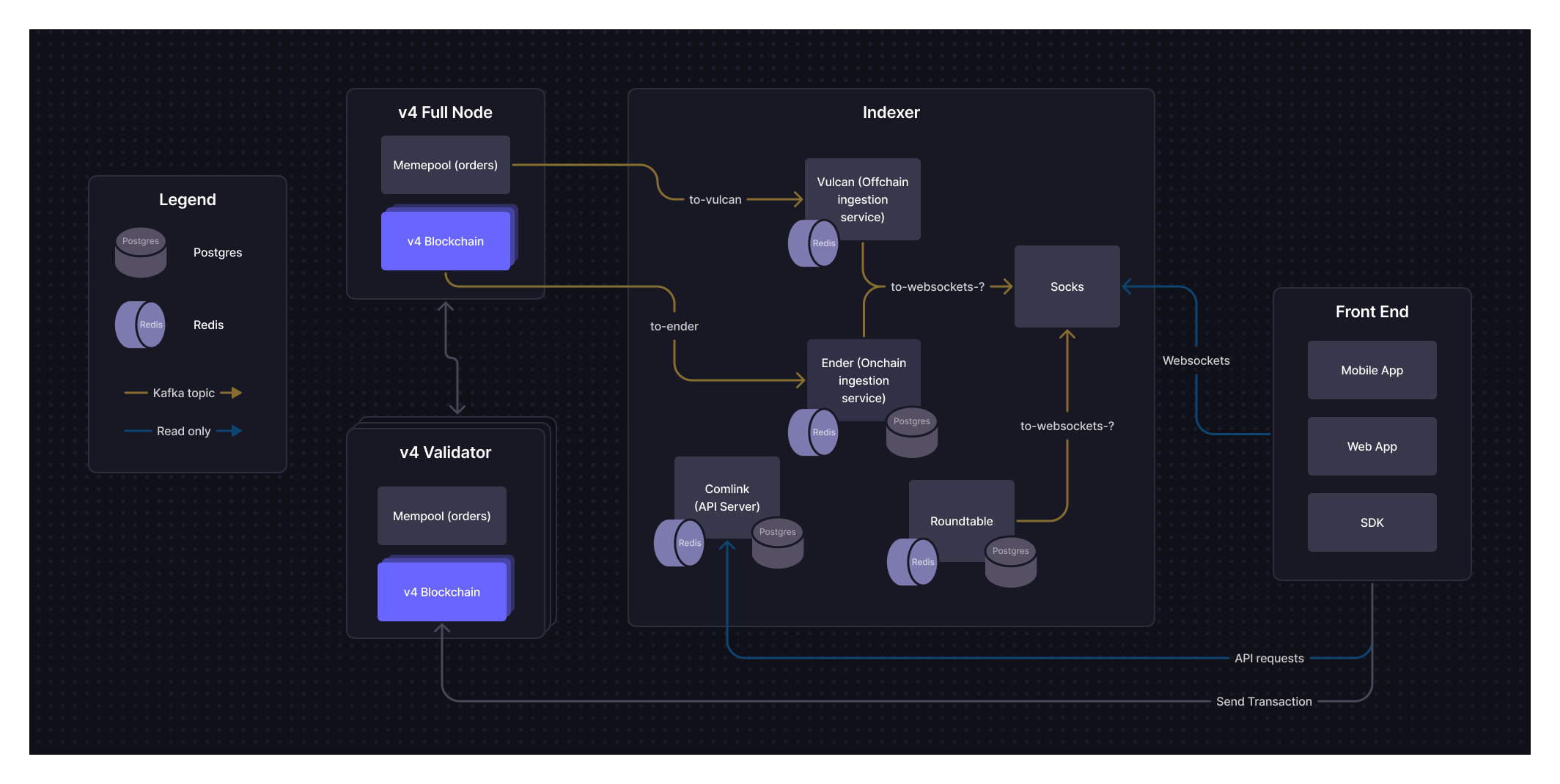
The Indexer is made up of a series of services that ingest information from v4 Full Nodes and serve that information to various clients. Kafka topics are used to pass events/data around to the services within the Indexer. The key services that make up Indexer are outlined below.
#### Ender (Onchain ingestion)
Ender is the Indexer’s onchain data ingestion service. It consumes data from the “to-ender” Kafka topic (which queues all onchain events by block) and each payload will include all event data for an entire block. Ender takes all state changes from that block and applies them to a Postgres database for the Indexer storing all onchain data. Ender will also create and send websocket events via a “to-websocket-?” Kafka topic for any websocket events that need to be emitted.
#### Vulcan (Offchain ingestion)
Vulcan is the Indexer’s offchain data ingestion service. It will consume data from the “to-vulcan” Kafka topic (queues all offchain events), which will carry payloads that include active order book updates, place order updates, cancel order updates, and optimistic fills. This data will be stored in a Redis cache. Vulcan will update Redis with any new open orders, set the status of canceled orders to cancel pending, and update orderbooks based on the payload received. Vulcan will also update Postgres whenever a partially filled order is canceled to update the state of the order in Postgres. Vulcan will also create and send websocket events via a “to-websocket-?” Kafka topic for any websocket events that need to be emitted.
#### Comlink (API Server)
Comlink is an API server that will expose REST API endpoints to read both onchain and offchain data. For example, a user could request their USDC balance or the size of a particular position through Comlink, and would receive a formatted JSON response.
As an explicit goal set out by the dYdX team, we’re designing v4 APIs to closely match the [v3 APIs](https://dydx.exchange/blog/v4-deep-dive-indexer#:~\:text=closely%20match%20the-,v3%20exchange%20APIs,-.%20We%20have%20had). We have had time to gather feedback and iterate on these APIs over time with v3, and have confidence that they are reasonable at the product-level.
#### Roundtable
Roundtable is a periodic job service that provides required exchange aggregation computations. Examples of these computations include: 24h volume per market, open interest, PnL by account, candles, etc.
#### Socks (Websocket service)
Socks is the Indexer’s websockets service that allows for real-time communication between clients and the Indexer. It will consume data from ender, vulcan, and roundtable, and send websocket messages to connected clients.
### Hosting & Deploying the Indexer
In service of creating an end-to-end decentralized product, the Indexer will be open source. This will include comprehensive documentation about all services and systems, as well as infrastructure-as-code for running the Indexer on popular cloud providers.
The specific responsibilities of a third party operator looking to host the Indexer generally include initial deployment and ongoing maintenance.
Initial deployment will involve:
* Setting up AWS infrastructure to utilize the open-source repo.
* Deploying Indexer code to ingest data from a full-node and expost that information through APIs and websockets
* Datadog (provides useful metrics and monitoring for Indexer services), and Bugsnag (real-time alerting on bugs or issues requiring human intervention).
Maintenance of the Indexer will involve:
* Migrating and/or upgrading the Indexer for new open-source releases
* Monitoring Bugsnag and Datadog for any issues and alerting internal team to address
* Debugging and fixing any issues with a run book provided by dYdX
dYdX believes that, at minimum, a DevOps engineer will be required to perform the necessary duties for deployment and maintenance of the Indexer. An operator will need to utilize the services below:
* AWS
* ECS - Fargate
* RDS - Postgres Database
* EC2
* Lambda
* ElastiCache Redis
* EC2 ELB - Loadbalancer
* Cloudwatch - Logs
* Secret Manager
* Terraform Cloud - for deploying to the cloud
* Bugsnag - bug awareness
* Datadog - metrics and monitoring
* Pagerduty - alerting
Operators should be able to host the open-sourced Indexer for public access in a highly available (i.e., high uptime) manner. Requirements include owning accounts to the services above and hiring the appropriate personnel to perform deployment and maintenance responsibilities.
## OEGS
### What is the Order Entry Gateway Service (OEGS)
The Order Entry Gateway represents the next step in dYdX’s multi-stage performance evolution:
1. Designated proposers — A governance-selected subset of validators responsible for proposing blocks. This creates a predictable topology for faster routing (available in v9 software upgrade).
2. Order Entry Gateway Service (OEGS) — specialized nodes for direct, one-hop delivery to proposers (available after v9 upgrade).
The Order Entry Gateway Service (OEGS) is open-sourced infrastructure that provides a direct, optimized path from traders to the proposer set, reducing latency, increasing throughput, and lowering barriers for professional and retail traders alike.
OEGS is now live on testnet, reach out to us for more information.
### 1. Previous State
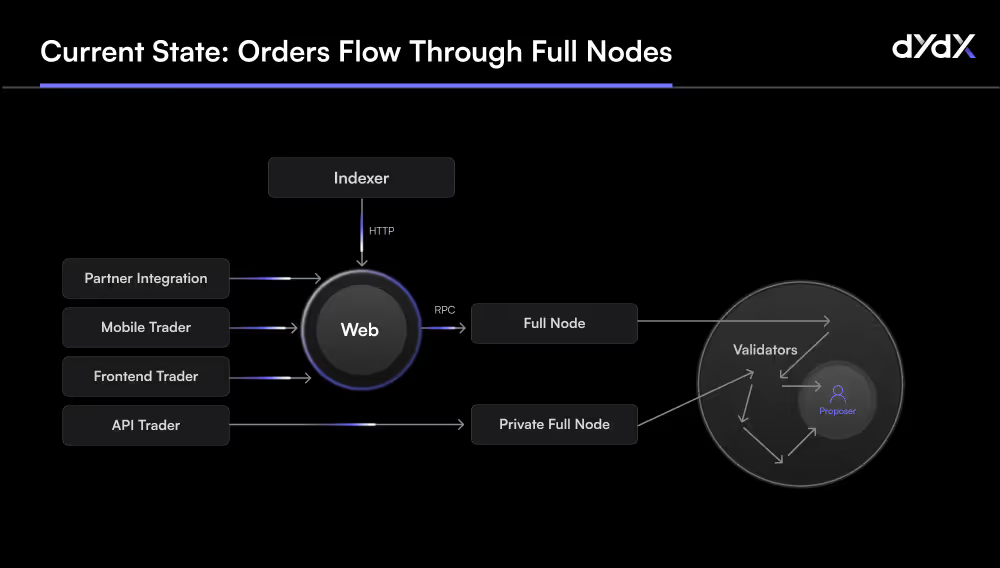
In dYdX previous architecture (original blog post [here](https://www.dydx.xyz/blog/v4-technical-architecture-overview)), orders from traders — whether via the web app, mobile, API, or third-party integration — are submitted to full nodes, which then gossip them across the network until they reach the current block proposer.
* **Pros**: Fully decentralized, no single point of routing.
* **Cons**: Multi-hop gossip introduces latency and unpredictability.
To achieve competitive speeds, professional trading firms have had to typically run their own private full nodes with streaming enabled, directly injecting orders into the gossip layer.
**Previous State** — orders flow through full nodes, then across an unpredictable set
#### Validator and Full Node Roles
Validators drive consensus, maintain an off-chain in-memory order book, gossip transactions across the network, and propose blocks following a weighted round-robin proof of stake model.
Full Nodes run the same protocol software but hold no staking power—they don’t vote or propose. They gossip transactions, process committed blocks, and stream blockchain state to the Indexer—a read-optimized service that powers trading UIs with order book and trade data.
#### Why Professional Traders run Full Nodes
Full-node access has become a performance necessity for high-speed trading — but it also represents a high barrier to entry—technical, financial, and operational.
Running a full node means orders don’t need to traverse geo-distributed public RPCs — you eliminate middle-hop latency by injecting them directly into the gossip network.
Full nodes also enable real-time streaming of L3 order book updates, fills, taker orders, and subaccount changes—via gRPC or WebSocket—supporting highly responsive UI or algorithmic trading logic.
Historically, traders relying solely on the public Indexer have faced reliability and uptime challenges, making self-hosted nodes the only way to guarantee consistent, low-latency market data. Since April 2025, we've made huge [improvements](https://x.com/AntonioMJuliano/status/1924593158165344628) (98%!) to API performance and reliability.
### 2. Designated Proposers
We recently introduced the concept of designated proposers (blog post [here](https://www.dydx.xyz/blog/governance-controlled-path-reliability-and-performance)) — a governance-selected subset of validators responsible for proposing blocks. This change to the open-source software creates a predictable topology, making it possible to route transactions directly to the next proposer instead of broadcasting widely. This is a fully deterministic enhancement to CometBFT that brings increased resilience, network performance, and operational clarity — while preserving the full validator set, stake-based voting power, and decentralized governance of the network.
### 3. The Order Entry Gateway Service (OEGS)
The OEGS builds on the designated proposer model by creating a specialized set of gateway nodes that:
* Peer directly with all designated proposers.
* Accept orders via public, high-performance endpoints (gRPC).
* Bypass standard gossip, broadcasting orders in a single hop to the proposer set.
This infrastructure built to:
* Simplify access – traders can send orders to a public, high-performance gRPC endpoint instead of deploying their own nodes.
* Ensure fairness – the Gateway peers directly with validator nodes, improving routing latency and propagation uniformity.
* Scale gracefully – governance can update, expand, or delegate the Gateway set without disrupting overall network topology.
Gateway nodes streamline communication between traders and proposers, replacing the need for multiple gossip hops with direct and parallel message delivery.
### How It Works: Infrastructure Flow
1. Trader submits an order via UI, API, or third-party partner integration to the OEGS.
2. OEGS full nodes processes validation checks (similar to regular full node).
3. Gateway is persistently peered with the proposer set—gossiping the order directly, bypassing standard gossip hops due to direct peering.
4. Designated proposers include it in the next proposed block by consensus.
5. Order fills are committed on-chain; full nodes and Indexers update their state accordingly.
This streamlined flow ensures minimal latency while preserving decentralization and consensus integrity.
#### Deployment Options
dYdX Labs plans to fully open-source the OEGS code and infrastructure requirements. Any community deployed infrastructure (e.g., front-end, mobile app, API) could consider sending orders to the OEGS but this remains fully opt-in.
Traders may still send orders directly to a full node which maintains decentralization and censorship-resistence. Governance may consider additional incentives for an OEGS operator, given their elevated role and service expectations.
#### For Market Makers & Traders
You’ll get the benefit of ultra-low-latency order routing and immediate streaming data—without the burden of node deployment or uptime management. It levels the playing field between solo operators and well-resourced trading firms.
### Getting Started
Head over to the OEGS endpoints [here](/interaction/endpoints) or take a look at the Node client Python example [here](/interaction/endpoints#node-client).
OEGS complements full-node streaming, validators’ performance, and indexer infrastructure. We’re planning further enhancements to scale alongside trader needs.
:::info
DISCLAIMER
The OEGS Gateway service (the “Service”) is provided and operated solely by Imperator Alliance – FZCO (“Imperator”), an independent third-party service provider. Imperator is entirely independent from, and is not owned or otherwise affiliated with dYdX Operations Services Limited ("DOS”).
DOS does not (i) provide, operate, or make available the Service, (ii) exercise any control over the Service, or (iii) assume or accept any responsibility or liability whatsoever in connection with the Service, including, without limitation, with respect to its availability, functionality, security, accuracy, or reliability. Reference to the Service on any DOS-related website, documentation, or resource does not constitute, and shall not be construed as, an endorsement, recommendation, or guarantee by DOS.
Without limiting the generality of the foregoing, under no circumstances shall DOS be held liable or responsible to any person or entity for any claim, demand, cause of action, damages, losses, liabilities, costs, or expenses of any kind, whether direct, indirect, incidental, punitive, special, consequential, exemplary, or otherwise, arising out of or in connection with: (a) access to, reliance upon, use of, or inability to use the Service; (b) any information or content made available through the Service; or (c) any activities, transactions, or conduct undertaken via the Service.
Access to and use of the Service is undertaken solely at the risk of the user and is subject exclusively to the terms, conditions, policies, and practices established and maintained by Imperator, all of which are independent of, and not reviewed, approved, or enforced by, DOS.
:::
## Intro to dYdX Chain Architecture
#### System Architecture
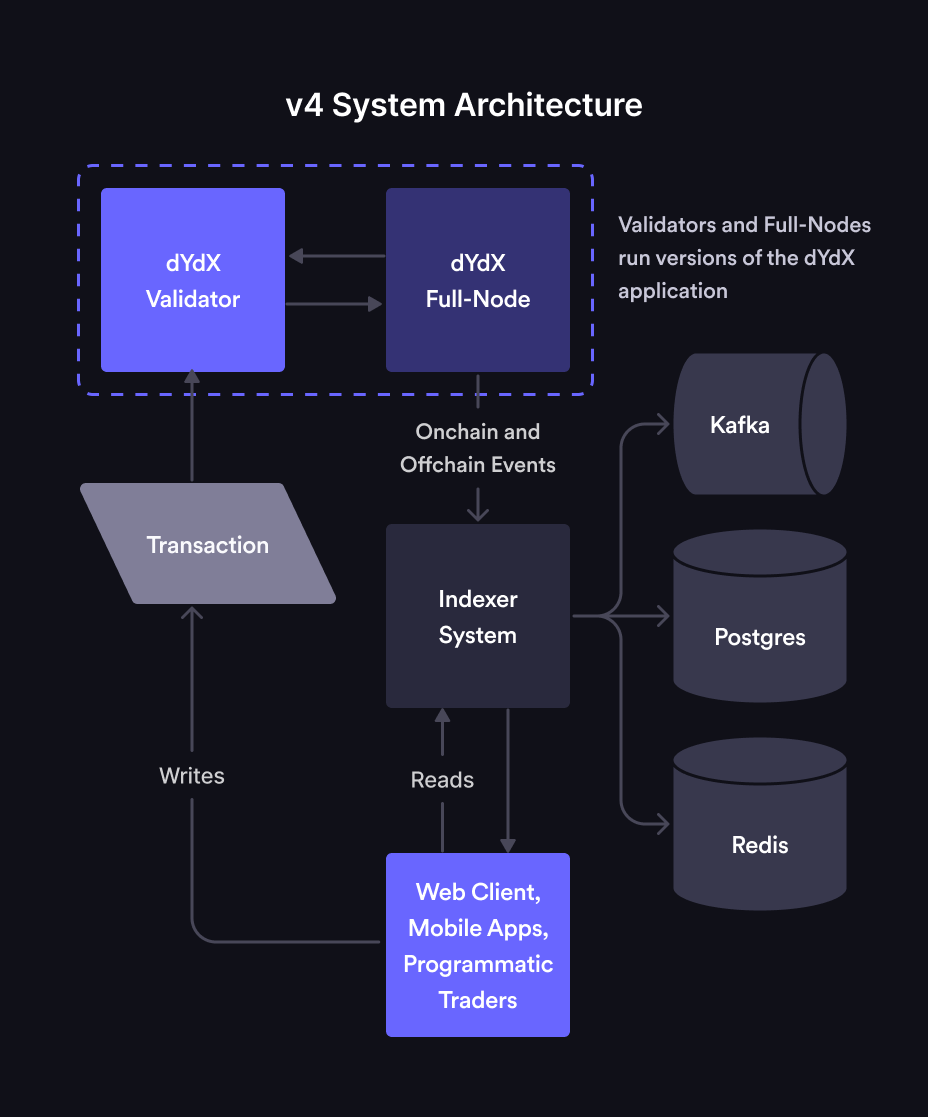
dYdX Chain (sometimes referred to as "v4") has been designed to be completely decentralized end-to-end. The main components broadly include the protocol, the Indexer, and the front end. Each of these components are available as open source software. None of the components are run by dYdX Trading Inc.
#### Protocol (or "Application")
The open-source protocol is an L1 blockchain built on top of [CometBFT](https://dydx.exchange/blog/v4-technical-architecture-overview#:~\:text=on%20top%20of-,CometBFT,-and%20using%20CosmosSDK) and using [CosmosSDK](https://docs.cosmos.network/). The node software is written in Go, and compiles to a single binary. Like all CosmosSDK blockchains, dYdX Chain uses a proof-of-stake consensus mechanism.
The protocol is supported by a network of nodes. There are two types of nodes:
* **Validators**: Validators are responsible for storing orders in an in-memory orderbook (i.e. off chain and not committed to consensus), gossipping transactions to other validators, and producing new blocks for dYdX Chain through the consensus process. The consensus process will have validators take turns as the proposer of new blocks in a weighted-round-robin fashion (weighted by the number of tokens staked to their node). The proposer is responsible for proposing the contents of the next block. When an order gets matched, the proposer adds it to their proposed block and initiates a consensus round. If ⅔ or more of the validators (by stake weight) approve of a block, then the block is considered committed and added to the blockchain. Users will submit transactions directly to validators.
* **Full Nodes**: A Full Node represents a process running the dYdX Chain open-source application that does not participate in consensus. It is a node with 0 stake weight and it does not submit proposals or vote on them. However, full nodes are connected to the network of validators, participate in the gossiping of transactions, and also process each new committed block. Full nodes have a complete view of a dYdX Chain and its history, and are intended to support the Indexer. Some parties may decide (either for performance or cost reasons) to run their own full node and/or Indexer.
#### Indexer
The Indexer is a read-only collection of services whose purpose is to index and serve blockchain data to end users in a more efficient and web2-friendly way. This is done by consuming real time data from a dYdX Chain full node, storing it in a database, and serving that data through a WebSocket and REST requests to end-users.
While the dYdX Chain open-source protocol itself is capable of exposing endpoints to service queries about some basic onchain data, those queries tend to be slow as validators and full nodes are not optimized to efficiently handle them. Additionally, an excess of queries to a validator can impair its ability to participate in consensus. For this reason, many Cosmos validators tend to disable these APIs in production. This is why it is important to build and maintain Indexer and full-node software separate from validator software.
Indexers use Postgres databases to store onchain data, Redis for offchain data, and Kafka for consuming and streaming on/offchain data to the various Indexer services.
#### Front-ends
In service of building an end-to-end decentralized experience, dYdX has built three open-source front ends: a web app, an iOS app, and an Android app.
* **Web application**: The website was built using JavaScript and React. The website interacts with the Indexer through an API to get offchain orderbook information and will send trades directly to the chain. dYdX has open sourced the front-end codebase and associated deployment scripts. This allows anyone to easily deploy and access the dYdX front end to/from their own domain/hosting solution via IPFS/Cloudflare gateway.
* **Mobile**: The iOS and Android apps are built in native Swift and Kotlin, respectively. The mobile apps interact with the Indexer in the same way the web application does, and will send trades directly to the chain. The mobile apps have been open sourced as well, allowing anyone to deploy the mobile app to the App Store or Play store. Specifically for the App store, the deployer needs to have a developer account as well as a Bitrise account to go through the app submission process.
#### Order Entry Gateway Service (OEGS) ?
The Order Entry Gateway represents the next step in dYdX’s multi-stage performance evolution and is made possible by the following 2 designs:
1. Designated proposers — A governance-selected subset of validators responsible for proposing blocks. This creates a predictable topology for faster routing (available in v9 software upgrade).
2. Order Entry Gateway Service (OEGS) — open-sourced infrastructure that provides a direct, optimized path from traders to the proposer set, reducing latency, increasing throughput, and lowering barriers for professional and retail traders alike (available now on testnet).
#### Lifecycle of an Order
Now that we have a better understanding of each of the components of dYdX Chain, let's take a look at how it all comes together when placing an order. When an order is placed on dYdX Chain, it follows the flow below:
1. User places a trade on a decentralized front end (e.g., website) or via API
2. The order is routed to a validator. That validator gossips that transaction to other validators and full nodes to update their orderbooks with the new order.
3. The consensus process picks one validator to be the proposer. The selected validator matches the order and adds it to its next proposed block.
4. The proposed block continues through the consensus process.
1. If ⅔ of validator nodes vote to confirm the block, then the block is committed and saved to the onchain databases of all validators and full nodes.
2. If the proposed block does not successfully hit the ⅔ threshold, then the block is rejected.
5. After the block is committed, the updated onchain (and offchain) data is streamed from full nodes to Indexers. The Indexer then makes this data available via API and WebSockets back to the front end and/or any other outside services querying for this data.
## Onboarding FAQs
### Background
1. How does the network work?
* dYdX Chain (or "v4") is composed of full nodes and each maintains an in-memory order book. Anyone can use the open source software to run a full node. Traders can submit order placements and cancellations to full nodes, which gossip the transactions amongst themselves.
* Full nodes with enough delegated layer 1 governance tokens participate in block building as validators. Validators on dYdX Chain take turns proposing blocks of trades every \~1 second. The validator whose turn it is to propose a block at a given height is called the proposer. The proposer uses its mempool orderbook to propose a block of matches, which validators either accept or reject according to CometBFT (Tendermint) consensus.
* All full nodes have visibility into the consensus process and the transactions in the mempool. Another component of dYdX Chain is the indexer software, an application that reads data from full nodes and exposes it via REST / WebSocket APIs for convenience.
2. What is the difference between a full node and a validator?
* A full node does not participate in consensus. It receives data from other full nodes and validators in the network via the gossip protocol. A validator participates in consensus by broadcasting votes signed by each validator’s private keys.
3. What are the benefits of running a full node as a market maker?
* Running a full node will eliminate the latency between placing an order and when the actual order is gossiped throughout the network. Without your own node, your order will need to first be relayed to the nearest geographic node, which will then propagate it throughout the network for you. With your own node, your order will directly be gossiped.
* Additionally, running a full node allows you to use [full node streaming](/nodes/full-node-streaming), a feature that aims to provide real-time, accurate orderbook updates and fills.
* Instructions on setting up a full node can be found [here](/nodes/running-node/setup).
4. What is the current block time?
* The current block time is \~1 second on average.
5. What is an indexer?
* The indexer is a read-only service that consumes real-time data from dYdX Chain to a database for visibility to users. The indexer consumes data from dYdX Chain via a connection to a full node. The full node contains a copy of the blockchain and an in-memory order book. When the full node updates its copy of the blockchain and in-memory order book due to processing transactions, it will also stream these updates to the indexer. The indexer keeps the data in its database synced with the full-node using these updates. This data is made available to users querying through HTTPS REST APIs and streaming via websockets. More info can be found [here](/indexer-client).
### Trading
1. How can I understand how finality works on dYdX Chain?
* When your order fills, a block proposer will propose a block containing the fill (visible to the whole network), and then the block will go through consensus. If the block is valid it will be finalized a couple seconds later (in Cosmos-speak this happens at the “commit” stage of consensus after all validators have voted). At that point, an indexer service will communicate the fill to you.
* It is recommended to post orders with a “Good-Til-Block” of the current block height, and adjusting prices once per block. If the block is published without a match to your order, you know that it is no longer active and did not fill.
2. What are the different order types in dYdX Chain?
* There are two order types: Short-Term orders and stateful orders.
* Short-Term orders are meant for programmatic, low-latency traders that want to place orders with shorter expirations.
* Stateful orders are meant for retail that wants to place orders with longer expirations. These orders exist on chain.
3. How does the orderbook work in dYdX Chain for short-term orders?
* Each validator runs their own in-memory orderbook (also known as mempool), and the set of orders each validator knows about is what order placement transactions are in their mempool.
* User places a trade on a decentralized front end (e.g., website) or via the typescript or python client that places orders directly to a full node or validator API.
* The consensus process picks one validator to be the block proposer. The selected validator will propose their view of the matches in the next proposed block.
* If the matches are valid (orders cross, subaccounts well-collateralized, etc.) and accepted by ⅔+ of validator stake weight (consensus), then the block is committed and those matches are written to state as valid matches.
* After the block is committed, the updated onchain (and offchain) data is streamed from full nodes to Indexers. The Indexer then makes this data available via API and websockets back to the front end and/or any other outside services querying for this data.
* Note: the block proposer’s matches are the canonical matches for the next block assuming their block is accepted by consensus.
* Other validators maintain a list of matches and those matches might differ from the block proposer’s matches, but if they’re not the block proposer those matches will not be proposed in the next block.
* Similarly, the indexer is not the block proposer so its list of matches might be different from the block proposer’s matches, until the network reaches finality.
4. Why should market makers only use short-term orders?
* Short-Term orders are placed and can be immediately matched after they’re added to the mempool, while stateful orders can only be placed and matched after they’re added to a block.
* Short-Term orders should always have superior time priority to stateful orders.
* Stateful orders have worse time priority since they can only be matched after they are included on the block, short-term orders can be matched in the same block.
* Short-Term orders have less restrictive rate limits than stateful order rate limits. See rate limits later on in this section.
* Short-Term orders can be replaced, and stateful orders currently don’t support replacement.
* Short-Term orders can be canceled immediately after they’re placed, while stateful orders can only be canceled after they’ve been included in a block.
* Short-Term orders can be received by validators in any order, while stateful orders have an ordering requirement and will fail to be placed if they’re received out of order.
* This is because stateful orders use a “sequence number”, which is equivalent to a nonce on Ethereum. Short-Term orders don’t use this.
5. How can I place a short-term order?
* Please use the latest dYdX Chain [typescript client](https://www.npmjs.com/package/@dydxprotocol/v4-client-js) to place orders.
* Please refer to the [order.proto](https://github.com/dydxprotocol/v4-chain/blob/4eb219b1b726df9ba17c9939e8bb9296f5e98bb3/proto/dydxprotocol/clob/order.proto) for parameter and field definitions.
* For more advanced order placements, please refer to one of the [validator clients](/interaction/trading).
6. How can I tell if the block proposer has placed my short-term order?
* The block proposer has proposed and filled the order in the block.
* The block proposer has the order in their mempool.
7. How can I tell if my short-term order is canceled?
* Short-term order placements and cancellations are best-effort, and therefore can't be considered final (actually placed or canceled and unfillable) until expiry.
* A FOK or IOC order is also unfillable after expiry.
* The indexer **does not** send a websocket notification when a short-term order expires, which happens when the chain height exceeds the goodTilBlock of the order.
* The block height is the only reliable way to know if a short-term order is canceled with finality.
* However, the indexer **does** send a websocket notification when a short-term order cancel is received by the indexer's full node.
* In most cases, this "best effort" cancel means the order is cancelled. However, some small fraction of these cancels are not successful.
* See [Limit Order Book and Matching](/concepts/trading/limit-orderbook) for more information.
8. How can I replace an order?
* Replacing an order reuses the short-term order placement function with the [same order ID](https://github.com/dydxprotocol/v4-chain/blob/4eb219b1b726df9ba17c9939e8bb9296f5e98bb3/proto/dydxprotocol/clob/order.proto#L10) and an equal-to-or-greater good til block.
* Note: when replacing partially-filled orders, the previous fill amount is counted towards your current order.
* Example: Buy 1 BTC order @ $20k is filled for 0.5 BTC. After replacing that order with a Buy 2 BTC order @ $25k, that order can only be filled for a maximum of 1.5 BTC. This is because the previously replaced order was already filled for 0.5 BTC.
9. Are fills computed/updates streamed only when a block is finalized? How about order placements?
* Fills are computed only when a block is finalized.
* Short term order place / cancel (including IOC / FOK orders being canceled due to not filling / being on the book or POST-ONLY orders crossing) are streamed when the full node the Indexer deployment is listening to receives the order / cancel and not only when the block is finalized.
* This is why the status “BEST\_EFFORT\_OPENED” or “BEST\_EFFORT\_CANCELED” since the Indexer only knows that a full-node received the order / cancel, and it’s not guaranteed to be true across the whole network.
* For the orderbook updates, these are sent when the full-node the Indexer is listening to receives orders / cancels and not just when the block is finalized.
* For example, when the full-node receives a short term order it will be approximate how much is filled and how much would go on the orderbook. This is what the Indexer uses to stream orderbook updates. However, there is no guarantee that the orderbook looks the same in other nodes in the network.
* Note that you can now stream the orderbook directly through your full node for the orderbook. Read more about that [here](/nodes/full-node-streaming).
10. Do orders get matched and removed from the book in between blocks?
* For removal of short term orders, yes they can be removed in between blocks, however this is on a node-by-node basis and not across the whole network.
* E.g. a short-term order could be removed on one node, but still be present on another.
* When a short-term order expires (current block height > goodtilBlock), then it is guaranteed to be removed from all nodes.
* For removal of stateful orders, they can be removed from the book in-between blocks. This is on a node-by-node basis.
* If the node removing the stateful orders is the block proposer, these stateful order removals will also be propagated to all other nodes, and be entirely removed from the network.
* For all orders, regarding matching:
* For matching, each node on the network will attempt to match the orders as they are received in-between blocks.
* Per block, only 1 node (the block proposer) will propagate the matches it’s done during the block to all other nodes in the network. Validator nodes take turns being the block proposer based on their stake weight.
* If a set of validators with ⅔+ of the stake weight of the network see the matches propagated as valid, then those matches are included in the block when finalized.
* The only matches that occur on the network are the ones in the block.
11. Do certain order types have priority? Are cancels prioritized?
* Short term orders when received by a node will be matched against its in-memory orderbook.
* Cancels of short-term orders are also processed by a node when received.
* Stateful orders (long-term / conditional) are matched at the end of the block when they are received.
* E.g. Stateful orders have at least a 1 block-time delay (it’s possible the order does not get included in the block) between a node receiving the order, and it being matched.
* Stateful order placement will be processed AFTER short-term order placements and cancellations for a block.
* Stateful order cancellations are also done at the end of the block they are received.
* The stateful order cancellations are also processed AFTER short-term placements and cancellations for a block.
* As mentioned above, only the matches from the block proposer will be included in the block (if a set of validators with ⅔+ of the stake weight of the network see the matches as valid).
12. How does the order cancellation mechanism work?
* Short-term:
* When validators receive a cancellation, if they don't already see a match for the order, they will remove the order from their order book.
* Only once every validator receives the cancellation is when the order will no longer be able to be matched.
* The other way an order would no longer be matchable is if the block height is past the good til block.
* Long-term:
* Once a stateful order cancellation is included into a block, the order will be canceled and no longer matchable. This could take 1s+ for a cancelation to be included in a block.
13. Why is it slower to cancel orders than place orders?
* An order placement only needs to be on a single validator to have a match happen, but the cancellation has to have arrived at the block proposer. Since the BP rotates, to be completely sure that the order won't be matched, it has to arrive at all the validators who will be block proposer before the order expires. This is why cancelations seem to be guaranteed slower than placing/matching orders.
14. How do order statuses transition for the Indexer, for short-term and long-term orders?
* Short-term:
* Once the order is placed and seen by the Indexer's full-node, the order has status BEST\_EFFORT\_OPENED.
* If the order is matched and has a fill in a block, the order has status OPEN.
* If the order is fully-filled, the order has status FILLED.
* If the order is canceled by a cancel order message, the order will have status BEST\_EFFORT\_CANCELED. The order may still have fills if other validator nodes haven't received the cancel message yet.
* If the order expires due to the block height exceeding the good til block of the order, the order status will be CANCELED. The order can no longer be filled.
* Long-term:
* Once the order is placed and included in a block, the order has status OPEN.
* If the order is fully filled, the order has status FILLED.
* If the cancelation of the order is included in a block, the order has status CANCELED. The order can no longer be filled.
15. How do subaccounts work on dYdX Chain?
* Each address’s subaccounts all fall under a single address, but they are labeled subaccount0, subaccount1, etc. This is unlike v3, where each subaccount was a secondary address.
* To begin trading, you need to make sure your funds are in your subaccount. You can do this two ways:
* Frontend: Simply leave your frontend open and it will automatically sweep.
* Backend: Simply transfer USDC to it like in [this example](https://github.com/dydxprotocol/v4-clients/blob/123cd819939fe47ff80dda04b1ac1144dffa4fda/v4-client-js/examples/transfer_example_subaccount_transfer.ts).
16. Do I need gas when I transfer funds to create a new subaccount?
* Yes, you will need gas. Fortunately, both USDC and cosmos native dYdX can be used to pay for gas fees. This USDC must be in the main wallet and not another subaccount to pay for fees.
* To ensure this, the frontend leaves a small amount of USDC in your wallet when sweeping into your subaccount, to ensure there's enough to pay for gas.
17. What impact do subaccounts have on rate limits?
* Rate limits are per account, and not per subaccount.
18. How do we compete for liquidation orders?
* If you run a full-node, there is a liquidations daemon that has metrics on what accounts are up for liquidation orders, and they could try and compete for liquidations that way.
* However, this is not at all documented so you'll have to work it out by reading code.
### Full Nodes & Validators
1. How much throughput and latency can be expected from a self-hosted full node? Would having multiple full nodes in different regions improve speed?
* Throughput of up to 1500 orders/second from our load-testing. Latency depends on which validator is the proposer. Having multiple full-nodes in different regions where there are validators (so maybe 1 in Europe + 1 in Tokyo) would lead to improved latency.
2. Do validators communicate through a public P2P network, or is there an internal network?
* It's a public P2P network.
3. What is the expected order-to-trade latency under normal conditions?
* Expected order → trade latency would be:
* Time for order to get from the node it was submitted to, to the proposer, so location dependent.
* Order match -> trade, probably at least 1 block so \~0.8s, could be more than 1 block.
4. Is it faster to submit transactions directly to a validator or to broadcast transactions to the network?
* It is faster to submit a transaction directly to the block proposer. The speed difference between a full-node and a validator is negligible unless that validator is the proposer.
5. Do you have some validators that we can send orders to?
* Validators don't expose the RPC endpoints for orders.
6. How do other teams improve their speed?
* Some teams are trying to get data about the order book/order updates from a full-node they are running to improve the latency to receiving data, as there is additional latency to getting order updates due to the Indexer systems having additional latency. We currently do not have documentation around this, but are working on it.
### Indexer
1. How does the indexer reconstruct the orderbook when it started/initial snapshot of the book?
* A full node is run alongside the Indexer and sends messages to the indexer when it receives orders either from the RPC or gossiped from other nodes, as well as any updates from:
* node pruning the order when it expires.
* another order that matches an order that the node received earlier.
* node removing order due to receiving a cancel from RPC or gossip.
* The indexer also updates the order book whenever it receives these order messages.
2. How does the indexer know what orders are in the book on start up?
* On a cold-start, a full-node would still have all the stateful orders and would send them to the indexer. For short-term orders, the full-node would not know them, nor would the indexer. Since short-term orders only are valid for 20 blocks, within 20 blocks the indexer would have an accurate view of the order book, but for the first 20 blocks it would not.
### MEV
1. How will dYdX Chain handle MEV?
* Unlike general-purpose smart contract environments, the Cosmos infrastructure enables unique MEV solutions to be built that align a validator’s incentives with a user’s incentives. dYdX Chain has a framework where MEV is measured via a dashboard. The first step would be to punish validators with slashing. Further proposed solutions are still being considered, and will be announced once finalized.
2. When do I have finality related to fills?
* When your order fills, a block proposer proposes a block containing the fill (visible to the whole network), and then the block undergoes consensus. If the block is valid, it finalizes shortly thereafter (in Cosmos-speak this happens at the “commit” stage of consensus, after all validators have voted). In Cosmos, every block is final (no reorgs or forks).
* If you’re connected via full node, you’ll see each step of this process. If you’re connected via the indexer service, you’ll see order updates over webSocket as soon as each block is confirmed.
3. Is deliberately taking canceled orders considered an attack against makers?
* Nodes should respect cancels as soon as they receive them. If they don't, then we see that as MEV and the aforementioned dashboard/metrics tracking MEV will track that.
### Pricing
1. How is the oracle price computed?
* The oracle price has five parts:
* Slinky: sidecar that pulls price data from external sources and caches them for the validator to use [link](https://github.com/dydxprotocol/slinky).
* Vote Extensions: Every block during the Precommit stage, all validators will submit vote extensions for what they believe the oracle price of all tracked assets should be.
* Consensus: The block after VE are submitted, Slinky deterministically aggregates all VE from the previous block and proposes a new updated price which is voted into consensus.
* `x/prices` Module: updates the state based on the new price, also has logic for validation and etc. [link](https://github.com/dydxprotocol/v4-chain/tree/main/protocol/x/prices).
* Params: determines the external sources and sensitivity [link](https://github.com/dydxprotocol/v4-testnets/blob/aa1c7ac589d6699124942a66c2362acad2e6f50d/dydx-testnet-4/genesis.json#L6106), these are configured per network (testnet genesis example), but should query the network config for these `dydxprotocold query prices list-market-param`.
2. How often are prices updated on-chain?
* Prices within Slinky are committed on a one-block delay, since validators use the vote extensions from block `n-1` to securely submit their price data for block `n`.
* Most of the time, prices will update every single block. Price updates happen when over `2/3` of validators are correctly running the Slinky sidecar.
* Prices will not update on any given block if:
* The market is disabled within `x/marketmap`
* Less than `2/3s` of validators (by stake weight) contributed to a price update. This can happen if not enough validators run Slinky, or there is a massive, widespread outage across providers.
3. Does Slinky store historical prices?
* No. Prices are stored in `x/oracle` module, and only stores the most recently posted price. However, you can use blockchain indexers or inspect past blocks to see the prices committed on previous heights.
### Rewards
1. How will trading rewards work on dYdX Chain?
* Trading rewards are not controlled by dYdX. dYdX recommends that trading rewards could be calculated primarily based on total taker fees paid, along with a few other variables. The full proposed formula can be found [here](/concepts/trading/rewards),
2. Do liquidity provider rewards exist on v4 (dYdX Chain)?
* Liquidity provider rewards in v4 are not controlled by dYdX. dYdX recommends that liquidity provider rewards should cease to exist in v4. Makers could be rewarded with a maker rebate ranging from 0.5bps to 1.1bps, based on their nominal volume and volume share. The full proposed fee schedule can be found [here](/concepts/trading/rewards).
## Account
`address`: [Address]
`subaccount_number`: [SubaccountNumber]
[Address]: /types/address
[SubaccountNumber]: /types/subaccount_number
## AccountWithParentSubaccountNumber
`address`: [Address]
`parent_subaccount_number`: [ParentSubaccountNumber]
[Address]: /types/address
[ParentSubaccountNumber]: /types/parent_subaccount_number
## Address
An address of an account, represented by a string.
:::code-group
```rust [Rust]
String
```
```python [Python]
str
```
```typescript [TypeScript]
string
```
:::
## AddressResponse
`subaccounts`: [SubaccountResponseObject] ⛁
`total_trading_rewards`: [BigDecimal]
[SubaccountResponseObject]: /types/subaccount_response_object
[BigDecimal]: /types/big_decimal
## ApiOrderStatus
`ApiOrderStatus` is an enum consists of the following values
* `OrderStatus`
* `BestEffort`
## ApiTimeInForce
`ApiTimeInForce` is an enum consists of the following values
* `Gtt`
* `Fok`
* `Ioc`
## AssetId
A string identifier representing a specific asset (e.g., "USDC"). Used to uniquely reference assets within the system.
:::code-group
```rust [Rust]
String
```
```python [Python]
str
```
```typescript [TypeScript]
string
```
:::
## AssetId
A `u32` integer identifier representing a specific asset (e.g., USDC, dYdX token).
See more on [Perpetuals and Assets](/concepts/trading/assets).
## AssetPosition
`asset_id`: [u32]
`quantums`: [u8]
`index`: [u64]
[u32]: /types/u32
[u8]: /types/u8
[u64]: /types/u64
## AssetPositionResponseObject
`symbol`: [Symbol]
`side`: [PositionSide]
`size`: [Quantity]
`subaccountNumber`: [SubaccountNumber]
`assetId`: [AssetId]
[Symbol]: /types/symbol
[PositionSide]: /types/position_side
[Quantity]: /types/quantity
[SubaccountNumber]: /types/subaccount_number
[AssetId]: /types/asset_id
## AssetPositionSubaccountMessage
Update sub-message received on the `v4_subaccounts` channel.
`address`: [`Address`]
`subaccountNumber`: [`SubaccountNumber`]
`positionId`: string
`assetId`: [`AssetId`]
`symbol`: [`Symbol`]
`side`: [`PositionSide`]
`size`: [`Quantity`]
[`Address`]: /types/address
[`SubaccountNumber`]: /types/subaccount_number
[`PositionSide`]: /types/position_side
[`Quantity`]: /types/quantity
[`AssetId`]: /types/asset_id
[`Symbol`]: /types/symbol
## AssetPositionsMap
Key: [Ticker]
Value: [AssetPositionResponseObject]
[Ticker]: /types/ticker
[AssetPositionResponseObject]: /types/asset_position_response_object
## Authenticator
`Authenticator` is an enum represented by the following values
* `SignatureVerification`
* `MessageFilter`
* `SubaccountFilter`
* `ClobPairIdFilter`
* `AnyOf`
* `AllOf`
## Bad Request
[https://datatracker.ietf.org/doc/html/rfc7231#section-6.5.1](https://datatracker.ietf.org/doc/html/rfc7231#section-6.5.1)
## BaseAccount
`address`: string
`pub_key`: Any
`account_number`: [u64]
`sequence`: [u64]
[u64]: /types/u64
## BigDecimal
A high-precision decimal number type used to represent values requiring exact precision, such as prices or quantities. Typically serialized as a string to avoid precision loss.
:::code-group
```rust [Rust]
big_decimal::BigDecimal
```
```python [Python]
str
```
```typescript [TypeScript]
string
```
:::
## Block
\`header: [Header]
`data`: [Data]
`evievidence`: [EvidenceList]
`last_commit`: [Commit]
[Header]: /types/header
[Data]: /types/data
[EvidenceList]: /types/evidence_list
[Commit]: /types/commit
## BlockHeightInitialMessage
Initial message received on the `v4_block_height` channel.
It is a [`HeightResponse`] object.
[`HeightResponse`]: /types/height_response
## BlockHeightUpdateMessage
Update message received on the `v4_block_height` channel.
`blockHeight`: [`Height`]
`time`: [`DateTime`]
[`DateTime`]: /types/date_time
[`Height`]: /types/height
## BlockId
`hash`: [u8] ⛁
`part_set_header`: [PartSetHeader]
[u8]: /types/u8
[PartSetHeader]: /types/part_set_header
## BridgeEvent
`id`: [u32]
`coin`: [Coin]
`address`: string
`eth_block_height`: [u64]
[u32]: /types/u32
[Coin]: /types/coin
[u64]: /types/u64
## BroadcastMode
`BroadcastMode` is an enum consists of the following values:
* BroadcastTxSync
* BroadcastTxCommit
## BuilderCodeParameters
Represents the metadata for the partner or builder of an order. This allows them to specify a fee for providing their service which will be paid out in the event of an order fill.
`builder_address`: [Address]
* The address of the builder to which the fee will be paid
`fee_ppm`: [u32]
* The fee enforced on the order in parts per million (ppm)
[Address]: /types/address
[u32]: /types/u32
## CandleResolution
`CandleResolution` is an enum represented by the following values
* `M1`
* `M5`
* `M15`
* `M30`
* `H1`
* `H4`
* `D1`
import Opt from '../../components/Opt';
## CandleResponseObject
`ticker`: [Ticker]
`trades`: [u64]
`startedAt`: [DateTime in UTC]
`baseTokenVolume`: [Quantity]
`open`: [Price]
`low`: [Price]
`high`: [Price]
`close`: [Price]
`resolution`: [CandleResolution]
`usdVolume`: [Quantity]
`startingOpenInterest`: [BigDecimal]
`orderBookMidPriceOpen`: [BigDecimal]
`orderBookMidPriceClose`: [BigDecimal]
[Ticker]: /types/ticker
[DateTime in UTC]: /types/date_time
[Quantity]: /types/quantity
[Price]: /types/price
[CandleResolution]: /types/candle_resolution
[BigDecimal]: /types/big_decimal
[u64]: /types/u64
import Array from '../../components/Array';
## CandlesInitialMessage
Initial message received on the `v4_candles` channel.
`candles`: [`CandleResponseObject`]
[`CandleResponseObject`]: /types/candle_response_object
import Array from '../../components/Array';
## CandlesUpdateMessage
Update message received on the `v4_candles` channel.
It is a [`CandleResponseObject`].
[`CandleResponseObject`]: /types/candle_response_object
## ClientId
`ClientId` is represented by [u32]
[u32]: /types/u32
## ClientMetadata
A wrapper around a [u32] value used to attach optional, client-defined metadata to orders or fills. Useful for tracking or categorizing actions on the client side.
[u32]: /types/u32
## ClobPair
`id`: [u32]
`metadata`: [Metadata]
`quantum_conversion_exponent`: [i32]
`step_base_quantums`: [u64]
`subticks_per_tick`: [u32]
`status`: [ClobPairStatus]
[u32]: /types/u32
[u64]: /types/u64
[i32]: /types/i32
[Metadata]: /types/metadata
[ClobPairStatus]: /types/clob_pair_status
## ClobPairId
A CLOB (Central Limit Order Book) Pair ID refers to the identifier for a specific order book (spot, perpetual, etc.). It uniquely identifies where liquidity rests, tick sizes, step sizes, and other trading configuration for that product.
`ClobPairId` is represented by [u32]
[u32]: /types/u32
## ClobPairStatus
`ClobPairStatus` is an enum consists of the following values:
* `Unspecified`
* `Active`
* `Paused`
* `CancelOnly`
* `PostOnly`
* `Initializing`
* `FinalSettlement`
## Coin
`denom`: string
`amount`: string
## Commission
`commission_rates`: [CommissionRates]
`update_time`: [Timestamp]
[CommissionRates]: /types/commission_rates
[Timestamp]: /types/timestamp
## CommissionRates
`rate`: string
`max_rate`: string
`max_change_rate`: string
## Commit
`height`: [i64]
`round`: [i32]
`block_id`: [BlockId]
`signatures`: [CommitSig] ⛁
[i64]: /types/i64
[i32]: /types/i32
[BlockId]: /types/block_id
[CommitSig]: /types/commit_sig
## CommitSig
`block_id_flag`: [i32]
`validator_address`: [u8] ⛁
`timestamp`: [Timestamp]
`signature`: [u8] ⛁
[i32]: /types/i32
[u8]: /types/u8
[Timestamp]: /types/timestamp
## ComplianceReason
`ComplianceReason` is an enum consists of the following values
* MANUAL
* US\_GEO
* CA\_GEO
* GB\_GEO
* SANCTIONED\_GEO
* COMPLIANCE\_PROVIDER
## ComplianceResponse
`restricted`: bool
`reason`: string
## ComplianceReason
`ComplianceReason` is an enum consists of the following values
* COMPLIANT
* FIRST\_STRIKE\_CLOSE\_ONLY
* FIRST\_STRIKE
* CLOSE\_ONLY
* BLOCKED
import Opt from '../../components/Opt';
## ComplianceV2Response
`status`: [ComplianceStatus]
`reason`: [ComplianceReason]
`updatedAt`: [DateTime]
[ComplianceStatus]: /types/compliance_status
[ComplianceReason]: /types/compliance_reason
[DateTime]: /types/date_time
## Consensus
`block`: [u64]
`app`: [u64]
[u64]: /types/u64
## Cosmos
// TODO
This type is from cosmos SDK. The exact response will be added later.
## Data
`txs`: [u8] ⛁⛁
[u8]: /types/u8
## DateTime
A a timestamp type representing a specific date and time in Coordinated Universal Time (UTC), with nanosecond precision.
It must be represented as an ISO 8601 formatted string.
## DelayedCompleteBridgeMessages
`message`: [MessageCompleteBridge]
`block_height`: [u32]
[MessageCompleteBridge]: /types/message_complete_bridge
[u32]: /types/u32
## Delegation
`delegator_address`: string
`validator_address`: string
`shares`: string
## DelegationResponse
`delegation`: [Delegation]
`balance`: [Coin]
[Delegation]: /types/delegation
[Coin]: /types/coin
## Denom
`Denom` is an enum consists of the following values
* `Usdc`
* `Dydx`
* `DydxInt`
* `NobleUsdc`
* `Custom`
## Description
`moniker`: string
`identity`: string
`website`: string
`security_contact`: string
`details`: string
## EquityTierLimit
`usd_tnc_required`: [u8] ⛁
`limit`: [u32]
[u8]: /types/u8
[u32]: /types/u32
## EquityTierLimitConfiguration
`short_term_order_equity_tiers`: [EquityTierLimit] ⛁
`stateful_order_equity_tiers`: [EquityTierLimit] ⛁
[EquityTierLimit]: /types/equity_tier_limit
## Evidence
`sum`: [EvidenceSum]
[EvidenceSum]: /types/evidence_sum
## EvidenceList
`evidence`: [Evidence] ⛁
[Evidence]: /types/evidence
## EvidenceSum
`EvidenceSum` is an enum consists of the following values:
* `DuplicateVoteEvidence`
* `LightClientAttackEvidence`
\#f64
`f64` represents 64 bit floating point number
## FillId
A wrapper around a String that uniquely identifies a specific fill event.
Used to reference and track individual trade executions.
import Opt from '../../components/Opt';
## FillResponseObject
Represents the details of a trade fill, including size, price, market information, and metadata related to the order and subaccount.
`id`: [FillId]
`side`: [OrderSide]
`liquidity`: [Liquidity]
`type`: [FillType]
`market`: [Ticker]
`market_type`: [MarketType]
`price`: [Price]
`size`: [BigDecimal]
`fee`: [BigDecimal]
`affiliate_rev_share`: [BigDecimal]
`created_at`: [DateTime]
`created_at_height`: [Height]
`order_id`: [OrderId]
`client_metadata`: [ClientMetadata]
`subaccount_number`: [SubaccountNumber]
`builder_fee`: [BigDecimal]
> **Note:** Builder fee fields will be introduced in a future version of the API (v9.0).
`builder_address`: [Address]
[FillId]: /types/fill_id
[OrderSide]: /types/order_side
[BigDecimal]: /types/big_decimal
[FillType]: /types/fill_type
[Liquidity]: /types/liquidity
[Ticker]: /types/ticker
[MarketType]: /types/market_type
[Price]: /types/price
[SubaccountNumber]: /types/subaccount_number
[Height]: /types/height
[DateTime]: /types/date_time
[ClientMetadata]: /types/client_metadata
[OrderId]: /types/order_id
[Address]: /types/address
import Opt from '../../components/Opt';
import Array from '../../components/Array';
## FillSubaccountMessage
`id`: [`FillId`]
`subaccountId`: [`SubaccountId`]
`side`: [`OrderSide`]
`liquidity`: [`Liquidity`]
`type`: [`FillType`]
`clobPairId`: [`ClobPairId`]
`size`: [`Quantity`]
`price`: [`Price`]
`quoteAmount`: string
`eventId`: string
`transactionHash`: string
`createdAt`: [`DateTime`]
`createdAtHeight`: [`Height`]
`ticker`: [`Ticker`]
`orderId`: [`OrderId`]
`clientMetadata`: [`ClientMetadata`]
[`FillId`]: /types/fill_id
[`SubaccountId`]: /types/subaccount_id
[`OrderSide`]: /types/order_side
[`Liquidity`]: /types/liquidity
[`FillType`]: /types/fill_type
[`ClobPairId`]: /types/clob_pair_id
[`DateTime`]: /types/date_time
[`Height`]: /types/height
[`Quantity`]: /types/quantity
[`Ticker`]: /types/ticker
[`Price`]: /types/price
[`OrderId`]: /types/order_id
[`ClientMetadata`]: /types/client_metadata
## FillType
An enum representing the origin or nature of a fill. Possible string values are:
* `LIMIT` – Result of a regular limit order.
* `LIQUIDATED` – Result of liquidating another trader's position.
* `LIQUIDATION` – Result of one's own position being liquidated.
* `DELEVERAGED` – Caused by automatic deleveraging in risk management.
* `OFFSETTING` – Result of offsetting positions, often for risk reduction.
## FundingPaymentResponseObject
Represents the details of a funding payment, including payment amount, funding rate, position information, and metadata related to the perpetual market and subaccount.
`createdAt`: [DateTime]
`createdAtHeight`: [Height]
`perpetualId`: string
`ticker`: [Ticker]
`oraclePrice`: [Price]
`size`: [BigDecimal]
`side`: [PositionSide]
`rate`: [BigDecimal]
`payment`: [BigDecimal]
`subaccountNumber`: [SubaccountNumber]
`fundingIndex`: [BigDecimal]
[DateTime]: /types/date_time
[Height]: /types/height
[Ticker]: /types/ticker
[Price]: /types/price
[BigDecimal]: /types/big_decimal
[PositionSide]: /types/position_side
[SubaccountNumber]: /types/subaccount_number
## FundingPaymentsResponseObject
Represents a paginated response containing funding payment data for a subaccount or parent subaccount.
`pageSize`: [u32]
`totalResults`: [u32]
`offset`: [u32]
`fundingPayments`: [FundingPaymentResponseObject][]
[u32]: /types/u32
[FundingPaymentResponseObject]: /types/funding_payment_response_object
## GasInfo
`gas_wanted`: [u64]
`gas_used`: [u64]
[u64]: /types/u64
## GetNodeInfoResponse
`default_node_info`: [::tendermint\_proto::p2p::DefaultNodeInfo][::tendermint_proto::p2p::DefaultNodeInfo]
`application_version`: [VersionInfo]
[VersionInfo]: /types/version_info
[::tendermint_proto::p2p::DefaultNodeInfo]: /types/cosmos
## GoodTilOneof
`GoodTilOneof` is an enum consists of the following values
* `GoodTillBlock`
* `GoodTillBlockTime`
## Header
`version`: [Consensus]
`chain_id`: string
`height`: [i64]
`time`: [TimeStamp]
[Consensus]: /types/consensus
[i64]: /types/i64
[TimeStamp]: /types/timestamp
## Height
A block number representing a specific point in the blockchain's history.
Used to fetch historical data or to set an expiration block for an order.
## HeightResponse
`height`: [Height]
`time`: [DateTime in UTC]
[Height]: /types/height
[DateTime in UTC]: /types/date_time
## HistoricalBlockTradingReward
`trading_reward`: [BigDecimal]
`created_at_height`: [Height]
`created_at`: [DateTime]
[BigDecimal]: /types/big_decimal
[Height]: /types/height
[DateTime]: /types/date_time
## HistoricalFundingResponseObject
`ticker`: [Ticker]
`effective_at`: [DateTime in UTC]
`effective_at_height`: [Height]
`price`: [Price]
`rate`: [BigDecimal]
[Ticker]: /types/ticker
[DateTime in UTC]: /types/date_time
[Height]: /types/height
[Price]: /types/price
[BigDecimal]: /types/big_decimal
## HistoricalTradingRewardAggregation
`trading_reward`: [BigDecimal]
`started_at_height`: [Height]
`started_at`: [DateTime]
`ended_at_height`: [Height]
`ended_at`: [TradingRewardAggregationPeriod]
[BigDecimal]: /types/big_decimal
[Height]: /types/height
[DateTime]: /types/date_time
[TradingRewardAggregationPeriod]: /types/trading_reward_aggregation_period
## i32
signed integer
## i64
signed 64 bit integer
## KeyPair
`key`: string
## Liquidity
An enum indicating the liquidity role of the fill. Possible string values are:
* `TAKER` – The order removed liquidity from the order book (matched an existing order).
* `MAKER` – The order added liquidity to the order book (rested before being matched).
## MarketMapperRevShareDetails
`expiration_ts`: int
## MarketPrice
`id`: [u32]
`exponent`: [i32]
`price`: [u64]
[u32]: /types/u32
[i32]: /types/i32
[u64]: /types/u64
## Market Type
An enum indicating the type of market, with possible case-insensitive string values:
* `PERPETUAL`
* `SPOT`
## MarketsInitialMessage
Initial message received on the `v4_markets` channel.
`markets`: Map\[[`Ticker`], [`PerpetualMarket`]]
[`Ticker`]: /types/ticker
[`PerpetualMarket`]: /types/perpetual_market
import Opt from '../../components/Opt';
import Array from '../../components/Array';
## MarketsUpdateMessage
Update message received on the `v4_markets` channel.
`trading`: Map\[[`Ticker`], [`TradingPerpetualMarket`]]
`oraclePrices`: Map\[[`Ticker`], [`OraclePriceMarket`]]
[`Ticker`]: /types/ticker
[`TradingPerpetualMarket`]: /types/trading_perpetual_market
[`OraclePriceMarket`]: /types/oracle_price_market
## MegavaultOwnerSharesResponse
`address`: string
`shares`: [NumShares]
`share_unlocks`: [ShareUnlock] ⛁
`equity`: [u8] ⛁
`withdrawable_equity`: [u8] ⛁
[NumShares]: /types/num_shares
[ShareUnlock]: /types/share_unlock
[u8]: /types/u8
## MessageCompleteBridge
`authority`: string
`event`: [BridgeEvent]
[BridgeEvent]: /types/bridge_event
## Metadata
`Metadata` is an enum consists of the following values
* [PerpetualClobMetadata]
* [SpotClobMetadata]
[PerpetualClobMetadata]: /types/perpetual_clob_metadata
[SpotClobMetadata]: /types/spot_clob_metadata
## Module
`path`: string
`version`: string
`sum`: string
## Not Found
[https://datatracker.ietf.org/doc/html/rfc7231#section-6.5.4](https://datatracker.ietf.org/doc/html/rfc7231#section-6.5.4)
## NumShares
`num_shares`: [u8] ⛁
[u8]: /types/u8
## OK
[https://datatracker.ietf.org/doc/html/rfc7231#section-6.3.1](https://datatracker.ietf.org/doc/html/rfc7231#section-6.3.1)
import Opt from '../../components/Opt';
import Array from '../../components/Array';
## OraclePriceMarket
`oraclePrice`: [`Price`]
`effectiveAt`: [`DateTime`]
`effectiveAtHeight`: [`Height`]
`marketId`: [`u64`]
[`Price`]: /types/price
[`DateTime`]: /types/date_time
[`Height`]: /types/height
[`u64`]: /types/u64
import Opt from '../../components/Opt';
## Order
Order represents a single order belonging to a `Subaccount` for a particular `ClobPair`.
`order_id`: [OrderId]
* The unique ID of this order
* Meant to be unique across all orders
`side`: [OrderSide]
* The direction of the order (buy or sell)
`quantums`: [u64]
* The size of this order in base quantums
* Must be a multiple of `ClobPair.StepBaseQuantums` (where `ClobPair.Id = orderId.ClobPairId`)
`subticks`: [u64]
* The price level that this order will be placed at on the orderbook, in subticks
* Must be a multiple of `ClobPair.SubticksPerTick` (where `ClobPair.Id = orderId.ClobPairId`)
`time_in_force`: [i32]
* The time in force of this order
`reduce_only`: bool
* Enforces that the order can only reduce the size of an existing position
* If a ReduceOnly order would change the side of the existing position, its size is reduced to that of the remaining size of the position
* If existing orders on the book with ReduceOnly would already close the position, the least aggressive (out-of-the-money) ReduceOnly orders are resized and canceled first
`client_metadata`: [u32]
* Set of bit flags set arbitrarily by clients and ignored by the protocol
* Used by indexer to infer information about a placed order
`condition_type`: [i32]
* The type of condition for this order
`conditional_order_trigger_subticks`: [u64]
* The price at which this order will be triggered, in subticks
* If condition\_type is CONDITION\_TYPE\_UNSPECIFIED, this value must be 0
* If this value is nonzero, condition\_type cannot be CONDITION\_TYPE\_UNSPECIFIED
* Must be a multiple of ClobPair.SubticksPerTick (where `ClobPair.Id = orderId.ClobPairId`)
`twap_parameters`: [TwapParameters]
* Configuration for a TWAP order
* Must be set for TWAP orders
* When `twap_parameters` is supplied, `OrderFlags` must be set to 128 (TWAP) on `OrderId.OrderFlags`
* Ignored for all other order types
`builder_code_parameters`: [BuilderCodeParameters]
* Metadata for the partner or builder of an order specifying the fees charged
`good_til_oneof`: [GoodTilOneof]
* Information about when the order expires
`order_router_address`: string
* Router address to share the revenue
[OrderId]: /types/order_id
[OrderSide]: /types/order_side
[i32]: /types/i32
[u32]: /types/u32
[u64]: /types/u64
[GoodTilOneof]: /types/good_til_oneof
[TwapParameters]: /types/twap_parameters
[BuilderCodeParameters]: /types/builder_code_parameters
## OrderBatch
`clob_pair_id`: [u32]
`client_ids`: [u32] ⛁
[u32]: /types/u32
## OrderBookResponseObject
`bids`: List of [OrderbookResponsePriceLevel]
`asks`: List of [OrderbookResponsePriceLevel]
[OrderBookResponsePriceLevel]: /types/order_book_response_price_level
## OrderbookResponsePriceLevel
`price`: [Price]
`size`: [Quantity]
[Price]: /types/price
[Quantity]: /types/quantity
## OrderFlags
`OrderFlags` is an enum represented by the following values
* `ShortTerm`
* `Conditional`
* `LongTerm`
* `TWAP`
## OrderId
A string value that uniquely identifies a specific order. Used to track and reference orders within the system.
## OrderId
`subaccount_id`: [SubaccountId]
`client_id`: [u32]
`order_flags`: [u32]
`clob_pair_id`: [u32]
[SubaccountId]: /types/subaccount_id
[u32]: /types/u32
## OrderMarketParams
`atomic_resolution`: [i32]
`clob_pair_id`: [ClobPairId]
`oracle_price`: [Price]
`quantum_conversion_exponent`: [i32]
`step_base_quantums`: [u64]
`subticks_per_ticks`: [u32]
[i32]: /types/i32
[ClobPairId]: /types/clob_pair_id
[Price]: /types/price
[u64]: /types/u64
[u32]: /types/u32
import Opt from '../../components/Opt';
## OrderResponseObject
`client_id`: [ClientId]
`client_metadata`: [ClientMetadata]
`clob_pair_id`: [ClobPairId]
`created_at_height`: [Height]
`good_til_block`: [Height]
`good_til_block_time`: [DateTime in UTC]
`id`: [OrderId]
`order_flags`: [OrderFlags]
`post_only`: `bool`
`price`: [Price]
`reduce_only`: `bool`
`side`: [OrderSide]
`size`: [Quantity]
`status`: [ApiOrderStatus]
`subaccount_id`: [SubaccountId]
`subaccount_number`: [SubaccountNumber]
`ticker`: [Ticker]
`time_in_force`: [ApiTimeInForce]
`total_filled`: [BigDecimal]
`type`: [OrderType]
`updated_at`: [DateTime in UTC]
`updated_at_height`: [Height]
`trigger_price`: [Price]
`builder_fee`: [BigDecimal]
> **Note:** Builder fee fields will be introduced in a future version of the API (v9.0).
`fee_ppm`: [BigDecimal]
[ClientId]: /types/client_id
[ClientMetadata]: /types/client_metadata
[ClobPairId]: /types/clob_pair_id
[Height]: /types/height
[DateTime in UTC]: /types/date_time
[OrderId]: /types/order_id
[OrderFlags]: /types/order_flags
[Price]: /types/price
[OrderSide]: /types/order_side
[Quantity]: /types/quantity
[ApiOrderStatus]: /types/api_order_status
[SubaccountId]: /types/subaccount_id
[SubaccountNumber]: /types/subaccount_number
[Ticker]: /types/ticker
[ApiTimeInForce]: /types/api_time_in_force
[BigDecimal]: /types/big_decimal
[OrderType]: /types/order_type
## OrderRouterRevShare
`address`: string
`share_ppm`: int
## OrderSide
An enum representing the direction of an order. Possible string values are:
* `BUY` – Indicates a purchase order.
* `SELL` – Indicates a sell order.
## OrderStatus
`OrderStatus` is an enum consists of the following values
* `Open`
* `Filled`
* `Canceled`
* `BestEffortCanceled`
* `Untriggered`
* `BestEffortOpened`
* `Pending`
import Opt from '../../components/Opt';
import Array from '../../components/Array';
## OrderSubaccountMessage
Update sub-message received on the `v4_subaccounts` channel.
`id`: string
`subaccountId`: [`SubaccountId`]
`clientId`: [`ClientId`]
`clobPairId`: [`ClobPairId`]
`side`: [`OrderSide`]
`size`: [`Quantity`]
`ticker`: [`Ticker`]
`price`: [`Price`]
`type`: [`OrderType`]
`timeInForce`: [`ApiTimeInForce`]
`postOnly`: bool
`reduceOnly`: bool
`status`: [`ApiOrderStatus`]
`orderFlags`: [`OrderFlags`]
`totalFilled`: [`BigDecimal`]
`totalOptimisticFilled`: [`BigDecimal`]
`goodTilBlock`: [`Height`]
`goodTilBlockTime`: [`DateTime`]
`triggerPrice`: [`Price`]
`updatedAt`: [`DateTime`]
`updatedAtHeight`: [`Height`]
`removalReason`: string
`createdAtHeight`: [`Height`]
`clientMetadata`: [`ClientMetadata`]
[`SubaccountId`]: /types/subaccount_id
[`ClientId`]: /types/client_id
[`OrderSide`]: /types/order_side
[`ClobPairId`]: /types/clob_pair_id
[`OrderType`]: /types/order_type
[`Ticker`]: /types/ticker
[`OrderFlags`]: /types/order_flags
[`ApiTimeInForce`]: /types/api_time_in_force
[`ApiOrderStatus`]: /types/api_order_status
[`BigDecimal`]: /types/big_decimal
[`Height`]: /types/height
[`DateTime`]: /types/date_time
[`Price`]: /types/price
[`ClientMetadata`]: /types/client_metadata
[`Quantity`]: /types/quantity
## OrderType
An enum specifying the type of order to be placed or processed. Possible string values include:
* `LIMIT` – Executes at a specified price or better.
* `MARKET` – Executes immediately at the best available price.
* `STOP_LIMIT` – Becomes a limit order once a stop price is reached.
* `STOP_MARKET` – Becomes a market order once a stop price is reached.
* `TRAILING_STOP` – A dynamic stop order that adjusts based on market movement.
* `TAKE_PROFIT` – A limit order to secure profits once a target price is reached.
* `TAKE_PROFIT_MARKET` – A market order to secure profits once a target price is reached.
* `HARD_TRADE` – A special internal trade type, typically used in matching engines.
* `FAILED_HARD_TRADE` – Represents a failed execution of a `HardTrade`.
* `TRANSFER_PLACEHOLDER` – A placeholder type used internally for transfers.
import Array from '../../components/Array';
## OrdersInitialMessage
Initial message received on the `v4_orderbook` channel.
`bids`: [`OrderbookResponsePriceLevel`]
`asks`: [`OrderbookResponsePriceLevel`]
[`OrderbookResponsePriceLevel`]: /types/order_book_response_price_level
import Array from '../../components/Array';
import Opt from '../../components/Opt';
## OrdersInitialMessage
Update message received on the `v4_orderbook` channel.
`bids`: [`OrderbookResponsePriceLevel`]
`asks`: [`OrderbookResponsePriceLevel`]
[`OrderbookResponsePriceLevel`]: /types/order_book_response_price_level
## PageRequest
| Parameter | Location | Type | Required | Description |
| ------------- | -------- | ----- | -------- | ----------------------------------------------------------------------------------------------------------------------------------------------------------------------------------------------------------------------------------- |
| `key` | query | [u8] | false | key is a value returned in PageResponse.next\_key to begin querying the next page most efficiently. Only one of offset or key should be set. |
| `offset` | query | [u64] | false | offset is a numeric offset that can be used when key is unavailable. It is less efficient than using key. Only one of offset or key should be set. |
| `limit` | query | [u64] | false | limit is the total number of results to be returned in the result page. If left empty it will default to a value to be set by each app. |
| `count_total` | query | bool | false | count\_total is set to true to indicate that the result set should include a count of the total number of items available for pagination in UIs. count\_total is only respected when offset is used. It is ignored when key is set. |
| `reverse` | query | bool | false | reverse is set to true if results are to be returned in the descending order. |
[u8]: /types/u8
[u64]: /types/u64
## ParentSubaccountNumber
The value is represented by [u32].
[u32]: /types/u32
## ParentSubaccountResponseObject
`address`: [Address]
`parent_subaccount`: [SubaccountNumber]
`equity`: [BigDecimal]
`free_collateral`: [BigDecimal]
`margin_enabled`: bool
`child_subaccounts`: [SubaccountResponseObject] ⛁
[Address]: /types/address
[SubaccountNumber]: /types/subaccount_number
[BigDecimal]: /types/big_decimal
[SubaccountResponseObject]: /types/subaccount_response_object
import Array from '../../components/Array';
## ParentSubaccountTransferResponse
`transfers`: [ParentSubaccountTransferResponseObject]
[ParentSubaccountTransferResponseObject]: /types/parent_subaccount_transfer_response_object
## ParentSubaccountTransferResponseObject
`id`: [TransferId]
`sender`: [AccountWithParentSubaccountNumber]
`recipient`: [AccountWithParentSubaccountNumber]
`size`: [BigDecimal]
`created_at`: [DateTime]
`created_at_height`: [Height]
`symbol`: [Symbol]
`type`: [TransferType]
`transaction_hash`: [TxHash]
[TransferId]: /types/transfer_id
[AccountWithParentSubaccountNumber]: /types/account_with_parent_subaccount_number
[BigDecimal]: /types/big_decimal
[DateTime]: /types/date_time
[Height]: /types/height
[Symbol]: /types/symbol
[TransferType]: /types/transfer_type
[TxHash]: /types/tx_hash
import Opt from '../../components/Opt';
import Array from '../../components/Array';
## ParentSubaccountsInitialMessage
Initial message received on the `v4_parent_subaccounts` channel.
`subaccount`: [`ParentSubaccountResponseObject`]
`orders`: [`OrderResponseObject`]
`block_height`: [`Height`]
[`ParentSubaccountResponseObject`]: /types/parent_subaccount_response_object
[`OrderResponseObject`]: /types/order_response_object
[`Height`]: /types/height
import Opt from '../../components/Opt';
import Array from '../../components/Array';
## ParentSubaccountsUpdateMessage
Update message received on the `v4_parent_subaccounts` channel.
`perpetualPositions`: [`PerpetualPositionSubaccountMessage`]
`assetPositions`: [`AssetPositionSubaccountMessage`]
`orders`: [`OrderSubaccountMessage`]
`fills`: [`FillSubaccountMessage`]
`transfers`: [`TransferSubaccountMessage`]
`tradingReward`: [`TradingRewardSubaccountMessage`]
`blockHeight`: [`Height`]
[`PerpetualPositionSubaccountMessage`]: /types/perpetual_position_subaccount_message
[`AssetPositionSubaccountMessage`]: /types/asset_position_subaccount_message
[`OrderSubaccountMessage`]: /types/order_subaccount_message
[`FillSubaccountMessage`]: /types/fill_subaccount_message
[`TransferSubaccountMessage`]: /types/transfer_subaccount_message
[`TradingRewardSubaccountMessage`]: /types/trading_reward_subaccount_message
[`Height`]: /types/height
## PartSetHeader
`total`: [u32]
`hash`: [u8] ⛁
[u8]: /types/u8
[u32]: /types/u32
## Perpetual
`params`: [PerpetualParams]
`funding_index`: [u8] ⛁
`open_interest`: [u8] ⛁
[PerpetualParams]: /types/perpetual_params
[u8]: /types/u8
## PerpetualClobMetadata
`perpetual_id`: [u32]
[u32]: /types/u32
## PerpetualFeeTier
`name`: string
`absolute_volume_requirement`: [u64]
`total_volume_share_requirement_ppm`: [u32]
`maker_volume_share_requirement_ppm`: [u32]
`maker_fee_ppm`: [i32]
`taker_fee_ppm`: [i32]
[u64]: /types/u64
[u32]: /types/u32
[i32]: /types/i32
import Opt from '../../components/Opt';
## PerpetualMarket
`atomicResolution`: [i32]
`baseOpenInterest`: [BigDecimal]
`clobPairId`: [ClobPairId]
`defaultFundingRate1H`: [BigDecimal]
`initialMarginFraction`: [BigDecimal]
`maintenanceMarginFraction`: [BigDecimal]
`marketType`: [PerpetualMarketType]
`nextFundingRate`: [BigDecimal]
`openInterest`: [BigDecimal]
`openInterestLowerCap`: [BigDecimal]
`openInterestUpperCap`: [BigDecimal]
`oraclePrice`: [Price]
`priceChange24H`: [BigDecimal]
`quantumConversionExponent`: [i32]
`status`: [PerpetualMarketStatus]
`stepBaseQuantums`: [u64]
`stepSize`: [BigDecimal]
`subticksPerTick`: [u32]
`tickSize`: [BigDecimal]
`ticker`: [Ticker]
`trades24H`: [u64]
`volume24H`: [Quantity]
`defaultFundingRate1H`: [BigDecimal]
[i32]: /types/i32
[u64]: /types/u64
[u32]: /types/u32
[Ticker]: /types/ticker
[BigDecimal]: /types/big_decimal
[ClobPairId]: /types/clob_pair_id
[PerpetualMarketType]: /types/perpetual_market_type
[Price]: /types/price
[PerpetualMarketStatus]: /types/perpetual_market_status
[Quantity]: /types/quantity
## PerpetualMarketMap
Key-value pair of [Ticker] and [PerpetualMarket] where [Ticker] is the `key`.
[Ticker]: /types/ticker
[PerpetualMarket]: /types/perpetual_market
## PerpetualMarketStatus
`PerpetualMarketStatus` is an enum represented by following values
* `Active`
* `Paused`
* `CancelOnly`
* `PostOnly`
* `Initializing`
* `FinalSettlement`
## PerpetualMarketType
`PerpetualMarketType` is an enum consists of the following values
* `Cross`
* `Isolated`
## PerpetualParams
`id`: [u32]
`ticker`: string
`market_id`: [u32]
`atomic_resolution`: [i32]
`default_funding_ppm`: [i32]
`liquidity_tier`: [u32]
`market_type`: [i32]
[u32]: /types/u32
[i32]: /types/i32
## PerpetualPosition
`perpetual_id`: [u32]
`quantums`: [u8] ⛁
`funding_index`: [u8] ⛁
`quote_balance`: [u8] ⛁
[u32]: /types/u32
[u8]: /types/u8
## PerpetualPositionResponseObject
`market`: [Ticker]
`status`: [PerpetualPositionStatus]
`side`: [PositionSide]
`size`: [Quantity]
`maxSize`: [Quantity]
`entryPrice`: [Price]
`exitPrice`: [Price]
`realizedPnl`: [BigDecimal]
`createdAt`: [DateTime in UTC]
`createdAtHeight`: [Height]
`sumOpen`: [BigDecimal]
`sumClose`: [BigDecimal]
`netFunding`: [BigDecimal]
`unrealizedPnl`: [BigDecimal]
`closedAt`: [DateTime in UTC]
`subaccount_number`: [SubaccountNumber]
[Ticker]: /types/ticker
[PerpetualPositionStatus]: /types/perpetual_position_status
[PositionSide]: /types/position_side
[Quantity]: /types/quantity
[Price]: /types/price
[DateTime in UTC]: /types/date_time
[Height]: /types/height
[SubaccountNumber]: /types/subaccount_number
[BigDecimal]: /types/big_decimal
## PerpetualPositionStatus
A `PerpetualPositionStatus` is an enum having one of the following string in case insensitive manner
* `OPEN`
* `CLOSED`
* `LIQUIDATED`
import Opt from '../../components/Opt';
import Array from '../../components/Array';
## PerpetualPositionSubaccountMessage
Update sub-message received on the `v4_subaccounts` channel.
`address`: [`Address`]
`subaccountNumber`: [`SubaccountNumber`]
`positionId`: string
`market`: [`Ticker`]
`side`: [`PositionSide`]
`status`: [`PerpetualPositionStatus`]
`size`: [`Quantity`]
`maxSize`: [`Quantity`]
`netFunding`: [`BigDecimal`]
`entryPrice`: [`Price`]
`exitPrice`: [`Price`]
`sumOpen`: [`BigDecimal`]
`sumClose`: [`BigDecimal`]
`realizedPnl`: [`BigDecimal`]
`unrealizedPnl`: [`BigDecimal`]
[`Address`]: /types/address
[`SubaccountNumber`]: /types/subaccount_number
[`Ticker`]: /types/ticker
[`Quantity`]: /types/quantity
[`BigDecimal`]: /types/big_decimal
[`Price`]: /types/price
[`PositionSide`]: /types/position_side
[`PerpetualPositionStatus`]: /types/perpetual_position_status
## PerpetualPositionsMap
Key: [Ticker]
Value: [PerpetualPositionResponseObject]
[Ticker]: /types/ticker
[PerpetualPositionResponseObject]: /types/perpetual_position_response_object
## PnlTickId
`PnlTickId` is represented by `string`.
## PnlTickInterval
`PnlTickInterval` is an enum consists of the following values
* `hour`
* `day`
## PnlTicksResponseObject
`blockHeight`: [Height]
`blockTime`: [DateTime in UTC]
`createdAt`: [DateTime in UTC]
`equity`: [BigDecimal]
`totalPnl`: [BigDecimal]
`netTransfer`: [BigDecimal]
[Height]: /types/height
[BigDecimal]: /types/big_decimal
[DateTime in UTC]: /types/date_time
## PositionSide
An enum representing the direction of a position, with possible case-insensitive string values:
* `LONG`
* `SHORT`
## PositionStatus
A PositionStatus is an enum having one of the following string in case insensitive manner
* `OPEN`
* `CLOSED`
* `LIQUIDATED`
## Price
A [BigDecimal] value that is representing the execution price of a trade. Uses high-precision decimal format to ensure accuracy in financial calculations.
[BigDecimal]: /types/big_decimal
## Quantity
A numeric value representing the amount of an asset.
It must be a positive [BigDecimal] number, typically expressed as a string to preserve precision.
[BigDecimal]: /types/big_decimal
## QueryMarketMapperRevShareDetailsResponse
`details`: [MarketMapperRevShareDetails]
[MarketMapperRevShareDetails]: /types/market_mapper_rev_share_details
## QueryMarketMapperRevenueShareParamsResponse
`params`: [MarketMapperRevenueShareParams]
[MarketMapperRevenueShareParams]: /types/market_mapper_revenue_share_params
## QueryMegavaultOwnerSharesResponse
`address`: `string`
`shares`: [NumShares]
`shares_unlocks`: [ShareUnlock] ⛁
`equity`: [u8] ⛁
`withdrawable_equity`: [u8] ⛁
[NumShares]: /types/num_shares
[ShareUnlock]: /types/share_unlock
[u8]: /types/u8
## QueryMegavaultWithdrawalInfoResponse
`shares_to_withdraw`: [NumShares]
`expected_quote_quantums`: [u8] ⛁
`megavault_equity`: [u8] ⛁
`total_shares`:
[NumShares]: /types/num_shares
[u8]: /types/u8
## QueryOrderRouterRevShareResponse
`order_router_rev_share`: [OrderRouterRevShare]
[OrderRouterRevShare]: /types/order_router_rev_share
## QueryUnconditionalRevShareConfigResponse
`config`: [UnconditionalRevShareConfig] ⛁
[UnconditionalRevShareConfig]: /types/unconditional_rev_share_config
## RecipientConfig
`address`: string
`share_ppm`: int
## RewardParams
`treasury_account`: string
`denom`: string
`denom_exponent`: [i32]
`market_id`: [u32]
`fee_multiplier_ppm`: [u32]
[i32]: /types/i32
[u32]: /types/u32
## ShareUnlock
`shares`: [NumShares]
`unlock_block_height`: [u32]
[NumShares]: /types/num_shares
[u32]: /types/u32
## SparklineResponseObject
`SparklineResponseObject` is a key-value pair of [Ticker] and List of [BigDecimal]
[Ticker]: /types/ticker
[BigDecimal]: /types/big_decimal
## SparklineTimePeriod
`SparklineTimePeriod` is an enum consists of the following values
* `OneDay`
* `SevenDays`
## SpotClobMetadata
`base_asset_id`: [u32]
`quote_asset_id`: [u32]
[u32]: /types/u32
## String
String
## Subaccount
`address`: [Address]
`number`: [SubaccountNumber]
[Address]: /types/address
[SubaccountNumber]: /types/subaccount_number
## SubaccountId
`SubaccountId` is represented by `string`.
## SubaccountInfo
`id`: [SubaccountId]
`asset_position`: [AssetPosition] ⛁
`perpetual_positions`: [PerpetualPosition] ⛁
`margin_enabled`: bool
[SubaccountId]: /types/subaccount_id
[AssetPosition]: /types/asset_position
[PerpetualPosition]: /types/perpetual_position
## SubaccountNumber
A [u32] integer used to identify a specific subaccount within a main account.
Enables organizing and managing multiple positions or strategies under a single user account.
[u32]: /types/u32
## SubaccountResponseObject
`assetPositions`: [AssetPositionsMap]
`address`: [Address]
`subaccountNumber`: [SubaccountNumber]
`equity`: [BigDecimal]
`freeCollateral`: [BigDecimal]
`latestProcessedBlockHeight`: [Height]
`marginEnabled`: bool
`openPerpetualPositions`: [PerpetualPositionsMap]
`updatedAtHeight`: [Height]
[Address]: /types/address
[SubaccountNumber]: /types/subaccount_number
[BigDecimal]: /types/big_decimal
[AssetPositionsMap]: /types/asset_positions_map
[PerpetualPositionsMap]: /types/perpetual_positions_map
[Height]: /types/height
import Array from '../../components/Array';
## SubaccountsInitialMessage
Initial message received on the `v4_subaccounts` channel.
`subaccount`: [`SubaccountMessageObject`]
`orders`: [`OrderMessageObject`]
`blockHeight`: [`Height`]
[`SubaccountMessageObject`]: /types/subaccount_response_object
[`OrderMessageObject`]: /types/order_response_object
[`Height`]: /types/height
import Opt from '../../components/Opt';
import Array from '../../components/Array';
## SubaccountsUpdateMessage
Update message received on the `v4_subaccounts` channel.
`perpetualPositions`: [`PerpetualPositionSubaccountMessage`]
`assetPositions`: [`AssetPositionSubaccountMessage`]
`orders`: [`OrderSubaccountMessage`]
`fills`: [`FillSubaccountMessage`]
`transfers`: [`TransferSubaccountMessage`]
`tradingReward`: [`TradingRewardSubaccountMessage`]
`blockHeight`: [`Height`]
[`PerpetualPositionSubaccountMessage`]: /types/perpetual_position_subaccount_message
[`AssetPositionSubaccountMessage`]: /types/asset_position_subaccount_message
[`OrderSubaccountMessage`]: /types/order_subaccount_message
[`FillSubaccountMessage`]: /types/fill_subaccount_message
[`TransferSubaccountMessage`]: /types/transfer_subaccount_message
[`TradingRewardSubaccountMessage`]: /types/trading_reward_subaccount_message
[`Height`]: /types/height
## Symbol
A string identifier representing a trading pair or asset (e.g., "BTC-USD").
It is used to specify markets or instruments and must be provided as a string.
:::code-group
```rust [Rust]
String
```
```python [Python]
str
```
```typescript [TypeScript]
string
```
:::
## Ticker
A Ticker is a pair of currency like "BTC-USD", represented by a string.
:::code-group
```rust [Rust]
String
```
```python [Python]
str
```
```typescript [TypeScript]
string
```
:::
## Time in Force
An enum which indicates how long an order will remain active before it is executed or expires.
* `UNSPECIFIED`: represents the default behavior where an order will first match with existing orders on the book, and any remaining size will be added to the book as a maker order;
* `IOC` enforces that an order only be matched with maker orders on the book. If the order has remaining size after matching with existing orders on the book, the remaining size is not placed on the book;
* `POST_ONLY`: enforces that an order only be placed on the book as a maker order. Note this means that validators will cancel any newly-placed post only orders that would cross with other maker orders;
* `FILL_OR_KILL`: enforces that an order will either be filled completely and immediately by maker orders on the book or canceled if the entire amount can‘t be matched.
:::warning
The `FILL_OR_KILL` option is deprecated and will be removed in a future version.
:::
## TimeResponse
`iso`: [DateTime in UTC]
`epoc`: f64
[DateTime in UTC]: /types/date_time
## Timestamp
`seconds`: [i64]
`nanos`: [i32]
[i64]: /types/i64
[i32]: /types/i32
## Tokenized
`denom`: [Denom]
`coin`: [Coin]
[Denom]: /types/denom
[Coin]: /types/coin
## TradeId
`TradeId` is represented by `string`
## TradeResponseObject
`id`: [TradeId]
`created_at_height`: [Height]
`created_at`: [DateTime in UTC]
`side`: [OrderSide]
`price`: [Price]
`size`: [Quantity]
`trade_type`: [TradeType]
[TradeId]: /types/trade_id
[Height]: /types/height
[DateTime in UTC]: /types/date_time
[OrderSide]: /types/order_type
[Price]: /types/price
[Quantity]: /types/quantity
[TradeType]: /types/trade_type
## TradeType
`TradeType` is an enum represented by the following values
* `Limit`
* `Liquidated`
* `Deleveraged`
## TradeUpdate
`id`: [`TradeId`]
`createdAt`: [`DateTime`]
`side`: [`OrderSide`]
`price`: [`Price`]
`size`: [`Quantity`]
`type`: [`TradeType`]
[`TradeId`]: /types/trade_id
[`DateTime`]: /types/date_time
[`OrderSide`]: /types/order_side
[`TradeType`]: /types/trade_type
[`Price`]: /types/price
[`Quantity`]: /types/quantity
import Array from '../../components/Array';
## TradesInitialMessage
`trades`: [`TradeResponseObject`]
[`TradeResponseObject`]: /types/trade_response_object
import Array from '../../components/Array';
## TradesUpdateMessage
Update message received on the `v4_trades` channel.
`trades`: [`TradeUpdate`]
[`TradeUpdate`]: /types/trade_update
import Opt from '../../components/Opt';
import Array from '../../components/Array';
## TradingPerpetualMarket
`atomicResolution`: [`i32`]
`baseAsset`: string
`base_openInterest`: [`BigDecimal`]
`basePositionSize`: [`Quantity`]
`clobPairId`: [`ClobPairId`]
`id`: string
`marketId`: [`u64`]
`incrementalPositionSize`: [`Quantity`]
`initialMarginFraction`: [`BigDecimal`]
`maintenanceMarginFraction`: [`BigDecimal`]
`maxPositionSize`: [`Quantity`]
`openInterest`: [`BigDecimal`]
`quantum_conversion_exponent`: [`i32`]
`quoteAsset`: string
`status`: [`PerpetualMarketStatus`]
`stepBaseQuantums`: [`i32`]
`subticksPerTick`: [`i32`]
`ticker`: [`Ticker`]
`priceChange24H`: [`BigDecimal`]
`trades24H`: [`u64`]
`volume24H`: [`Quantity`]
`nextFundingRate`: [`BigDecimal`]
[`ClobPairId`]: /types/clob_pair_id
[`Quantity`]: /types/quantity
[`BigDecimal`]: /types/big_decimal
[`i32`]: /types/i32
[`u64`]: /types/u64
[`Ticker`]: /types/ticker
[`PerpetualMarketStatus`]: /types/perpetual_market_status
## TradingRewardAggregationPeriod
A `TradingRewardAggregationPeriod` is an enum having one of the following string
* `DAILY`
* `WEEKLY`
* `MONTHLY`
import Opt from '../../components/Opt';
import Array from '../../components/Array';
## TradingRewardSubaccountMessage
Update sub-message received on the `v4_subaccounts` channel.
`tradingReward`: [`BigDecimal`]
`createdAt`: [`DateTime`]
`createdAtHeight`: [`Height`]
[`BigDecimal`]: /types/big_decimal
[`DateTime`]: /types/date_time
[`Height`]: /types/height
## TransferResponseObject
`id`: string
`created_at`: [DateTime in UTC]
`created_at_height`: [u32]
`sender`: [Account]
`recipient`: [Account]
`size`: [BigDecimal]
`symbol`: [Symbol]
`transaction_hash`: string
`transfer_type`: [TransferType]
[DateTime in UTC]: /types/date_time
[u32]: /types/u32
[Account]: /types/account
[BigDecimal]: /types/big_decimal
[Symbol]: /types/symbol
[TransferType]: /types/transfer_type
import Opt from '../../components/Opt';
import Array from '../../components/Array';
## TransferSubaccountMessageContents
Update sub-message received on the `v4_subaccounts` channel.
`sender`: [`Account`]
`recipient`: [`Account`]
`symbol`: [`Symbol`]
`size`: [`Quantity`]
`type`: [`TransferType`]
`transaction_hash`: string
`created_at`: [`DateTime`]
`created_at_height`: [`Height`]
[`Account`]: /types/account
[`Symbol`]: /types/symbol
[`Quantity`]: /types/quantity
[`TransferType`]: /types/transfer_type
[`DateTime`]: /types/date_time
[`Height`]: /types/height
## TransferType
TransferType is an enum having one of the following value
* `TransferIn`
* `TransferOut`
* `Deposit`
* `Withdrawal`
## TwapParameters
When using TWAP parameters, the `OrderFlags` value must be set to 128 (TWAP) on `OrderId.OrderFlags` in the order placement message.
`duration`: [`u32`]
* Duration of the TWAP order execution in seconds
* Must be between 300 (5 minutes) and 86,400 (24 hours)
`interval`: [`u32`]
* Interval in seconds for each suborder execution
* Must be a whole number and a factor of the duration
* Must be between 30 seconds and 3,600 (1 hour)
`price_tolerance`: [`u32`]
* Price tolerance in parts per million (ppm) for each suborder
* Applied to the oracle price when each suborder is triggered
* Must be between 0 and 1,000,000
[`u32`]: /types/u32
## Tx
`Tx` is represented by binary/byte data.
## TxHash
`TxHash` is represented by a string.
## TxOptions
`authenticators`: [i32] ⛁
`sequence`: [i32]
`account_number`: [i32]
[i32]: /types/i32
## u32
An unsigned 32-bit integer type, representing whole numbers in the range from **0** to **4,294,967,295** (2³² − 1).
It cannot store negative values.
## u64
unsigned 64 bit integer
## u8
An unsigned 8-bit integer type, representing whole numbers in the range from **0** to **255** (28 − 1).
It cannot store negative values.
## UnbondingDelegation
`delegator_address`: string
`validator_address`: string
`entries`: [UnbondingDelegationEntry] ⛁
[UnbondingDelegationEntry]: /types/unbounding_delegation_entry
## UnbondingDelegationEntry
`created_height`: [i64]
`completion_time`: [Timestamp]
`initial_balance`: string
`balance`: string
`unbonding_id`: [u64]
`unbonding_on_hold_ref_count`: [i64]
[i64]: /types/i64
[u64]: /types/u64
[Timestamp]: /types/timestamp
## UnconditionalRevShareConfig
`configs`: [RecipientConfig]
[RecipientConfig]: /types/recipient_config
## UserStats
`taker_notional`: [u64]
`maker_notional`: [u64]
[u64]: /types/u64
## Validator
`operator_address`: string
`consensus_pubkey`: Any
`jailed`: bool
`status`: [i32]
`token`: string
`delegator_shares`: string
`description`: [Description]
`unbounding_height`: [i64]
`unbounding_time`: [Timestamp]
`commission`: [Commission]
`min_self_delegation`: string
`unbounding_on_hold_ref_count`: [i64]
`unbounding_ids`: [u64] ⛁
[i32]: /types/i32
[Description]: /types/description
[i64]: /types/i64
[Timestamp]: /types/timestamp
[Commission]: /types/commission
[u64]: /types/u64
## VaultHistoricalPnl
`ticker`: string
`historical_pnl`: [PnlTicksResponseObject]
[PnlTicksResponseObject]: /types/pnl_ticks_response_object
## VaultPosition
`ticker`: string
`asset_position`: [AssetPositionResponseObject]
`perpetual_position`: [PerpetualPositionResponseObject]
`equity`: [BigDecimal]
[AssetPositionResponseObject]: /types/asset_position_response_object
[PerpetualPositionResponseObject]: /types/perpetual_position_response_object
[BigDecimal]: /types/big_decimal
## VersionInfo
`name`: string
`app_name`: string
`version`: string
`git_commit`: string
`build_tags`: string
`go_version`: string
`build_deps`: [Module] ⛁
[Module]: /types/module
## Wallet
`key`: [KeyPair]
`account_number`: [i32]
`sequence`: [i32]
[KeyPair]: /types/key_pair
[i32]: /types/i32
## Accounts and Subaccounts
Accounts and subaccounts serve as identifiers in the dYdX ecosystem.
### Main Account
A (main) account is associated with a public-private keypair, and with a trader's on-chain identity.
* Known publicly and associated with an address;
* Holds tokens/assets that are sent to/from the chain, including tokens used for gas and collateral;
* Gas for transactions is used from the main account;
* Main accounts cannot trade;
* Several main accounts can be derived from the same mnemonic phrase. Each user main account is completely independent and private/unlinkable from each other.
### Subaccounts
Subaccounts provide a way to isolate funds and manage risk within an account. They are used to trade.
* Each main account can have 128,001 subaccounts;
* Each subaccount is uniquely identified using as subaccount ID of `(main account address, integer)`;
* Once you deposit funds to a valid subaccount ID, the subaccount will automatically be created;
* Only the main account can send transactions on behalf of a subaccount;
* Subaccounts do not require gas (no gas is used for trading);
* Subaccounts require collateral token (currently USDC) in order to trade.
## Perpetuals and Assets
### Perpetuals
Perpetual contracts, or "perps," is a derivative and a type of futures contract commonly used in crypto trading. Unlike traditional futures, they do not have an expiration date, allowing traders to hold positions indefinitely. This makes them ideal for continuous speculation on asset prices.
#### Benefits
* Gain exposure to crypto prices without holding the actual tokens.
* Go long or short depending on market expectations.
* Hedge existing positions against volatility.
* Potential for higher returns (with increased risk).
* Earn from funding rate payments even when prices are stable.
#### Risks
* Falling below maintenance margin can lead to forced closure of positions.
* High market swings can magnify losses, especially with leverage.
* Requires understanding of derivatives mechanics (margin, funding, leverage).
### Assets and Collateral
To trade within dYdX, a collateral is required. Financially, a collateral is an asset that is pledged to secure a loan like borrowing cryptocurrency.
In dYdX a collateral is used to:
* Open and maintain trading positions;
* Manage margin requirements;
* Fee payments;
* Other rewards.
Principal assets in dYdX are USDC and the dYdX token.
## Permissioned Keys
### Overview
Permissioned Keys are a dYdX specific extension to the Cosmos authentication system that allows an account to add custom logic for verifying and confirming transactions placed on that account. For example, an account could enable other accounts to sign and place transactions on their behalf, limit those transactions to certain message types or clob pairs etc, all in a composable way.
To enable this there are currently six types of "authenticator" that can used, four that enable specific authentication methods and two that allow for composability:
**Sub-Authenticator Types**
* **SignatureVerification** – Enables authentication via a specific key
* **MessageFilter** – Restricts authentication to certain message types
* **SubaccountFilter** – Restricts authentication to certain subaccount constraints
* **ClobPairIdFilter** – Restricts transactions to specific CLOB pair IDs
**Composable Authenticators**
* **AnyOf** - Succeeds if *any* of its sub-authenticators succeeds
* **AllOf** - Succeeds only if *all* sub-authenticators succeed
### Capabilities
#### Available Features ✅
1. **Account Access Control**
* Limit withdrawals/transfers entirely
* Multiple trading keys under same account
* Trading key separation from withdrawal keys
2. **Asset-Specific Trading**
* Whitelist specific trading pairs
* E.g., Allow BTC/USD and ETH/USD, restrict others
3. **Subaccount Management**
* Control trading permissions per subaccount
* E.g., Enable trading on subaccount 0, restrict subaccount 1
#### Current Limitations ❌
1. **Position Management**
* Cannot set maximum position sizes
* No order size restrictions
* No custom leverage limits
## Contract Loss Mechanisms
During periods of high volatility in the markets underlying the perpetual contracts, the value of some accounts may drop below zero before they can be liquidated. In these cases, the protocol’s deleveraging system kicks in.
### Liquidation and Deleveraging
When an account is undercollateralized, the protocol automatically liquidates its positions until the account is sufficiently collateralized or the positions are closed.
If an account’s value turns negative, deleveraging occurs immediately against randomly chosen offsetting positions, which may reduce the expected profits of offsetting accounts.
#### Example
1. A deposits $100 and goes long 500 ABC contracts at $1.
2. B deposits $100 and goes short 500 ABC contracts at $1.
3. The price jumps from $1 to $2:
a. A expects a profit of ($2 - $1) \* 500 = $500.
b. B’s equity becomes negative: $100 - ($2 - $1) \* -500 = $-400.
c. B’s bankruptcy price is $1.2, so A’s position is closed at $1.2, resulting in a $100 profit for A and a $100 loss for B, leaving B’s account value at $0.
Deleveraging usually occurs after an account is eligible for liquidation, followed by further adverse price movement. If a large price shift occurs in one oracle update, an account may go directly from collateralized to negative and be immediately deleveraged.
### Insurance Fund
The insurance fund covers insufficient collateral by adjusting liquidation order prices (up to a max spread from the oracle) to improve their chances of filling. See Liquidations on dYdX Chain for details.
#### Example
1. A deposits $100 and goes long 500 ABC contracts at $1 with a maintenance margin fraction (MMF) of 3%.
a. A’s maintenance margin requirement (MMR) = 3% \* $1 \* 500 = $15.
2. ABC’s price drops to $0.801:
a. A’s pnl = (0.801 - 1.000) \* 500 = -$99.5.
b. A’s equity is now $0.50, below the MMR.
3. The protocol liquidates A’s position at $0.77:
a. Note: by default, the maximum spread at which the liquidation order may be placed from the oracle price is 1.5 \* MMF = 4.5%.
b. A’s pnl at $0.77 would be (0.77 - 1.0) \* 500 = -$115, more than A’s $100 equity.
c. The insurance fund contributes $15 to “aggress” the limit price, enabling a fill at $0.77.
d. The liquidation order is matched against the order book just like any other order; if sufficient bid liquidity exists, the fill price may be better than the limit price.
Note that once an account balance turns negative, deleveraging occurs immediately without using the insurance fund.
### FAQ
> When does auto-deleveraging occurs?
Deleveraging usually occurs after an account is eligible for liquidation, followed by further adverse price movement. If a large price shift occurs in one oracle update, an account may go directly from collateralized to negative and be immediately deleveraged.
> Do isolated markets have their own insurance fund?
Isolated markets are markets that have segregated pools of collateral and their own insurance fund. Each isolated market, then, has its own individual risk properties.
## Funding
:::note
Funding rates contemplated in the default v4 software will be subject to adjustments by the applicable Governance Community.
:::
### What are funding rates?
Perpetual contracts have no expiry date and therefore no final settlement or delivery. Funding payments are therefore used to incentivize the price of the perpetual to trade at the price of the underlying.
The purpose of the funding rate is to keep the price of each perpetual market trading close to its Oracle Price. When the price is too high, longs pay shorts, incentivizing more traders to sell / go short, and driving the price down. When the price is too low, shorts pay longs, incentivizing more traders to buy / go long, driving the price up.
### How are funding rates calculated on dYdX ?
The main component of the funding rate is a premium that considers market activity for a perpetual. It is calculated for every market using the formula:
```
Premium = (Max(0, Impact Bid Price - Index Price) - Max(0, Index Price - Impact Ask Price)) / Index Price
```
Where the impact bid and impact ask prices are defined as:
* `Impact Bid Price` = Average execution price for a market sell of the impact notional value
* `Impact Ask Price` = Average execution price for a market buy of the impact notional value
* `Impact Notional Amount = 500 USDC / Initial Margin Fraction`
For example, at a 10% initial margin fraction, the impact notional value is 5,000 USDC.
At the end of each hour, the one-hour premium is calculated as the simple average (i.e. TWAP) of the 60 premiums calculated over the last hour.
How is the sample calculated?
At a high level, the proposer determines the premium for each block based on their local view of the order book and then proposes a `FundingPremiumVote`. At the end of each `funding-sample` period (default to 1 minute), the median `FundingPremiumVote` is taken as the sample for that period. Therefore, at the end of each `funding-tick` period (default to 1 hour), the average of the past samples is used as the final funding rate.
In addition to the premium component, each market has a fixed interest rate component that aims to account for the difference in interest rates of the base and quote currencies. The funding rate is then:
```
Funding Rate = (Premium Component / 8) + Interest Rate Component
```
As part of the default settings of the v4 open source software, the interest rate component for cross markets is 0% . The funding rate is simply the one-hour premium for markets with no interest rate component.
As part of [governance vote 220](https://dydx.forum/t/drc-update-default-funding-rate-for-isolated-markets/3417) the default interest rate component for isolated markets is 0.125 bps per hour or 1 bps per 8 hours.
### What role do block proposers play in funding rates on dYdX?
As part of the default settings of the v4 open source software, there are two distinct epochs established with the Epochs module. Every block proposer proposes a `FundingPremiumVote` during each block. At the end of a `funding-sample` epoch, the state machine deterministically computes a funding sample from all the `FundingPremiumVote`s in this epoch (1 minute).
The second epoch is the "funding-tick epoch," which occurs every hour at the start of the hour and is responsible for adjusting funding rates based on the funding samples collected from the preceding epoch.
### Where is the funding rate for a particular market located on dYdX?
Please see the [Get Historical Funding](/indexer-client/http#get-historical-funding) API method.
### What is a funding rate cap?
The funding rate cap refers to a predetermined maximum limit on the funding rate applied to a particular contract. It aims to limit the potential costs incurred by traders, especially during volatile market conditions. As part of the default settings of the v4 open source software, there’s a cap on each funding sample (per minute) and the funding rate (per hour).
### How is the funding rate cap calculated?
The 8-hour rate cap is calculated by `600% * (Initial Margin - Maintenance Margin)`.
| Market | Initial margin | Maintenance margin |
| --------- | -------------- | ------------------ |
| Large-Cap | 5% | 3% |
| Mid-Cap | 10% | 5% |
| Long-Tail | 20% | 10% |
For example, for BTC-USD, which falls under Large-Cap, the 8-hour rate is capped by `600% * (IMF - MMF) = 600% * (5% - 3%) = 12%`.
### FAQ
> What Funding parameters can be controlled by Governance?
Governance has the ability to adjust Funding Rate parameters:
* Funding rate clamp factor, premium vote clamp factor, and min number of votes per premium sample. Proto
* Epoch information, which defines the funding interval and premium sampling interval. Proto
* Liquidity Tier, which defines the impact notional value. Proto
> How does the funding rate impact P\&L?
Realized P\&L increases or decreases while you hold a position due to funding fees, which are paid or received every hour depending on your position and the funding rate.
> When are the funding rates charged?
We charge funding rates every hour on our platform. The funding rate is calculated at the end of each hour and is based on the average of premiums collected over the last 60 minutes. This hourly funding rate helps keep the perpetual contract prices aligned with their underlying asset prices.
> Where can I find the details of how much I paid for the funding rate and view my payment history?
Funding rate payments are reflected in the "Funding" section of your account history on the dYdX frontend. You can also view your funding rate payment history through the [Get Funding History](/indexer-client/http#get-funding-payments) API method.
## Governance Functionalities
Below is a current list of all module parameters that `x/gov` has the ability to update directly. Further documentation will be released which outlines overviews of each custom module, how modules interact with one another, and technical guides regarding how to properly submit governance proposals.
### Trading Stats & Fees
#### Stats Module
The Stats Module tracks user maker and taker volumes over a period of time (aka look-back window). This is currently set to 30 days. The maker and taker volume info is used to place users in corresponding fee-tiers.
Governance has the ability to update the params of the Stats Module, which defines the look-back window (measured in seconds). [Proto](https://github.com/dydxprotocol/v4-chain/blob/4eb219b1b726df9ba17c9939e8bb9296f5e98bb3/proto/dydxprotocol/stats/params.proto#L10-L14)
#### FeeTiers Module
Governance has the ability to update fee tiers ([proto](https://github.com/dydxprotocol/v4-chain/blob/4eb219b1b726df9ba17c9939e8bb9296f5e98bb3/proto/dydxprotocol/feetiers/params.proto#L6-L10)). To read more about fee tiers head to [V4 Deep Dive: Rewards and Parameters](https://dydx.exchange/blog/v4-rewards-and-parameters).
### Trading Core
#### Insurance Fund
Governance has the ability to send funds from the Protocol’s Insurance Fund. Funds can be sent to individual accounts, or other modules.
Note: any account has the ability to send assets to the Insurance Fund.
#### Liquidations Config
Governance has the ability to adjust how liquidations are processed. [Proto](https://github.com/dydxprotocol/v4-chain/blob/4eb219b1b726df9ba17c9939e8bb9296f5e98bb3/proto/dydxprotocol/clob/liquidations_config.proto#L8-L34)
* Max Insurance Fund quantums for deleveraging: The maximum number of quote quantums (exclusive) that the insurance fund can have for deleverages to be enabled.
* The maximum liquidation fee, in parts-per-million. 100% of this fee goes to the Insurance Fund
* The maximum amount of how much a single position can be liquidated within one block.
* The maximum amount of how much a single subaccount can be liquidated within a single block
* Fillable price config: configuration regarding how the fillable-price spread from the oracle price increases based on the adjusted bankruptcy rating of the subaccount.
#### Funding Rate
Governance has the ability to adjust Funding Rate parameters:
* Funding rate clamp factor, premium vote clamp factor, and min number of votes per premium sample. [Proto](https://github.com/dydxprotocol/v4-chain/blob/4eb219b1b726df9ba17c9939e8bb9296f5e98bb3/proto/dydxprotocol/perpetuals/params.proto#L6-L19)
* Epoch information, which defines the funding interval and premium sampling interval. [Proto](https://github.com/dydxprotocol/v4-chain/blob/4eb219b1b726df9ba17c9939e8bb9296f5e98bb3/proto/dydxprotocol/epochs/epoch_info.proto#L6-L43)
* Liquidity Tier, which defines the impact notional value. [Proto](https://github.com/dydxprotocol/v4-chain/blob/4eb219b1b726df9ba17c9939e8bb9296f5e98bb3/proto/dydxprotocol/perpetuals/perpetual.proto#L100-L139)
### Trading Rewards
#### Vest Module
The Vest Module is responsible for determining the rate of tokens that vest from Vester Accounts to other accounts such as a Community Treasury Account and a Rewards Treasury Account. The rate of token transfers is linear with respect to time. Thus, block timestamps are used to vest tokens.
Governance has the ability to create, update, or delete a `VestEntry` ([proto](https://github.com/dydxprotocol/v4-chain/blob/4eb219b1b726df9ba17c9939e8bb9296f5e98bb3/proto/dydxprotocol/vest/vest_entry.proto#L9-L30)), which defines:
* The start and end time of vesting
* The token that is vested
* The account to vest tokens to
* The account to vest tokens from
#### Rewards Module
The Rewards Module distributes trading rewards to traders (previously written about [V4 Deep Dive: Rewards and Parameters](https://dydx.exchange/blog/v4-rewards-and-parameters)). Governance has the ability to adjust the following ([proto](https://github.com/dydxprotocol/v4-chain/blob/4eb219b1b726df9ba17c9939e8bb9296f5e98bb3/proto/dydxprotocol/rewards/params.proto#L6-L26)):
* Which account Trading Rewards are funded from
* The token Trading Rewards are funded in
* The market which tracks the oracle price of the token that Trading Rewards are funded in
* `C` which is a protocol constant further explained in the post linked above
### Markets
#### Oracles
Governance has the ability to adjust the list of oracles used for each market. [Proto](https://github.com/dydxprotocol/v4-chain/blob/4eb219b1b726df9ba17c9939e8bb9296f5e98bb3/proto/dydxprotocol/prices/market_param.proto#L31-L33)
Note that this functionality does not include creating / removing an exchange-source supported by the protocol as a whole, which will require a binary upgrade.
#### Liquidity Tiers
Liquidity Tiers group markets of similar risk into standardized risk parameters. Liquidity tiers specify the margin requirements needed for each market and should be determined based on the depth of the relative market’s spot book as well as the token’s market capitalization.
[Current Liquidity](https://dydx-ops-rest.kingnodes.com/dydxprotocol/perpetuals/liquidity_tiers) Tiers include:
| ID | Name | initial margin fraction | maintenance fraction (what fraction MMF is of IMF) | impact notional | maintenance margin fraction (as is) | impact notional (as is) | Lower Cap (USDC Millions) | Upper Cap (USDC Millions) |
| -- | --------- | ----------------------- | -------------------------------------------------- | --------------- | ----------------------------------- | ----------------------- | ------------------------- | ------------------------- |
| 0 | Large-Cap | 0.02 | 0.6 | 500 USDC / IM | 0.012 | 25\_000 USDC | None | None |
| 1 | Small-Cap | 0.1 | 0.5 | 500 USDC / IM | 0.05 | 5\_000 USDC | 20 | 50 |
| 2 | Long-Tail | 0.2 | 0.5 | 500 USDC / IM | 0.1 | 2\_500 USDC | 5 | 10 |
| 3 | Safety | 1 | 0.2 | 2500 USDC / IM | 0.2 | 2\_500 USDC | 2 | 5 |
| 4 | Isolated | 0.05 | 0.6 | 125 USDC / IM | 0.03 | 2\_500 USDC | 0.5 | 1 |
| 5 | Mid-Cap | 0.05 | 0.6 | 250 USDC / IM | 0.03 | 5\_000 USDC | 40 | 100 |
| 6 | FX | 0.01 | 0.5 | 25 USDC / IM | 0.0005 | 2\_500 USDC | 0.5 | 1 |
| 7 | IML 5x | 0.2 | 0.5 | 25 USDC / IM | 0.1 | 125 USDC | 0.5 | 1 |
* Each market has a `Lower Cap` and `Upper Cap` denominated in USDC.
* Each market already has a `Base IMF`.
* At any point in time, for each market:
* Define
* `Open Notional = Open Interest * Oracle Price`
* `Scaling Factor = (Open Notional - Lower Cap) / (Upper Cap - Lower Cap)`
* `IMF Increase = Scaling Factor * (1 - Base IMF)`
* Then a market’s `Effective IMF = Min(Base IMF + Max(IMF Increase, 0), 1.0)`
* The effective IMF is the base IMF while the Open Notional \< Lower Cap, and increases linearly until Open Notional = Upper Cap, at which point the IMF stays at 1.0 (requiring 1:1 collateral for trading)
Governance has the ability to create and modify Liquidity Tiers as well as update existing markets’ Liquidity Tier placements. ([proto](https://github.com/dydxprotocol/v4-chain/blob/4eb219b1b726df9ba17c9939e8bb9296f5e98bb3/proto/dydxprotocol/perpetuals/perpetual.proto#L100-L139))
#### Updating a Live Market
This functionality allows the community to update parameters of a live market, which can be composed of 4 parts
* Updating a liquidity tier
* Perpetual (`x/perpetuals`), governance-updatable through `MsgUpdatePerpetualFeeParams` ([proto definition](https://github.com/dydxprotocol/v4-chain/blob/4eb219b1b726df9ba17c9939e8bb9296f5e98bb3/proto/dydxprotocol/feetiers/tx.proto#L19))
* Market (`x/prices`), governance-updatable through `MsgUpdateMarketParam` ([proto](https://github.com/dydxprotocol/v4-chain/blob/4eb219b1b726df9ba17c9939e8bb9296f5e98bb3/proto/dydxprotocol/prices/market_param.proto#L6-L34))
* Clob pair (`x/clob`), governance-updatable through `MsgUpdateClobPair` ([proto](https://github.com/dydxprotocol/v4-chain/blob/b2c6062b4e588b98a51454f50da9e8e712cfc2d9/proto/dydxprotocol/clob/tx.proto#L102))
#### Adding New Markets
The action of a governance proposal is defined by the [list of messages that are executed](https://github.com/dydxprotocol/cosmos-sdk/blob/4fadfe5a4606b6dc76644d377ed34420f3b80801/x/gov/abci.go#L72-L90) when it’s accepted. A proposal to add a new market should include the following messages (in this particular order):
```
MsgCreateOracle (create objects in x/prices)
MsgCreatePerpetual (create object in x/perpetual)
MsgCreatePerpetualClobPair (create object in x/clob)
MsgDelayMessage (schedule a MsgSetClobPairStatus to enable trading in x/clob)
```
### Safety
#### Spam Mitigation
To prevent spam on the orderbook and prevent the blockchain state from getting too large, governance has the ability to adjust:
* How many open orders a subaccount can have based on its equity tier. [Proto](https://github.com/dydxprotocol/v4-chain/blob/4eb219b1b726df9ba17c9939e8bb9296f5e98bb3/proto/dydxprotocol/clob/equity_tier_limit_config.proto#L8-L19)
* Order placement rate limits. [Proto](https://github.com/dydxprotocol/v4-chain/blob/4eb219b1b726df9ba17c9939e8bb9296f5e98bb3/proto/dydxprotocol/clob/block_rate_limit_config.proto#L8-L35)
### Bridge
#### Bridge Module
The Bridge Module is responsible for receiving bridged tokens from the Ethereum blockchain.
Governance has the ability to update:
* Event Parameters: Specifies which events to recognize and which tokens to mint. [Proto](https://github.com/dydxprotocol/v4-chain/blob/4eb219b1b726df9ba17c9939e8bb9296f5e98bb3/proto/dydxprotocol/bridge/params.proto#L9-L20)
* Proposal Parameters: Determines how long a validator should wait until it proposes a bridge event to other validators, and how many or often to propose new bridge events. [Proto](https://github.com/dydxprotocol/v4-chain/blob/4eb219b1b726df9ba17c9939e8bb9296f5e98bb3/proto/dydxprotocol/bridge/params.proto#L22-L45)
* Safety Parameters: Determines if bridging is enabled/disabled and how many blocks mints are delayed after being accepted by consensus. [Proto](https://github.com/dydxprotocol/v4-chain/blob/4eb219b1b726df9ba17c9939e8bb9296f5e98bb3/proto/dydxprotocol/bridge/params.proto#L47-L55)
### Community Assets
#### Community Pool & Treasury
There are two addresses intended for managing funds owned by the community:
1. a Community Pool and
2. a Community Treasury.
The Community Pool is the recipient of any Community Tax that is implemented via the Distribution Module. The Community Pool is controllable by governance.
The Community Treasury is an account controlled by governance and can be funded via any account or module sending tokens to it.
### CosmosSDK Default Modules
For more information on default modules, head to the [Cosmos SDK official documentation](https://docs.cosmos.network/sdk/v0.47/build/modules). dYdX Chain inherits the same governance properties of any standard CosmosSDK modules that are present on dYdX Chain.
## Isolated Markets
In v5.0.0 the Isolated Markets feature was added to the V4 chain software. The below is an overview of how trading will work on Isolated Markets on the V4 chain software.
> Note: This document covers how the feature works from the protocol point of view and not the front end or the indexer. For more details on what isolated markets are see the [blog post](https://dydx.exchange/blog/introducing-isolated-markets-and-isolated-margin).
## Trading Isolated Markets
Positions in isolated markets can only be opened on a subaccount with no open perpetual positions or a subaccount with an existing perpetual position in the same isolated market. Once a perpetual position for an isolated market is opened on a subaccount, no positions in any other markets can be opened until the perpetual position is closed.
The above restriction only applies to positions, orders can still be placed for different markets on a subaccount while it holds an open position for an isolated market. The orders will fail and be canceled when they match if the subaccount still holds an open position for a different isolated market. A new [error code](https://github.com/dydxprotocol/v4-chain/blob/protocol/v5.0.0/protocol/x/clob/types/errors.go#L364-L368) `2005` has been added to indicate such a failure.
Other than the above caveat, isolated markets can be traded in the same way as before v5.0.0.
> Note: The maximum number of subaccounts per address was increased from 127 to 128000 in v5.0.0 to address the need for a separate subaccount per isolated market.
## Querying for Isolated Markets
There is a new `market_type` parameter in the `PerpetualParams` proto struct that indicates the type of market.
There are 2 possible values for this parameter:
* `PERPETUAL_MARKET_TYPE_CROSS` - markets where subaccounts can have positions cross-margined with other `PERPETUAL_MARKET_TYPE_CROSS` markets, all markets created before the v5.0.0 upgrade are `PERPETUAL_MARKET_TYPE_CROSS` markets
* `PERPETUAL_MARKET_TYPE_ISOLATED` - markets that can only be margined in isolated, no cross-margining with other markets is possible
An example of how each type of market looks when queried using the `/dydxprotocol/perpetuals/perpetual/:id` REST endpoint.
* `PERPETUAL_MARKET_TYPE_CROSS`
```json
{
"perpetual": {
"params": {
"id": 1,
"ticker": "ETH-USD",
"market_id": 1,
"atomic_resolution": -9,
"default_funding_ppm": 0,
"liquidity_tier": 0,
"market_type": "PERPETUAL_MARKET_TYPE_CROSS"
},
"funding_index": "0",
"open_interest": "0"
}
}
```
* `PERPETUAL_MARKET_TYPE_ISOLATED`
```json
{
"perpetual": {
"params": {
"id": 1,
"ticker": "FLOKI-USD",
"market_id": 37,
"atomic_resolution": -13,
"default_funding_ppm": 0,
"liquidity_tier": 2,
"market_type": "PERPETUAL_MARKET_TYPE_ISOLATED"
},
"funding_index": "0",
"open_interest": "0"
}
}
```
## Isolated Positions
**Isolated positions** on the **dYdX frontend** are perpetual positions held in subaccounts with a subaccount number greater than 127, up to the limit of 128,000. Each isolated position is held in a separate subaccount.
:::tip
**Isolated positions** are a feature provided and managed by the **dYdX frontend** (web) interface. This page provides information on how to integrate this feature into your API-based implementation.
:::
### Mapping of isolated positions to subaccounts
The dYdX frontend implementation separates subaccounts (0 - 128,000) into 2 separate types.
#### Parent subaccounts
Subaccounts 0 to 127 are parent subaccounts. Parent subaccounts can have multiple positions opened and all positions are cross-margined.
#### Child subaccounts
Subaccounts 128 to 128,000 are child subaccounts. Child subaccounts will only ever have up to 1 position open. Each open isolated position on the frontend is held by a separate child subaccount.
Once an isolated position is closed in the frontend, the subaccount associated with isolated position can be re-used for the next isolated position.
Child subaccounts are mapped to parent subaccounts using the formula:
e.g. parent subaccount 0 has child subaccounts 128, 256,...
parent subaccount 1 has child subaccounts 129, 257,...
```
parent_subaccount_number = child_subaccount_number % 128
```
:::note
Note that currently only parent subaccount 0 is exposed via the frontend and so isolated positions will be held in subaccounts number 128, 256, ...
:::
:::note
Note that the above "types" of subaccounts are not enforced at a protocol level, and only on the frontend. Any subaccount can hold any number of positions in cross-marginable markets which all will cross-margined at the protocol level.
:::
:::note
When you are using the dYdX frontend, any margin transferred to an empty child subaccount that isn’t used for placing a trade will get sent back to the cross subaccount after some time.
:::
### Getting data for parent subaccount
API endpoints exist to get data for a parent subaccount and all it's child subaccounts on the Indexer.
> Currently all data for an account viewable on the frontend can be fetched by using the parent subaccount APIs to fetch data for parent subaccount number 0.
See the [Indexer API](/indexer-client/http#get-parent-subaccount) page for more details of the parent subaccount APIs.
## Limit Order Book and Matching
This document outlines the key differences between centralized exchanges and dYdX Chain, focusing on the decentralized limit order book and matching engine.
### Blockchain Overview
dYdX Chain is a p2p blockchain network using [CosmosSDK](https://github.com/cosmos/cosmos-sdk) and [CometBFT](https://github.com/cometbft/cometbft) (formerly Tendermint).
Anyone can run a full node using the open-source software. Full nodes with sufficient delegated governance tokens participate in block building as validators.
The software repository is: [https://github.com/dydxprotocol/v4-chain/](https://github.com/dydxprotocol/v4-chain/)
### Limit Order Book
Each full node in the network maintains an in-memory order book, which undergoes state changes in real time as traders submit order instructions.
Block proposers use trades from their local order book to build blocks, with matches generated by price-time priority. Since message arrival order varies between nodes, the order book may differ across the network at any given point in time. To address this, upon seeing a new consensus-commited block, nodes sync their local books with the block contents.
Clients can subscribe to a node's book state using the [Full Node Streaming API](/nodes/full-node-streaming).
### Matching and Block Processing
The order matching logic is broadly similar to centralized exchanges, with some key differences:
1. On receiving a cancel instruction:
* The node cancels the order unless it's already matched locally.
* The cancel instruction is stored until it expires (based on the [GTB field](https://github.com/dydxprotocol/v4-chain/blob/4780b4cba2cab75e0af5675c3e87e551162ecf33/proto/dydxprotocol/clob/tx.proto#L90)).
2. On receiving an order:
* The order fails to place if it has already been cancelled.
* Otherwise, it is matched and/or placed on the order book, with optimistic matches stored locally.
3. Validator nodes propose blocks that include all their local matches.
4. When processing a new block:
* The node starts from the state of the prior block (local state used to propose is temporarily disregarded).
* The block’s changes are applied.
* The node replays its local state on top of the new state, during which:
* Cancels are preserved.
* Orders matched in the prior local state are re-placed.
* Orders may match differently, fail to place due to cancellation, or not match at all in the new state.
##### Source Code References
For further details on how the protocol handles these actions, refer to the following source code references:
* See [here](https://github.com/dydxprotocol/v4-chain/blob/dc6e0a004fd81e3139a24f88b10605ab5ce16cfd/protocol/x/clob/ante/clob.go#L90) and [here](https://github.com/dydxprotocol/v4-chain/blob/2d5dfa55357abd5ead46f8baa03ed76d420849cc/protocol/x/clob/memclob/memclob.go#L103) for how the protocol reacts when (1) a cancel is seen.
* When (2) [an order is placed](https://github.com/dydxprotocol/v4-chain/blob/dc6e0a004fd81e3139a24f88b10605ab5ce16cfd/protocol/x/clob/ante/clob.go#L132) and [checked to not be already cancelled](https://github.com/dydxprotocol/v4-chain/blob/749dff9cbca56eb2a6ab3a19feeb338de8db80e6/protocol/x/clob/keeper/orders.go#L780).
* When (3) [proposing a block](https://github.com/dydxprotocol/v4-chain/blob/189b11217490aa5a87a4108dde0f679b0190511b/protocol/app/prepare/prepare_proposal.go#L157).
* And (4) when [nodes process blocks committed by consensus](https://github.com/dydxprotocol/v4-chain/blob/4780b4cba2cab75e0af5675c3e87e551162ecf33/protocol/x/clob/abci.go#L152).
### Order Messages
Order instructions are limit order placements, replacements, and cancellations.
> Note: This section covers short-term orders which live off-chain, in node memory, until matched.
>
> Stateful orders (on-chain, consensus-speed placement) exist for longer-lived limit orders but aren't recommended for API traders.
> More info: [Short-term vs Long-term Orders](/concepts/trading/orders#short-term-vs-long-term).
#### Finality and GTB
Each limit order placement or cancellation [includes a GTB (good-til-block) field](https://github.com/dydxprotocol/v4-chain/blob/dc6e0a004fd81e3139a24f88b10605ab5ce16cfd/proto/dydxprotocol/clob/order.proto#L114-L146), which specifies the block height after which the instruction expires.
While rare, it is possible for a cancel instruction to be seen by the current block proposer but not by one or more subsequent proposers (if the instruction isn't gossiped to them in time through the p2p network). In such cases, the order could still match after the sender expects it to have been cancelled.
Therefore, we recommend that API traders consider setting tight GTB values on order placements (e.g. the current chain height + 3) because expiry due to GTB is the only guaranteed way for an order to become unfillable. Consensus does not permit any order to fill at a height greater than its GTB.
#### Replacements
We recommend using replacement instructions over cancelling and placing new orders.
Replacing prevents accidental double-fills that can occur with a ‘place order A, cancel order A, place order B’ approach, where both A and B might fill simultaneously unless the chain height has already passed A’s GTB.
For example, after the following messages are sent:
1. Place A: Sell 1 @ $100, client id = 123
2. Cancel A
3. Place B: Sell 1 @ $101, client id = 456
If a proposer sees messages 1 and 3, but not 2, it sees both orders A and B as open. If it also sees marketable bids for qty >= 2, both could fill simultaneously.
##### Replacement Instruction Fields
To replace an order, send a placement with the same order ID **and a larger GTB value**.
Orders have the same ID if these client-specified fields match ([OrderId proto definition](https://github.com/dydxprotocol/v4-chain/blob/dcd2d9c2f6170bd19218d92cf6f2f88216b2ffe1/proto/dydxprotocol/clob/order.proto#L9-L41)):
* [Subaccount ID](https://github.com/dydxprotocol/v4-chain/blob/dcd2d9c2f6170bd19218d92cf6f2f88216b2ffe1/proto/dydxprotocol/subaccounts/subaccount.proto#L10-L17) (owner: signing address, number: 0 unless different subaccount)
* Client ID
* Order flags (0 for short-term orders)
* CLOB pair ID
## Liquidations
As part of the default settings of the v4 open source software (”dYdX Chain”), accounts whose total value falls below their maintenance margin requirement may have their positions automatically closed by the liquidation engine. Positions are closed via protocol-generated liquidation matches where a protocol-generated liquidation order uses a calculated “Fillable Price” as the limit price to match against liquidity resting on the order book.\
Profits or losses from liquidations are taken on by the insurance fund.
A liquidated subaccount may have its position partially or fully closed. v4 open source software includes a liquidations configuration which — as determined by the applicable Governance Community — will determine how much of the position is liquidated.
### Liquidation Penalty
As part of the default settings of the v4 open source software, when an account is liquidated, up to the entire remaining value of the account may be taken as penalty and transferred to an insurance fund.
The liquidation engine will attempt to leave funds in accounts of positive value where possible after they have paid the Maximum Liquidation Penalty of 1.5%. The 1.5% fee contemplated in the default v4 software will be subject to adjustments by the applicable Governance Community.
### Isolated Liquidation Price
This is the price at which a specific position reaches the point of liquidation.
1. **Formula Explanation:**
* The liquidation price `p'` is calculated using:
```
p' = (e - s * p) / (|s| * MMF - s)
```
* Here:
* `e` is the current equity in the account.
* `s` is the size of the position.
* `p` is the original price of the position.
* `MMF` is the maintenance margin fraction, a percentage that indicates the minimum equity required to keep the position open.
2. **Example:**
* Suppose a trader deposits $1,000 (`e = 1000`).
* The trader shorts 3 ETH contracts (`s = -3`) at $3,000 per contract, with a maintenance margin fraction of 5% (`MMF = 0.05`).
* The formula becomes: `p' = (1000 - (-3 * 3000)) / (3 * 0.05 - (-3))`
* This simplifies to: `p' = (1000 + 9000) / (0.15 + 3) = 10000 / 3.15 ≈ 3174.60`
* This means if the price of ETH rises to $3,174.60, the position will reach the liquidation threshold.
* At this price, the trader's remaining equity would be 5% of the notional value of the position or $476.2 based on the calculation `(3 * 3174.6 * 0.05 ≈ 476.2)`.
### Cross Liquidation Price
For cross-margining (multiple positions sharing the same margin), the calculation is adjusted to account for the margin used by other positions.
1. **Key Terms:**
* **Total Maintenance Margin Requirement (`MMR_t`):** Calculate the maintenance margin needed for all positions at current prices: `MMR_t = |s| · p · MMF`
* **Other Positions' Margin Requirement (`MMR_o`)**: Subtract the margin requirement of the position in question from MMR\_t: `MMR_o = MMR_t - |s| * p * MMF`
* **New Margin Requirement at Price `p'`**: Add `MMR_o` to the margin requirement of the position at the new price: `MMR_o + |s| * p' * MMF`
* **Liquidation Price Formula**: Substitute into the equation to find the liquidation price for the position: `p' = (e - s * p - MMR_o) / (|s| * MMF - s)`
2. **Example:**
* Suppose a trader deposits $1,000 (`e = 1000`).
* The trader shorts 1.5 ETH (`s = -1.5`) at $3,000 and buys 1,000 STRK contracts at $1.75 (`MMF = 10%` for STRK).
* **Calculate Other Positions' Margin Requirement**: `MMR_o = 1000 * 1.75 * 0.10 = 175`
* Compute the Liquidation Price for ETH: `p' = (1000 - (-1.5 * 3000) - 175) / (1.5 * 0.05 + 1.5)`
* This simplifies to: `p' = (1000 + 4500 - 175) / 1.575 ≈ 3380.95`.
* If the ETH price reaches $3,380.95, the equity would fall to the required margin level.
### “Fillable Price” for Liquidations
As part of the default settings of dYdX Chain, the “fillable price” (or the limit price of a liquidation order) for a position being liquidated is calculated as follows. For both short and long position:
```
Fillable Price (Short or Long) = P x (1 - ((SMMR x MMF) x (BA x (1 - Q)))
```
Where (provided as genesis parameters):
* `P` is the oracle price for the market
* `SMMR` is the spread to maintenance margin ratio
* `MMR`= `Config.FillablePriceConfig.SpreadToMaintenanceMarginRatioPpm`
* `MMF` is the maintenance margin fraction for the position
* `BA` is the bankruptcy adjustment
* `A` = `Config.FillablePriceConfig.BankruptcyAdjustmentPpm`. Is ≥ 1.
* `Q = V / TMMR` where `V` is the total account value, and `TMMR` is the total maintenance margin requirement
On the other hand, the “Close Price” will be the sub-ticks of whatever maker order(s) the liquidation order matches against.
For more information on Margin fractions and calculations, see [Margin](/concepts/trading/margin).
### FAQ
> What price is used to determine liquidations?
As part of the default settings, Oracle Price is used to estimate the value of an account’s positions. If the account’s value falls below the account’s maintenance margin requirement, the account is liquidatable.
> Who receives the liquidation fees?
The insurance fund would receive liquidation fees / penalty. Please note that the applicable Governance Community needs to initially fund the insurance fund from the applicable community treasury.
> How liquidation engine works?
Our liquidation engine automatically closes positions that fall below the maintenance margin.
> Does dYdX apply a penalty in the event of liquidation?
Yes. The liquidation engine will attempt to leave funds in accounts of positive value where possible after they have paid the Maximum Liquidation Penalty of 1.5%. The 1.5% fee contemplated in the default v4 software will be subject to adjustments by the applicable Governance Community.
> How to avoid liquidation?
In order to avoid liquidation, you can deposit more assets to your account, as while opening a position the key point is to have enough assets to cover the maintenance margin requirements. You can also close the part of the position and the liquidation price will change.
## Margining
As part of default settings on the dYdX Chain open source software, each market has two risk parameters, Initial Margin Fraction (IMF) and Maintenance Margin Fraction (MMF):
* **Initial Margin Fraction**: A percentage (fixed until [certain level](#open-interest-based-imf) of Open Interest) that determines the minimum collateral required to open or increase positions.
* **Maintenance Margin Fraction**: A percentage (fixed) that determines the minimum collateral required to maintain positions and avoid liquidation.
### Open-Interest-Based IMF
The IMF of a perpetual market scales linearly according to the current `open_notional` in the market, starting at `open_notional_lower_cap` to `open_notional_upper_cap` (USDC denominated):
```
open_notional = open_interest * oracle_price
scaling_factor = (open_notional - open_notional_lower_cap) / (open_notional_upper_cap - open_notional_lower_cap)
IMF_increase = scaling_factor * (1 - base_IMF)
effective_IMF = Min(base_IMF + Max(IMF_increase, 0), 100%)
```
I.e. the effective IMF is the base IMF while `open_notinal < lower_cap`, and increases linearly until `open_notional = upper_cap`, at which point the IMF stays at 100% (requiring 1:1 collateral for trading). Importantly, the MMF (Maintenance Margin Fraction) does not change.
The [Open Notional Lower Cap](https://github.com/dydxprotocol/v4-chain/blob/b829b28b0d71e754ac553fbeec29ce5309bd79f7/proto/dydxprotocol/perpetuals/perpetual.proto#L133) and [Open Notional Upper Cap](https://github.com/dydxprotocol/v4-chain/blob/b829b28b0d71e754ac553fbeec29ce5309bd79f7/proto/dydxprotocol/perpetuals/perpetual.proto#L138) are parameters defined as part of the market's [Liquidity Tier](https://github.com/dydxprotocol/v4-chain/blob/b829b28b0d71e754ac553fbeec29ce5309bd79f7/proto/dydxprotocol/perpetuals/perpetual.proto#L100).
### Margin Calculation
The margin requirement for a single position is calculated as follows:
  Initial Margin Requirement = abs(S × P × I) Maintenance Margin
  Requirement = abs(S × P × M)
Where:
* `S` is the size of the position (positive if long, negative if short)
* `P` is the oracle price for the market
* `I` is the initial margin fraction for the market
* `M` is the maintenance margin fraction for the market
The margin requirement for the account as a whole is the sum of the margin requirement over each market `i` in which the account holds a position:
  Total Initial Margin Requirement = Σ abs(Si × Pi{" "}
  × Ii) Total Maintenance Margin Requirement = Σ abs(S
  i × Pi × Mi)
The total margin requirement is compared against the total value of the account, which incorporates the quote asset (USDC) balance of the account as well as the value of the positions held by the account:
Total Account Value = Q + Σ (Si × Pi)
The Total Account Value is also referred to as equity.
Where:
* `Q` is the account's USDC balance (note that `Q` may be negative). In the API, this is called `quoteBalance`. Every time a transfer, deposit or withdrawal occurs for an account, the balance changes. Also, when a position is modified for an account, the `quoteBalance` changes. Also funding payments and liquidations will change an account's `quoteBalance`.
* `S` and `P` are as defined above (note that `S` may be negative)
An account cannot open new positions or increase the size of existing positions if it would lead the total account value of the account to drop below the total initial margin requirement. If the total account value ever falls below the total maintenance margin requirement, the account may be liquidated.
Free collateral is calculated as:
Free collateral = Total Account Value - Total Initial Margin Requirement
Equity and free collateral can be tracked over time using the latest oracle price (obtained from the markets websocket).
## MegaVault
MegaVault is a live feature on the dYdX that allows users to deposit **USDC** and earn yield by providing liquidity to various markets. It operates as an automated liquidity provisioning system, using deposited funds to run **automated market-making (AMM)** strategies across multiple trading pairs.
Depositors can contribute USDC at any time and begin earning yield immediately. Withdrawals are also supported, though factors such as market conditions, leverage, or open positions may affect the timing and value of withdrawals (via slippage). MegaVault is designed to benefit both sides of the protocol: users earn potential returns, and markets benefit from deeper liquidity and more efficient trading.
Yield for depositors can originate from:
* Profit and loss (PnL) on market-making positions
* A share of trading fees generated by the vault’s activity
* Funding payments and incentives configured by governance or software deployers
An **operator**, elected through governance, currently manages certain manual operations like reallocating funds between sub-vaults and tuning quoting parameters. In future versions, these processes may be automated.
### Vault Mechanics & User Experience
* **Sub-vault Architecture**: MegaVault is composed of multiple “sub-vaults,” each assigned to a specific market. When users deposit USDC, the funds are distributed among these sub-vaults based on liquidity needs. Each sub-vault runs its own AMM strategy, tailored for that market’s dynamics.
* **Yield Aggregation & Distribution**: Returns generated from all sub-vaults are pooled and distributed proportionally among depositors. Users' deposits represent a fractional ownership of the vault’s total net equity — including both USDC and active trading positions.
* **Deposits and Withdrawals**: Users can deposit USDC at any time with no minimums. Withdrawals are also available on-demand, but the amount received may be affected by the vault’s exposure and market volatility. This can result in **slippage** — especially during large withdrawals or volatile periods.
* **Risks and Future Features**:
* Yield is **not guaranteed**. Depositors bear market risk, and negative PnL from trading positions can reduce vault equity.
* Withdrawals may be subject to **future restrictions**, such as **lockup periods** for specific strategies or new market listings.
* Currently, users cannot interact directly with sub-vaults; all deposits and withdrawals are routed through MegaVault.
## Oracle Prices
Oracle prices are aggregated prices that provide up-to-date price data for different assets. The oracle price for each trading pair is used for the following:
* Ensuring that each account is well-collateralized after each trade
* Determining when an account should be liquidated
* Triggering "triggerable" order types such as Stop-Limit and Take-Profit orders
### How are oracle prices determined on dYdX Chain?
Oracle prices are determined by the current validator set of the network.
1. each validator runs a sidecar that pulls prices from oracle providers and external exchanges, such as Binance, Bitfinex, Bitstamp, Bybit, Coinbase, crypto.com, GateIO, ... the entire list is shown [here](https://github.com/skip-mev/connect-mmu/blob/main/local/config-dydx-mainnet.json)
2. each validator submits their view of oracle prices through vote extensions (some caveats here where there's a max number of markets that can be updated per block, minimum threshold on price changes, etc.)
3. proposer proposes prices by aggregating these vote extensions
4. network accepts a block
5. oracle prices update
## Orders
An order is the way a trader manages positions in the dYdX markets. Different types of orders exist to support different trading strategies.
### Short-term vs Long-term
**Short-term** orders are short-lived orders that are not stored on-chain unless filled. These orders stay in-memory of the network validators, for up to 20 blocks, with only their fill amount and expiry block height being committed to state. Short-term orders are mainly intended for use by market makers with high throughput or for market orders.
**Long-term orders** are “stateful orders” that are committed to the blockchain. Long-term orders encompass any order that lives on the orderbook for longer than the short block window. The short block window represents the maximum number of blocks past the current block height that a short-term `MsgPlaceOrder` or `MsgCancelOrder` message will be considered valid by a validator. Currently the default short block window is 20 blocks.
#### Comparison
| | Short-term | Stateful |
| ------------------------------------- | ------------------------------------------------------------------------------------------------------------------------------------------------------------------------------------------------------------------------------------------------------------------------------------------------------------------------------------------------------------------------------------------------------------------------------------------------------------------------------------------------------------------------------------------------------------------------------------------------------------------------------------------------------------------------------------------------------------------------------------------------------------------------------------------------------------------------------------------------------------------------------------------------------------------------------------------------------------------------------------------------------------------------------------------------------------------------------------------------------------------------------------------------------------------------------------------------------------------------------------------------------------------------------------------------------------------------------------------------------------------------------------------------------------------------------------------------------------------------------------------------------------------------------------------------------------------------- | ---------------------------------------------------------------------------------------------------------------------------------------------------------------------------------------------------------------------------------------------------------------------------------------------------------------------------------------------------------------------------------------------------------------------------------------------------------------------------------------------------------------------------------------------------------------------------------------------------------------------------------------------------------------------------------------------------------------------------------------------------------------------------------------------------------------------------------------------------------------------------------------------------------------------------------------------------------------------------------------------------------------------------------------------------------------------------------------------------------------------------------------------------------------------------------------------------------------------------------------------------------------------------------------------------------------------------------------------------------------------------------------------------------------------------------------------------------------------------------------------------------------------------------------------------------------------------------------------------------------------------------------------------------------------------------------------- |
| purpose | Short-lived orders which are meant to placed immediately (in the same block the order was received). These orders stay in-memory up to 20 blocks, with only their fill amount and expiry block height being committed to state. Intended for use by market makers with high throughput, or for market orders. IoC and FoK orders are also considered short-term orders. Short-term orders do not survive a network restart.
• User would send a short-term transaction to a validator
• The transaction needs to contain exactly one Cosmos msg, and that msg is a [MsgPlaceOrder](https://github.com/dydxprotocol/v4-chain/blob/c092bf0166d1a111dcd9c2e4153334865c8fe553/proto/dydxprotocol/clob/tx.proto#L78)
• Each validator has a [MsgProposedOperations](https://github.com/dydxprotocol/v4-chain/blob/c092bf0166d1a111dcd9c2e4153334865c8fe553/proto/dydxprotocol/clob/tx.proto#L68), which is one validator’s view of the operations queue
• In the context of short-term orders, the block proposer should eventually be gossiped the short-term order and have it in their MsgProposedOperations
• The block proposer would then optimistically place the short-term order in [CheckTx](https://docs.cosmos.network/sdk/v0.50/learn/beginner/tx-lifecycle)
• Matches that short term orders were included in block during MsgProposedOperations would be included in block for all the validators in the network during [DeliverTx](https://docs.cosmos.network/sdk/v0.50/learn/beginner/tx-lifecycle)
| Long-lived orders which may execute far in the future. These orders should not be lost during a validator restart (placed in the block after the order was received). In the event a validator restarts, all stateful orders are [placed back onto the in-memory orderbook](https://github.com/dydxprotocol/v4-chain/blob/95b59028af247c0a93ef72de9bfd09a645d30eb1/protocol/app/app.go#L1125). Likely to be used primarily by retail traders. The front end would be sending stateful orders for all order types other than market orders.
Two types of stateful orders:
1. Long-Term Orders • meant to be added to the orderbook as soon as possible. Due to certain technical limitations, long-term orders are placed in the block after they are written to state. E.g. if `MsgPlaceOrder` is included in block N, taker order matching would occur for the long-term order in block N+1. • Order types requiring immediate execution such as fill-or-kill / immediate-or-cancel are disallowed as these should be placed as short term orders; Long-term FoK/IoC orders would never be maker orders, so there is no benefit to writing them to state.
2. Conditional Orders • execute when the oracle price becomes either LTE or GTE to specified trigger price, depending on the type of conditional order (e.g. stop loss sell = LTE, take profit buy = GTE) • orders are placed in the block after their condition is met and they become triggered • it is possible for a conditional order to become triggered in the same block they are initially written to state in. Conditional orders are placed in block ≥ N+1. |
| placement message | MsgPlaceOrder | `MsgPlaceOrder`, long term or conditional order flag enabled on `MsgPlaceOrder.Order.OrderId.OrderFlags` • valid OrderFlags values are 32 (conditional), 64 (long-term), and 128 (TWAP) for stateful orders |
| cancellation message | MsgCancelOrder
Short term cancellations are handled best-effort, meaning they are only gossiped and not included in MsgProposedOperations | `MsgCancelOrder`, long term or conditional order flag enabled on `MsgCancelOrder.OrderId.OrderFlags` |
| expirations | Good-Till-Block (GTB)
Short term orders have a maximum GTB of current block height + [ShortBlockWindow](https://github.com/dydxprotocol/v4-chain/blob/4eb219b1b726df9ba17c9939e8bb9296f5e98bb3/protocol/x/clob/types/constants.go#L9). Currently this value is 20 blocks, or about 30 seconds. Short term orders can only be GTB because in the interest of being resilient to chain halts or slowdowns. | Good-Till-Block-Time (GTBT)
Stateful orders have a maximum GTBT of current block time + [StatefulOrderTimeWindow](https://github.com/dydxprotocol/v4-chain/blob/4eb219b1b726df9ba17c9939e8bb9296f5e98bb3/protocol/x/clob/types/constants.go#L17). Currently this value is 95 days.
GTBT is used instead of GTB to give a more meaningful expiration time for stateful orders. |
| inclusion in block | `OperationRaw_ShortTermOrderPlacement` inside `MsgProposedOperations.OperationsQueue` which is an app-injected message in the proposal. Included if and only if the short term order is included in a match. | Normal cosmos transaction. The original Tx which included the `MsgPlaceOrder` or `MsgCancelOrder` would be included directly in the block. |
| signature verification | Short-term orders must undergo custom signature verification because they are included in an app-injected transaction.
The memclob stores each short term order placement’s raw transaction bytes in the memclob. When the order is included in a match, an `OperationRaw_ShortTermOrderPlacement` operation is included in `MsgProposedOperations` which contains these bytes.
During `DeliverTx`, we decode the raw transaction bytes into a transaction object and pass the transaction through the app’s antehandler which executes signature verification. If signature verification fails, the `MsgProposedOperations` execution returns an error and none of the operations are persisted to state. Operations for a given block is all-or-nothing, meaning all operations execute or none of them execute. | Normal cosmos transaction signature verification, executed by the app’s antehandler. |
| replay prevention | Keep orders in state until after Good-Till-Block aka expiry (even if fully-filled or cancelled) | Cosmos SDK sequence numbers, verified to be strictly increasing in the app’s antehandler.
Note that their use of sequence numbers requires stateful orders to be received in order otherwise they would fail. If placing multiple stateful orders they should be sent to the same validator to prevent issues. |
| time placed (matching logic) | `CheckTx`, immediately after placement transaction is received by the validator.
Short term orders are only included in a block when matched. See “time added to state” below. | long-term: Block N+1 in [PrepareCheckState](https://github.com/dydxprotocol/v4-chain/blob/4eb219b1b726df9ba17c9939e8bb9296f5e98bb3/protocol/x/clob/abci.go#L136) where `MsgPlaceOrder` was included in block N conditional: Block N+1 `PrepareCheckState` where the order was triggered in `EndBlocker` of block N |
| what is stored in state | `OrderAmountFilledKeyPrefix`: • key = OrderId • value = OrderFillAmount & PrunableBlockHeight
`BlockHeightToPotentiallyPrunableOrdersPrefix`: • key = block height • value = list of potentially prunable OrderIds
PrunableBlockHeight holds the block height at which we can safely remove this order from state. BlockHeightToPotentiallyPrunableOrders stores a list of order ids which we can prune for a certain block height. These are used in conjunction for replay prevention of short term orders | `StatefulOrderPlacementKeyPrefix`:
• key = OrderId • value = Order
`StatefulOrdersTimeSlice`: • key = time • value = list of OrderIds expiring at this GTBT
`OrderAmountFilledKeyPrefix`: • key = OrderId • value = OrderFillAmount & PrunableBlockHeight (prunable block height unused for stateful orders) |
| time added to state | `DeliverTx` when part of a match included in `MsgProposedOperations` | `StatefulOrderPlacementKeyPrefix` and `StatefulOrdersTimeSlice`: `DeliverTx`, the [MsgPlaceOrder](https://github.com/dydxprotocol/v4-chain/blob/4eb219b1b726df9ba17c9939e8bb9296f5e98bb3/protocol/x/clob/keeper/msg_server_place_order.go#L22) is executed for `MsgPlaceOrder` msgs included in the block. The handler performs stateful validation, a collateralization check, and writes the order to state. Stateful orders are also written to the checkState in CheckTx for spam mitigation purposes.
`OrderAmountFilledKeyPrefix`: DeliverTx, when part of a match included in `MsgProposedOperations` |
| time removed from state | Always in [EndBlocker](https://github.com/dydxprotocol/v4-chain/blob/4eb219b1b726df9ba17c9939e8bb9296f5e98bb3/protocol/x/clob/abci.go#L60) based off of prunable block height | • cancelled by user: removed from state in `DeliverTx` for `MsgCancelOrder` • forcefully-cancelled by protocol: removed from state in `DeliverTx` when processing `OperationRaw_OrderRemoval` operation. This operation type is included by the proposer in `MsgProposedOperations` when a stateful order is no longer valid. Removal reasons listed [here](https://github.com/dydxprotocol/v4-chain/blob/4eb219b1b726df9ba17c9939e8bb9296f5e98bb3/protocol/x/clob/types/order_removals.pb.go#L28) • fully-filled: removed from state in `DeliverTx` in the block in which they become fully filled. The order is added to `RemovedStatefulOrderIds` of `processProposerMatchesEvents` to be used in `EndBlocker` to remove from the in-memory orderbook. • expired: pruned during EndBlocker based off of GTBT
also removed from state in CheckTx for cancellations. This is for spam mitigation purposes. |
| time added to in-memory orderbook | When placed in `CheckTx`, if not fully-matched | When placed in `PrepareCheckState`, if not fully-matched |
| time removed from in-memory orderbook | • when fully-filled: removed in `PrepareCheckState` where invalid memclob state is purged via fully filled orders present in `OrderIdsFilledInLastBlock` • when cancelled: (CheckTx) • when expired: PrepareCheckState, removed using memclob.openOrders.blockExpirationsForOrders data structure which stores expiration times for short term orders based off of GTB | • when fully-filled: removed in `PrepareCheckState` where we purge invalid memclob state based off of `RemovedStatefulOrderIds` • when cancelled: removed in `PrepareCheckState` based off of `PlacedStatefulCancellations` • when expired: removed in `PrepareCheckState` by `PurgeInvalidMemclobState`, using the list of `ExpiredStatefulOrderIds` produced in `EndBlocker` |
### Types
Currently, dYdX supports 6 different order types:
* Market Order
* Limit Order
* Stop Market Order
* Stop Limit Order
* Take Profit Market Order
* Take Profit Limit Order
#### Market Order
A Market Order is an order to buy or sell a given asset and will execute immediately at the best price dependent on the liquidity on the other side of the order book. By default, the front end submits market orders as Immediate-or-Cancel orders, meaning the order will fill immediately (matched against the other side of the order book) and any part that isn’t filled will be canceled. Market orders are also used to close positions. For closing positions, the order is submitted as an Immediate-or-Cancel order.
#### Limit Order
A Limit Order is an order to buy or sell a given asset at a specified (or better) price. A limit order to buy will only execute at the limit price or lower, and a limit order to sell will only execute at the limit price or higher.
#### Stop Market Order
A Stop Market Order protects against losses by closing a trader’s position once the Oracle Price or the last traded price\* crosses the trigger price. The trigger price can be triggered by either the Oracle Price or the last traded price\*. Stop market orders can be used to limit losses on a trader’s positions by automatically closing them when the price falls below (for longs) or rises above (for shorts) the trigger price.
Once triggered, the resulting market order will be immediately filled at the best price on the books.
#### Stop Limit Order
A Stop Limit Order will execute only when the Oracle Price or the last traded price\* crosses a specified Trigger Price. The trigger price can be triggered by either the Oracle Price or the last traded price\*. Stop limit orders can be used to limit losses on a trader’s positions by automatically closing them when the price falls below (for longs) or rises above (for shorts) the trigger price.
Once triggered, the resulting limit order may either be immediately filled or may rest on the orderbook at the limit price. The limit price operates exactly the same as for normal limit orders.
#### Take Profit Market Order
Take Profit Market orders allow traders to set targets and protect profits on positions by specifying a price at which to close an open position for profit. Take profit market orders lock in profits by closing a trader’s position once the Oracle Price or last traded price\* crosses the trigger price.
For a long position, a trader places a stop above the current market price. For a short position, a trader places the stop below the current market price. Stop limit orders can be used to limit losses on a trader’s positions by automatically closing them when the price falls below (for longs) or rises above (for shorts) the trigger price.
#### Take Profit Limit Order
Take Profit Limit orders allow traders to set targets and protect profits on positions by specifying a price at which to close an open position for profit. Take profit limit orders enable profit taking like take profit market orders, but with the versatility and control of a limit order.
For a long position, a trader places a take profit limit above the current market price. For a short position, a trader places the trigger below the current market price. If the Oracle Price or last traded price\* rises/drops to take-profit point, the T/P order changes from 'Untriggered' -> 'Open', and then behaves as a traditional limit order. Take-profit orders are best used by short-term traders interested in managing their risk. This is because they can get out of a trade as soon as their planned profit target is reached and not risk a possible future downturn in the market.
#### TWAP Orders (release in v9.0)
TWAP (Time weighted average price) orders enable users to submit orders that will be executed at certain time intervals at the current market price. When submitting a TWAP order with TWAP parameters supplied, the `OrderFlags` value must be set to 128 (TWAP) on `MsgPlaceOrder.Order.OrderId.OrderFlags`.
## Quantums and Subticks
In dYdX, quantities and prices are represented in quantums (for quantities) and subticks (for prices), which need conversion for practical understanding.
### Quantums
The smallest increment of position size. Determined from `atomicResolution`.
atomicResolution - Determines the size of a quantum. [For example](https://github.com/dydxprotocol/v4-testnets/blob/aa1c7ac589d6699124942a66c2362acad2e6f50d/dydx-testnet-4/genesis.json#L5776), an `atomicResolution` of -10 for `BTC`, means that 1 quantum is `1e-10` `BTC`.
### Subticks
Human-readable units: `USDC/` e.g. USDC/BTC
Units in V4 protocol: `quote quantums/base quantums` e.g. (`1e-14 USDC/1e-10 BTC`)
Determined by `quantum_conversion_exponent`, this allows for flexibility in the case that an asset’s prices plummet, since prices are represent in subticks, decreasing `subticks_per_tick` would allow for ticks to denote smaller increments between prices.
E.g. 1 `subtick` = `1e-14 USDC/1e-10 BTC` and if BTC was at 20,000 USDC/BTC, a `tick` being 100 USDC/BTC (`subtick_per_tick` = 10000) may make sense.
If BTC drops to 200 USDC/BTC, a `tick` being 100 USDC/BTC no longer makes sense, and we may want a `tick` to be 1 USDC/BTC, which lets us set `subtick_per_tick` to 100 to get to a `tick` size of 1 USDC/BTC.
### Interpreting block data

:::steps
#### Buy or Sell
First, notice row I is negative. That means this trade is a sell by the taker account. If It was positive, it would be a buy.
#### Market determination
Next, look at row N. The perpetual\_id is 7, which maps to AVAX-USD market. You can see all the mappings from this endpoint for the dYdX Chain deployment by dYdX Operations Services Ltd. [https://indexer.dydx.trade/v4/perpetualMarkets](https://indexer.dydx.trade/v4/perpetualMarkets) where the clobPairId is the perpetual\_id.
#### Quantity determination
Next, we need to get the decimals for this market. First, get the atomicResolution from that endpoint above which we see is -7. Now we can get the size of the trade. From row I and J, take this number -500000000 and multiply by 10^(AtomicResolution) and you get: -500000000 x 10^-7 = 50, so the quantity is 50.
#### Price determination
Next, look at row, E, F, G, H, I, and J

The price of the trade is either `abs((G+E)/I)*10e(-6 - AtomicResolution)`, or `abs((H+F)/J)*10e(-6 - AtomicResolution)`, either one is the same. Note that the ‘-6’ is because the AtomicResolution of USDC is -6.
`abs((1479130125 + 369875)/-500000000)*10e(-6 + 7) = 29.59`
`abs((-1479337255 - 162745)/500000000)*10e(-6 +7) = 29.59`
#### Conclusion
In conclusion, we have determined that this trade is SELL 50 AVAX-USD at price $29.59
:::
import Accounts from './accounts/index.mdx'
import Markets from './markets/index.mdx'
import Utility from './utility/index.mdx'
import Vaults from './vaults/index.mdx'
## HTTP API
import BatchedArray from '../../../components/BatchedArray';
import Details from '../../../components/Details';
#### Block Height
Data feed of current block height. Data contains the last block height and time.
##### Method Declaration
:::code-group
```python [Python]
```
```typescript [TypeScript]
```
```rust [Rust]
// struct `Feeds`
pub async fn block_height(
&mut self,
batched: bool,
) -> Result, FeedError>
// The stream is unsubscribed when the `Feed` object is dropped
```
```url [Channel]
v4_block_height
```
:::
* Add feed to Python, TS clients.
##### Schema
The field `id` is not employed in the subscribe/unsubscribe schemas.
The field `contents` is serialized using the following schemas.
##### Messages
| Initial | Update |
| ----------------------------- | --------------------------------------------- |
| [`BlockHeightInitialMessage`] | [`BlockHeightUpdateMessage`] |
[`BlockHeightInitialMessage`]: /types/block_height_initial_message
[`BlockHeightUpdateMessage`]: /types/block_height_update_message
import BatchedArray from '../../../components/BatchedArray';
#### Candles
Data feed of the [candles](https://en.wikipedia.org/wiki/Candlestick_chart) of a market. Data contains updates for open, low, high, and close prices, trade volume, for a certain time resolution.
##### Method Declaration
:::code-group
```python [Python]
# class `Candles`
def subscribe(self, id: str, resolution: CandlesResolution, batched: bool = True) -> Self
def unsubscribe(self, id: str, resolution: CandlesResolution)
```
```typescript [TypeScript]
// class `IndexerSocket`
subscribeToCandles(market: string, resolution: CandlesResolution): void
unsubscribeFromCandles(market: string, resolution: CandlesResolution): void
```
```rust [Rust]
// struct `Feeds`
pub async fn candles(
&mut self,
ticker: &Ticker,
resolution: CandleResolution,
batched: bool,
) -> Result, FeedError>
// The stream is unsubscribed when the `Feed` object is dropped
```
```url [Channel]
v4_candles
```
:::
##### Schema
The field `id` is a string containing the market and candle resolution. It is formatted as `{market}/{resolution}`.
The field `contents` is serialized using the following schemas.
##### Messages
| Initial | Update |
| ------------------------- | ----------------------------------------- |
| [`CandlesInitialMessage`] | [`CandlesUpdateMessage`] |
[`CandlesInitialMessage`]: /types/candles_initial_message
[`CandlesUpdateMessage`]: /types/candles_update_message
import Feeds from './intro.mdx'
import Subaccounts from './subaccounts.mdx'
import Markets from './markets.mdx'
import Trades from './trades.mdx'
import Orders from './orders.mdx'
import Candles from './candles.mdx'
import ParentSubaccounts from './parent_subaccounts.mdx'
import BlockHeight from './block_height.mdx'
import Details from '../../../components/Details';
## WebSockets API
The WebSockets API provides data feeds providing the trader real-time information.
See the [guide](/interaction/data/feeds) for examples on how to use the WebSockets API.
### Common schemas
Interactions with the WebSockets endpoint is done using common base JSON schemas for all channels/feed types.
For specific feeds, see the following [subsections](#feeds).
#### Subscribe
Use the following schema to subscribe to a channel.
##### JSON Schema
| Parameter | Type | Description |
| --------- | ------ | --------------------------------------------------------------- |
| `type` | string | Message type (`subscribe`). |
| `channel` | string | Feed type identifier. |
| `id` | string | Selector for channel-specific data. Only used in some channels. |
| `batched` | bool | Reduce incoming messages by batching contents. |
```tsx
{
"type": "subscribe",
"channel": "v4_trades",
"id": "BTC-USD",
"batched": false
}
```
##### Response
| Parameter | Type | Description |
| --------------- | ------ | ------------------------------------------------- |
| `type` | string | Message type (`subscribed`). |
| `connection_id` | string | String identifying the subscription. |
| `message_id` | int | Message sequence number sent on the subscription. |
| `id` | string | Selector for channel-specific data. |
| `contents` | value | Channel-specific initial data. |
#### Unsubscribe
Use the following schema to unsubscribe from a channel.
Similar scheme to the `subscribe` schema, however with the `unsubscribe` type, and without the `batched` field.
##### JSON Schema
| Parameter | Type | Description |
| --------- | ------ | ----------------------------------- |
| `type` | string | Message type (`unsubscribe`). |
| `channel` | string | Feed type identifier. |
| `id` | string | Selector for channel-specific data. |
```tsx
{
"type": "unsubscribe",
"channel": "v4_trades",
"id": "BTC-USD"
}
```
##### Response
| Parameter | Type | Description |
| --------------- | ------ | --------------------------------------------------------------- |
| `type` | string | Message type (`unsubscribed`). |
| `connection_id` | string | String identifying the subscription. |
| `channel` | string | Feed type identifier. |
| `message_id` | int | Message sequence number sent on the subscription. |
| `id` | string | Selector for channel-specific data. Only used in some channels. |
#### Data
After subscription, the incoming messages will be serialized using the following schema.
##### JSON Schema
| Parameter | Type | Description |
| --------------- | ------ | --------------------------------------------------------------- |
| `connection_id` | string | String identifying the subscription. |
| `channel` | string | Feed type identifier. |
| `id` | string | Selector for channel-specific data. Only used in some channels. |
| `message_id` | int | Message sequence number sent on the subscription. |
| `version` | string | Protocol identifier. |
| `contents` | value | Channel-specific message data. |
### Channels
The available clients API is presented below.
For each, the subscription and unsubscription functions are shown. Internally, these functions send messages serialized in the [subscribe](#json-schema) and [unsubscribe](#json-schema-1) JSON schemas above.
For each channel/feed type the sub-schemas employed in the `contents` field of the received [Data](#json-schema-2) (after subscription) are shown.
import BatchedArray from '../../../components/BatchedArray';
#### Markets
Data feed of all dYdX markets. Data contains updates to all markets, including market parameters and oracle prices.
##### Method Declaration
:::code-group
```python [Python]
# class `Markets`
def subscribe(self, batched: bool = True) -> Self
def unsubscribe(self)
```
```typescript [TypeScript]
// class `IndexerSocket`
subscribeToMarkets(): void
unsubscribeFromMarkets(): void
```
```rust [Rust]
// struct `Feeds`
pub async fn markets(
&mut self,
batched: bool,
) -> Result, FeedError>
// The stream is unsubscribed when the `Feed` object is dropped
```
```url [Channel]
v4_markets
```
:::
##### Schema
The field `id` is not employed in the subscribe/unsubscribe schemas.
The field `contents` is serialized using the following schemas.
##### Messages
| Initial | Update |
| ------------------------- | ----------------------------------------- |
| [`MarketsInitialMessage`] | [`MarketsUpdateMessage`] |
[`MarketsInitialMessage`]: /types/markets_initial_message
[`MarketsUpdateMessage`]: /types/markets_update_message
import BatchedArray from '../../../components/BatchedArray';
#### Orders
Data feed of the orders of a market. Data contains lists of the bids and asks of the order book.
##### Method Declaration
:::code-group
```python [Python]
# class `OrderBook`
def subscribe(self, id: str, batched: bool = True) -> Self
def unsubscribe(self, id: str)
```
```typescript [TypeScript]
// class `IndexerSocket`
subscribeToOrderbook(market: string): void
unsubscribeFromOrderbook(market: string): void
```
```rust [Rust]
// struct `Feeds`
pub async fn orders(
&mut self,
ticker: &Ticker,
batched: bool,
) -> Result, FeedError>
// The stream is unsubscribed when the `Feed` object is dropped
```
```url [Channel]
v4_orderbook
```
:::
##### Schema
The field `id` is the market/ticker as a string.
The field `contents` is serialized using the following schemas.
##### Messages
| Initial | Update |
| ------------------------ | ---------------------------------------- |
| [`OrdersInitialMessage`] | [`OrdersUpdateMessage`] |
[`OrdersInitialMessage`]: /types/orders_initial_message
[`OrdersUpdateMessage`]: /types/orders_update_message
import BatchedArray from '../../../components/BatchedArray';
#### Parent Subaccounts
Data feed of a parent subaccount. This channel returns similar data to the [subaccount channel](/indexer-client/websockets/subaccounts).
A parent subaccount is a subaccount numbered between 0 and 127. Used for isolated position management by the dYdX frontend (web).
##### Method Declaration
:::code-group
```python [Python]
# Coming soon.
```
```typescript [TypeScript]
// Coming soon.
```
```rust [Rust]
// struct `Feeds`
pub async fn parent_subaccounts(
&mut self,
subaccount: ParentSubaccount,
batched: bool,
) -> Result, FeedError>
// The stream is unsubscribed when the `Feed` object is dropped
```
```url [Channel]
v4_parent_subaccounts
```
:::
##### Schema
The field `id` is a string containing the subaccount ID (address and subaccount number). It is formattted as `{address}/{subaccount-number}`.
The field `contents` is serialized using the following schemas.
##### Messages
| Initial | Update |
| ----------------------------------- | --------------------------------------------------- |
| [`ParentSubaccountsInitialMessage`] | [`ParentSubaccountsUpdateMessage`] |
[`ParentSubaccountsInitialMessage`]: /types/parent_subaccounts_initial_message
[`ParentSubaccountsUpdateMessage`]: /types/parent_subaccounts_update_message
import BatchedArray from '../../../components/BatchedArray';
#### Subaccounts
Data feed of a subaccount. Data contains updates to the subaccount such as position, orders and fills updates.
##### Method Declaration
:::code-group
```python [Python]
# class `Subaccounts`
def subscribe(self, address: str, subaccount_number: int) -> Self
def unsubscribe(self, address: str, subaccount_number: int)
```
```typescript [TypeScript]
// class `IndexerSocket`
subscribeToSubaccount(address: string, subaccountNumber: number): void
unsubscribeFromSubaccount(address: string, subaccountNumber: number): void
```
```rust [Rust]
// struct `Feeds`
pub async fn subaccounts(
&mut self,
subaccount: Subaccount,
batched: bool,
) -> Result, FeedError>
// The stream is unsubscribed when the `Feed` object is dropped
```
```url [Channel]
v4_subaccounts
```
:::
##### Schema
The field `id` is a string containing the subaccount ID (address and subaccount number). It is formattted as `{address}/{subaccount-number}`.
The field `contents` is serialized using the following schemas.
##### Messages
| Initial | Update |
| ----------------------------- | --------------------------------------------- |
| [`SubaccountsInitialMessage`] | [`SubaccountsUpdateMessage`] |
[`SubaccountsInitialMessage`]: /types/subaccounts_initial_message
[`SubaccountsUpdateMessage`]: /types/subaccounts_update_message
import BatchedArray from '../../../components/BatchedArray';
#### Trades
Data feed of the trades on a market. Data contains order fills updates, such as the order side, price and size.
##### Method Declaration
:::code-group
```python [Python]
# class `Trades`
def subscribe(self, id: str, batched: bool = True) -> Self
def unsubscribe(self, id: str)
```
```typescript [TypeScript]
// class `IndexerSocket`
subscribeToTrades(market: string): void
unsubscribeFromTrades(market: string): void
```
```rust [Rust]
// struct `Feeds`
pub async fn trades(
&mut self,
ticker: &Ticker,
batched: bool,
) -> Result, FeedError>
// The stream is unsubscribed when the `Feed` object is dropped
```
```url [Channel]
v4_trades
```
:::
##### Schema
The field `id` is the market/ticker as a string.
The field `contents` is serialized using the following schemas.
##### Messages
| Initial | Update |
| ------------------------ | ---------------------------------------- |
| [`TradesInitialMessage`] | [`TradesUpdateMessage`] |
[`TradesInitialMessage`]: /types/trades_initial_message
[`TradesUpdateMessage`]: /types/trades_update_message
## Quick Start with Python
This guide will walk you through the steps to set up and start using the dYdX API Python library.
:::steps
### Install Python3 and Poetry
Choose and install [Python 3.9+](https://www.python.org/downloads/) and [Poetry](https://python-poetry.org/docs#installing-with-the-official-installer) for your system.
### Clone the dydx client repo
```bash
git clone https://github.com/dydxprotocol/v4-clients.git
```
### Install all dependencies
Go to the Python client library.
```bash
cd v4-clients/v4-client-py-v2
```
Install the project dependencies using the following command:
```bash
poetry install
```
### Run an example
Now, we can run an example file. Let's run `example/accounts_endpoint.py` file.
```bash
poetry run python -m examples.account_endpoints
```
:::
**Now, you can play around with all the available examples. Happy trading!**
:::tip[Python Package]
The Python client is also available through the PyPI [package](https://pypi.org/project/dydx-v4-client/) `dydx-v4-client`.
```bash [Installation]
pip install dydx-v4-client
```
:::
## Quick Start with Rust
This guide will walk you through the steps to set up and start using the dYdX API Rust library.
:::steps
### Install Rust and Cargo
Choose and install [Rust](https://www.rust-lang.org/tools/install) and [Cargo](https://doc.rust-lang.org/cargo/getting-started/installation.html) for your system.
### Clone the dydx client repo
```bash
git clone https://github.com/dydxprotocol/v4-clients.git
```
### Run an example
Go to the Rust client library.
```bash
cd v4-clients/v4-client-rs
```
Now, we can run an example file. Let's run `accounts_endpoint` example.
```bash
cargo run --example account_endpoint
```
:::
**Now, you can play around with all the available examples. Happy trading!**
::::tip[Rust Crate]
The Rust client is also available through the crates.io [crate](https://crates.io/crates/dydx) `dydx`.
:::details[Installation]
```bash [Terminal]
cargo add dydx
```
Or add it manually to `Cargo.toml`.
```toml [Cargo.toml]
[dependencies]
dydx = "0.2.0" # Replace with the latest version // [!code ++]
```
:::
::::
:::::note[Configuration File]
The Rust client uses a TOML configuration file to configure several required parameters.
::::details[Examples]
:::code-group
```toml [mainnet.toml]
[node]
endpoint = "https://dydx-ops-grpc.kingnodes.com:443"
chain_id = "dydx-mainnet-1"
fee_denom = "ibc/8E27BA2D5493AF5636760E354E46004562C46AB7EC0CC4C1CA14E9E20E2545B5"
[indexer]
http.endpoint = "https://indexer.dydx.trade"
ws.endpoint = "wss://indexer.dydx.trade/v4/ws"
[noble] # optional
endpoint = "http://noble-grpc.polkachu.com:21590"
chain_id = "noble-1"
fee_denom = "uusdc"
```
```toml [testnet.toml]
[node]
endpoint = "https://test-dydx-grpc.kingnodes.com"
chain_id = "dydx-testnet-4"
fee_denom = "ibc/8E27BA2D5493AF5636760E354E46004562C46AB7EC0CC4C1CA14E9E20E2545B5"
[indexer]
http.endpoint = "https://indexer.v4testnet.dydx.exchange"
ws.endpoint = "wss://indexer.v4testnet.dydx.exchange/v4/ws"
[noble] # optional
endpoint = "http://noble-testnet-grpc.polkachu.com:21590"
chain_id = "grand-1"
fee_denom = "uusdc"
[faucet] # optional
endpoint = "https://faucet.v4testnet.dydx.exchange"
```
:::
::::
:::::
## Quick Start with TypeScript
This guide will walk you through the steps to set up and start using the dYdX API TypeScript library.
:::steps
### Install Node and npm
Choose and install [node](https://nodejs.org/en/download) for your system.
### Clone the dydx client repo
```bash
git clone https://github.com/dydxprotocol/v4-clients.git
```
### Run an example
Go to the TypeScript client library.
```bash
cd v4-clients/v4-client-js
```
Install and use required node version using `nvm`
```bash
nvm install
nvm use
```
Install and build the examples
```bash
npm install
npm run build
```
Now, we can run an example file. Let's run `example/accounts_endpoint.js` file.
```bash
node ../build/examples/account_endpoints.js
```
:::
**Now, you can play around with all the available examples. Happy trading!**
:::tip[JavaScript Package]
The JavaScript/TypeScript client is also available through the npm [package](https://www.npmjs.com/package/@dydxprotocol/v4-client-js) `v4-client-js`.
```bash [Installation]
npm i @dydxprotocol/v4-client-js
```
:::
import Details from '../../../components/Details';
## Accounts
All of your trading activity is associated with your account which corresponds to an address.
In dYdX, accounts are also composed by subaccounts. All trading is done through a subaccount. See more on the [Accounts and Subaccounts](/concepts/trading/accounts) page.
### Account Data
An account can have multiple subaccounts. To fetch all known (with some activity) subaccounts associated with an account the account's address is required.
:::code-group
```python [Python]
response = await indexer.account.get_subaccounts(ADDRESS)
```
```typescript [TypeScript]
const response = await indexer.account.getSubaccounts(ADDRESS);
```
```rust [Rust]
let subaccounts = indexer.accounts().get_subaccounts(address).await?;
```
:::
To fetch a specific subaccount, use the account's address the the subaccount number.
:::code-group
```python [Python]
# Fetch subaccount '0' information.
subaccount_resp = await indexer.account.get_subaccount(ADDRESS, 0)
```
```typescript [TypeScript]
// Fetch subaccount '0' information.
const subaccountResp = await indexer.account.getSubaccount(ADDRESS, 0);
```
```rust [Rust]
// Fetch subaccount '0' information.
let subaccount_resp = indexer.accounts().get_subaccount(&subaccount).await?;
```
:::
#### Balance
The responses above will contain information such as the subaccount's equity, also known as the total account value. Your equity is a combination of the account's USDC balance and sum of the open positions values. A minimum amount of funds is required to trade, see more on [Margin](/concepts/trading/margin) and [Equity Tier Limits](/concepts/trading/limits/equity-tier-limits).
:::code-group
```python [Python]
subaccount = subaccount_resp["subaccount"]
print("Equity: ", subaccount["equity"])
print("Open positions: ", subaccount["openPerpetualPositions"])
```
```typescript [TypeScript]
const subaccount = subaccountResp.subaccount;
console.log('Equity: ', subaccount.equity);
console.log('Open positions: ', subaccount.openPerpetualPositions);
```
```rust [Rust]
println!("Equity: {:?}", subaccount_resp.equity);
println!("Open positions: {:?}", subaccount_resp.open_perpetual_positions);
```
:::
::::note
dYdX is built on the Cosmos SDK and therefore has related methods available. To see the balances of your assets/tokens please see the methods below.
Get the account balance of all assets types (currently USDC and dYdX tokens).
:::code-group
```python [Python]
response = await node.get_account_balances(ADDRESS)
```
```typescript [TypeScript]
const coins = await node.get.getAccountBalances(ADDRESS);
```
```rust [Rust]
let balance = client
.get_account_balances(&address)
.await?;
```
:::
The balance of a specific asset can also be fetched instead.
:::code-group
```python [Python]
# `adv4tnt` is the dYdX token (testnet) denomination.
response = await node.get_account_balance(ADDRESS, "adv4tnt") # [!code focus]
```
```typescript [TypeScript]
// `adv4tnt` is the dYdX token (testnet) denomination.
const coins = await node.get.getAccountBalance(ADDRESS, "adv4tnt"); // [!code focus]
```
```rust [Rust]
// `adv4tnt` is the dYdX token (testnet) denomination.
let balance = node // [!code focus]
.get_account_balance(&address, &"adv4tnt".parse()?) // [!code focus]
.await?; // [!code focus]
```
:::
::::
### Asset Transfers
Methods are available to transfer [assets](/concepts/trading/assets#assets-and-collateral) among accounts and subaccounts. See the table below for the different transfer paths.
Links point to the API reference.
| Source | Destination | Method |
| ---------- | ----------- | --------------------------------------------- |
| Account | Subaccount | [Deposit](/node-client/private#deposit) |
| Subaccount | Account | [Withdraw](/node-client/private#withdraw) |
| Subaccount | Subaccount | [Transfer](/node-client/private#transfer) |
| Account | Account | [Send Token](/node-client/private#send-token) |
:::info
To transfer assets in and out of the dYdX network, please see the [Deposits and Withdawals](/interaction/deposits-withdrawals/overview) page. If using the **testnet**, please the [Faucet client](/interaction/endpoints#faucet-client) on how to request test funds.
:::
import Details from '../../../components/Details';
## WebSockets
The Indexer can provide realtime data through its WebSockets endpoint.
Below an example is provided of how to establish a connection and watch realtime **trades** updates. See the full API specification [here](/indexer-client/websockets) for other data feeds.
::::steps
### Connect
To get realtime updates, we first need to establish a connection with the WebSockets endpoint.
:::code-group
```python [Python]
# The message handler, triggered when a message is received.
def handler(ws: IndexerSocket, message: dict):
print(message)
```
```typescript [TypeScript]
// The message handler, triggered when a message is received.
function handler(message) {
console.log(message);
}
// Create a socket.
const mySocket = new SocketClient(
Network.testnet().indexerConfig,
// On-connection callback
() => { console.log('socket opened'); },
// On-disconnection callback
() => { console.log('socket closed'); },
// Message handler
(message) => { handler(message); },
// WebSockets event handler
(event) => { console.error('Encountered error:', event.message); },
);
// Establish the connection.
mySocket.connect();
```
```rust [Rust]
// Establish the connection.
// An internal loop is spawned which handles the connection state.
let mut indexer = IndexerClient::new(config.indexer);
```
:::
Upon a successful connection you will receive an initial connection message.
This message maybe abstracted away, depending on the client.
```tsx
{
"type": "connected",
"connection_id": "004a1efa-21bb-4b19-a2e9-a8ffadd6dc53",
"message_id": 0
}
```
### Subscribe
After a connection is established, you may subscribe to several feeds, containing different types of data.
WebSockets include information on **markets**, **trades**, **orders**, **candles**, and **subaccounts**.
:::code-group
```python [Python]
# Modify the `handler()` function.
# Subscribe only after a succesful connection.
def handler(ws: IndexerSocket, message: dict):
if message["type"] == "connected":
# Subscribe.
ws.trades.subscribe(ETH_USD)
print(message)
```
```typescript [TypeScript]
// Modify the `handler()` function.
// Subscribe only after a succesful connection.
function handler(message) {
console.log(message);
if (typeof message.data === 'string') {
const jsonString = message.data as string;
try {
const data = JSON.parse(jsonString);
if (data.type === IncomingMessageTypes.CONNECTED) {
// Subscribe.
mySocket.subscribeToTrades('ETH-USD');
}
console.log(data);
} catch (e) {
console.error('Error parsing JSON message:', e);
}
}
}
```
```rust [Rust]
// Subscribe.
let trades_feed = indexer.feed().trades(&"ETH-USD", false).await?;
```
:::
### Handling the data
After subscription, you will start receiving the update messages.
Here, the update messages contain the finalized trades (matched orders) for the `ETH-USD` ticker.
For each received message, the `handler()` function will be called on it. Modify it to implement your desired logic.
In Rust, callbacks are not used. Intead, the handle returned on subscription must be polled.
```rust [Rust]
// Continuous loop running until the feed is stopped.
while let Some(msg) = trades_feed.recv().await {
println!("New trades update: {msg:?}");
}
```
### Unsubscribe
When the data feed is not needed anymore, you may stop it and unsubscribe from it.
:::code-group
```python [Python]
ws.trades.unsubscribe(ETH_USD)
```
```typescript [TypeScript]
mySocket.unsubscribeFromTrades('ETH-USD');
```
```rust [Rust]
// To unsubscribe, drop the feed handle (here `trades_feed`).
```
:::
::::
### Details
#### Rate Limiting
The default rate limiting config for WebSockets is:
* 2 subscriptions per (connection + channel + channel ID) per second.
* 2 invalid messages per connection per second.
#### Maintaining a Connection
Every 30 seconds, the WebSockets API will send a [heartbeat `ping` control frame](https://developer.mozilla.org/en-US/docs/Web/API/WebSockets_API/Writing_WebSocket_servers#pings_and_pongs_the_heartbeat_of_websockets) to the connected client.
If a `pong` event is not received within 10 seconds back, the websocket API will disconnect.
#### CLI example
You can use a command-line WebSockets client such as [`interactive-websocket-cli`](https://www.npmjs.com/package/interactive-websocket-cli) to connect and subscribe to channels.
Example (with `interactive-websocket-cli`):
```tsx
# For the deployment by DYDX token holders (mainnet), use
# wscli connect wss://indexer.dydx.trade/v4/ws
wscli connect wss://indexer.v4testnet.dydx.exchange/v4/ws